
I found a fix for the "memory .dll error" for vista 32 & 64 bit user's.
-
LeChuckle
- Posts: 664
- Joined: 2007-02-09 13:53
Re: I found a fix for the "memory .dll error" for vista 32 & 64 bit user's.
isnt that what it says when youve mistyped something?
-
blekis
- Posts: 5
- Joined: 2009-06-19 11:55
 Re: I found a fix for the "memory .dll error" for vista 32 & 64 bit user's.
hmm.. nice!
its works, but after i did so, i have problem whit punkbuster! i got kick by pb"md5tool mismatch len=2048" eny ideas how to fix it????? thx.
and sorry for my bad english! ??:
??:
its works, but after i did so, i have problem whit punkbuster! i got kick by pb"md5tool mismatch len=2048" eny ideas how to fix it????? thx.
and sorry for my bad english!
??:-
Rudd
- Retired PR Developer
- Posts: 21225
- Joined: 2007-08-15 14:32
Re: I found a fix for the "memory .dll error" for vista 32 & 64 bit user's.
do we have to do anything with this for 1.5?

-
Ferron
- Posts: 47
- Joined: 2009-03-08 11:06
Re: I found a fix for the "memory .dll error" for vista 32 & 64 bit user's.
nope, its fixed by DICE.Dr2B Rudd wrote:do we have to do anything with this for 1.5?
-
ronxmckernan
- Posts: 2
- Joined: 2009-09-17 06:14
Re: I found a fix for the "memory .dll error" for vista 32 & 64 bit user's.
First let me say thanks for your work on this as its seems many suffer from this beguiling problem. Then I should mention that when typing into a command prompt window, spaces are not permitted for folder listings, so one must contain such a listing in quotation marks. For example, ... Program Files (x86) ... contains spaces so your command line must look like this ... C:\>cd "Program Files (x86)\" (hit enter). You can also skip a bunch of navigation steps to the proper folder by typing the following after the prompt (a prompt looks like this... >)
>cd "C:\Program Files (x86)\EA GAMES\Battlefield 2\" (hit enter). ***Notice the quotation marks--won't work without them***
Then use the editbin.exe command typed exactly as stated and you'll get the Microsoft Trademark dealie indicating success. Also, cd stands for change directory, that's all you're doing, it's not that hard to follow really.
Lastly let me say that, as weird as it sounds, I just started having this problem as a result of installing the v1.50 patch (runs fine under v1.41), and the above fix does not work as this patch already performs this fix inherently. Any ideas on this would be greatly appreciated. Thanks!
system notes: running 4 x 1GB DDR2 800 and have tried clean installs of BF2 on clean installs of XP Pro (x86), Vista64, and Win 7 (x64). /working fine up to 1.41 then install 1.50 patch and get memory sanity error loading every map and then CTD.
And thanks Raptor007, will try that ASAP, and report back!
>cd "C:\Program Files (x86)\EA GAMES\Battlefield 2\" (hit enter). ***Notice the quotation marks--won't work without them***
Then use the editbin.exe command typed exactly as stated and you'll get the Microsoft Trademark dealie indicating success. Also, cd stands for change directory, that's all you're doing, it's not that hard to follow really.
Lastly let me say that, as weird as it sounds, I just started having this problem as a result of installing the v1.50 patch (runs fine under v1.41), and the above fix does not work as this patch already performs this fix inherently. Any ideas on this would be greatly appreciated. Thanks!
system notes: running 4 x 1GB DDR2 800 and have tried clean installs of BF2 on clean installs of XP Pro (x86), Vista64, and Win 7 (x64). /working fine up to 1.41 then install 1.50 patch and get memory sanity error loading every map and then CTD.
And thanks Raptor007, will try that ASAP, and report back!
Last edited by ronxmckernan on 2009-09-17 13:01, edited 3 times in total.
-
CPU
- Posts: 45
- Joined: 2007-08-12 01:36
Re: I found a fix for the "memory .dll error" for vista 32 & 64 bit user's.
Very similar story for me (XP with 4G ram): with 1.41 the patched BF2.exe (I didn't editbin but downloaded the pre-patched exe) worked a treat and cleared my problem. Since 1.5 it's back and happens every time the map changesronxmckernan wrote:First let me say thanks for your work on this as its seems many suffer from this beguiling problem. Then I should mention that when typing into a command prompt window, spaces are not permitted for folder listings, so one must contain such a listing in quotation marks. For example, ... Program Files (x86) ... contains spaces so your command line must look like this ... C:\>cd "Program Files (x86)" (hit enter). You can also skip a bunch of navigation steps to the proper folder by typing the following after the prompt (a prompt looks like this... >)
>cd "C:\Program Files (x86)\EA GAMES\Battlefield 2" (hit enter). ***Notice the quotation marks--won't work without them***
Then use the editbin.exe command typed exactly as stated and you'll get the Microsoft Trademark dealie indicating success. Also, cd stands for change directory, that's all you're doing, it's not that hard to follow really.
Lastly let me say that, as weird as it sounds, I just started having this problem as a result of installing the v1.50 patch (runs fine under v1.41), and the above fix does not work as this patch already performs this fix inherently. Any ideas on this would be greatly appreciated. Thanks!
system notes: running 4 x 1GB DDR2 800 and have tried clean installs of BF2 on clean installs of XP Pro (x86), Vista64, and Win 7 (x64). /working fine up to 1.41 then install 1.50 patch and get memory sanity error loading every map and then CTD.
And thanks Raptor007, will try that ASAP, and report back!

everytime they build a new fool-proof system, someone gives birth to a better fool

-
ronxmckernan
- Posts: 2
- Joined: 2009-09-17 06:14
Re: I found a fix for the "memory .dll error" for vista 32 & 64 bit user's.
Update: Thanks again Raptor007 for the info on the /3GB and increase userva switches, but alas they did not work and the memory sanity errors continue with the 1.50 Patch. Interestingly, I am able to run Special Forces maps under v.1.50 without a problem, and also, I can run AIX 2.0 mod 64-player maps with full bots or full multiplayer servers without the error, even when I load remakes of the same vanilla BF2 maps that crash on load (ex. Daqing, Dalian, Dragon). I have not tested with PR yet though because I don't have the newest 1.50 patch compatible version downloaded yet (only 0.85). Given these things, I believe this to be a problem specifically with the patch and not my hardware or config. Have put in a support request to EA, so we'll see if that gets me anywhere. Will post with any results. 
-
Tim270
- PR:BF2 Developer
- Posts: 5166
- Joined: 2009-02-28 20:05
Re: I found a fix for the "memory .dll error" for vista 32 & 64 bit user's.
Please sticky this thread!

-
WhatMan
- Posts: 128
- Joined: 2010-01-30 22:13
Re: I found a fix for the "memory .dll error" for vista 32 & 64 bit user's.
Anyone know the most updated-working solution for this?
-
Rusty Shackleford
- Posts: 15
- Joined: 2009-01-15 22:37
Re: I found a fix for the "memory .dll error" for vista 32 & 64 bit user's.
If your problem is memory allocation error, this fix should still work.
-
seb120
- Posts: 44
- Joined: 2009-08-25 00:19
Re: I found a fix for the "memory .dll error" for vista 32 & 64 bit user's.
this worked but now im getting a md5 mismatch
-
Raic
- Posts: 776
- Joined: 2007-02-24 15:59
Re: I found a fix for the "memory .dll error" for vista 32 & 64 bit user's.
DO NOT USE THIS! ITS OLD AS HELL! bf2 1.5 has it included and if you go and edit the .exe you get PB problems.
-
Rusty Shackleford
- Posts: 15
- Joined: 2009-01-15 22:37
Re: I found a fix for the "memory .dll error" for vista 32 & 64 bit user's.
BF2 1.5 did NOT fix this problem completely.
-
Nick_Gunar
- Posts: 215
- Joined: 2009-10-20 07:54
Re: I found a fix for the "memory .dll error" for vista 32 & 64 bit user's.
With the 0.874, I didn't have any problems but with the 0.9, sometimes, when I am loading a map I crash to desktop with memory.dll error (my computer is kinda old though, that could be the problem ^^).
As far as I am concerned, the patch 1.5 didn't fix this.
As far as I am concerned, the patch 1.5 didn't fix this.
The best victory is when the opponent surrenders of its own accord before there are any actual hostilities... It is best to win without fighting.
-
Pesticide
- Posts: 307
- Joined: 2009-11-09 02:57
Re: I found a fix for the "memory .dll error" for vista 32 & 64 bit user's.
set your lighting gfx option to medium, fixes the error for me in win xp 32 bit.
-
WhatMan
- Posts: 128
- Joined: 2010-01-30 22:13
Re: I found a fix for the "memory .dll error" for vista 32 & 64 bit user's.
,removed. wrong thread
-
MishMash
- Posts: 1
- Joined: 2010-04-15 23:02
Re: I found a fix for the "memory .dll error" for vista 32 & 64 bit user's.
In Vista 32: cd c:\Program Files\ (Hit ENTER) **or** In Vista 64: cd c:\Program Files (x86)\ (Hit ENTER)
http://img.photobucket.com/albums/v448/sopdelta/C3.jpg
then usually it's "cd EA GAMES" (Hit ENTER)
_____________________________________________________________________________________________
I installed BF2 through steam and not by disk so my BF2 files are not located in the usual locations if I had installed with disk. Thus, when i type this --- >> "cd EA GAMES" and hit enter it says "the system cannot find the path specified"
I would appreciate if you would edit or post a new fix using steam directories.
thx in advance
MishMash
http://img.photobucket.com/albums/v448/sopdelta/C3.jpg
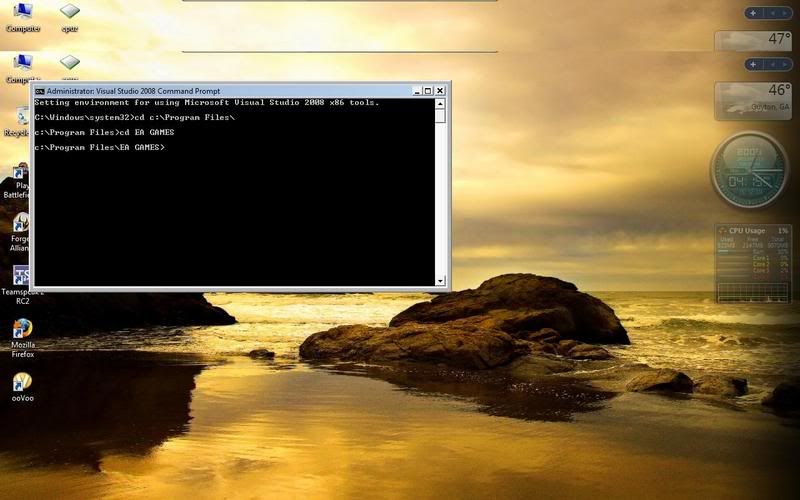
then usually it's "cd EA GAMES" (Hit ENTER)
_____________________________________________________________________________________________
I installed BF2 through steam and not by disk so my BF2 files are not located in the usual locations if I had installed with disk. Thus, when i type this --- >> "cd EA GAMES" and hit enter it says "the system cannot find the path specified"
I would appreciate if you would edit or post a new fix using steam directories.
thx in advance
MishMash
Last edited by MishMash on 2010-04-16 00:31, edited 1 time in total.
Reason: Fix Quote
Reason: Fix Quote
-
Raic
- Posts: 776
- Joined: 2007-02-24 15:59
Re: I found a fix for the "memory .dll error" for vista 32 & 64 bit user's.
In steam its in should be something like this "C:\Program Files\Steam\steamapps\common\battlefield 2"
But if you read the thread you notice that THIS PATCH IS NOT NEEDED FOR BF2 ANYMORE! 1.5 patch includes it already. If you keep getting memory errors drop your settings, lighting and textures are the first ones to lower.
But if you read the thread you notice that THIS PATCH IS NOT NEEDED FOR BF2 ANYMORE! 1.5 patch includes it already. If you keep getting memory errors drop your settings, lighting and textures are the first ones to lower.
-
Rudd
- Retired PR Developer
- Posts: 21225
- Joined: 2007-08-15 14:32
Re: I found a fix for the "memory .dll error" for vista 32 & 64 bit user's.
before my HD failure I had everything on high and was fine, but now it seems that I'm getting memory problems quite a bit. Does this still help at all and does it result in any PB problems in 1.5?
-
corp_calqluslethal
- Posts: 204
- Joined: 2009-05-17 20:18
Re: I found a fix for the "memory .dll error" for vista 32 & 64 bit user's.
yea you will get the md5 mismatch kick on certain severs. The fix works but you'd have to sacrifice playing on some severs. One i remember was constantly being kicked from UK Warfare for the mismatch.