BF2 win 7 issues

Help and support regarding PR:BF2 installation and in-game issues
icecreamterror
Posts: 73
Joined: 2008-06-07 14:31

Re: BF2 win 7 issues

Post by icecreamterror »

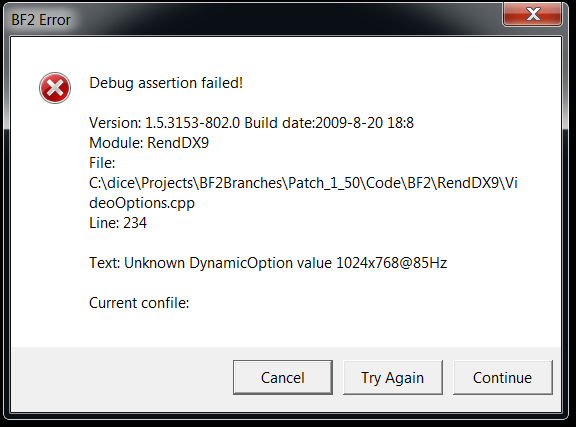
Iv got the same issue, changed my Video.con file to the setting above, but still get this:
Image

All iv done since it was working last was change my monitor!

(win7, GTX 260 black edition, 42" philips HD LCD)

llamakill
Posts: 2
Joined: 2008-08-22 22:14

Re: BF2 win 7 issues

Post by llamakill »

For anyone still struggling with BF2 on windows 7, I came across this post on the official EA forums that got mine up and running; Battlefield 2 with patch 1.5 crashes to desktop on Windows 7 x64 RTM - Fix on Page 2! - Battlefield 2 Members Helping Members - Battlefield 2: EA Forums

However, since installing BF2, my system seems to be going slower than normal even when BF2 is not open. Maybe it's just a coincidence, but who knows.

Best of luck with the above 'fix'

(It's about halway down the page, posted by M_Taylor40)
Last edited by llamakill on 2010-07-16 16:15, edited 1 time in total.
Reason: Location
Polka
Posts: 6245
Joined: 2007-07-08 14:18

Re: BF2 win 7 issues

Post by Polka »

Oh hai. So I have this problem too.

Image

Tried uninstalling and reinstalling as suggested in the thread linked in the above post twice, but the problem remains unsolved.

ATI Radeon HD 5700 Series
Windows 7 Ultimate 64-bit
Intel(R) Core(TM)2 Quad CPU Q8400 @ 2.66GHz (4 CPUs), ~2.7GHz
4096MB RAM

Only thing that I have changed since I last played BF2/PR in the summer was a driver update for my card.
Last edited by Polka on 2011-02-28 15:32, edited 1 time in total.
Image
whatshisname55
Posts: 955
Joined: 2010-07-16 03:05

Re: BF2 win 7 issues

Post by whatshisname55 »

Can you reinstall directx? That error message seems to have everything to do with directx 9. Or maybe a falsely set resolution hinted by the "Text: Unknown DynamicOption value 800x600".
Sizum85
Posts: 669
Joined: 2008-03-18 10:51

Re: BF2 win 7 issues

Post by Sizum85 »

Error message
System.Exception: There was an error writing a new file in the profiles directory. Details as follows.
---> System.UnauthorizedAccessException: Toegang tot het pad C:\Users\bram\Documents\Battlefield 2\Profiles\0002\General.con is geweigerd.
bij System.IO.__Error.WinIOError(Int32 errorCode, String maybeFullPath)
bij System.IO.File.Delete(String path)
bij c.c(Boolean A_0)
--- Einde van intern uitzonderingsstackpad ---
bij c.c(Boolean A_0)
bij g.a(String[] A_0)
please help..
SnipingCoward
Posts: 2326
Joined: 2007-12-31 22:40

Re: BF2 win 7 issues

Post by SnipingCoward »

@polka: please show us what your video.con looks like, especially the resolution line. It appears the value is missing something like "@60Hz" (-> "800x600@60Hz").

@shizum: it appears that either the specified file is missing or actually locked.
If you have copied your old profile from a CD all files will usually have a write protection flag. Right click on that 0002 folder and uncheck the read-only attribute. Apply it for all sub folders and files.
Got a PROBLEM? Check this: PR:BF2 Installation Guide

Got a common QUESTION? check here first: PR:BF2 FAQ, MUMBLE FAQ

"Hello, IT! ... Yes, have you tried turning it on and off again?"
burghUK
Posts: 2376
Joined: 2007-10-18 13:33

Re: BF2 win 7 issues

Post by burghUK »

find out your refresh rate and max resolution possible then

go to :

documents/battlefield 2 / profiles

go into both profiles and open up the video .con file in notepad.
on this line , mines loks like this (my max refresh and resolution)
VideoSettings.setResolution 1360x768@60Hz

Save it then try again.
i had this exat prblem but you need to change the video file in all profiles that you have.
Polka
Posts: 6245
Joined: 2007-07-08 14:18

Re: BF2 win 7 issues

Post by Polka »

[R-COM]SnipingCoward wrote:@polka: please show us what your video.con looks like, especially the resolution line. It appears the value is missing something like "@60Hz" (-> "800x600@60Hz").
VideoSettings.setTerrainQuality 2
VideoSettings.setGeometryQuality 2
VideoSettings.setLightingQuality 2
VideoSettings.setDynamicLightingQuality 2
VideoSettings.setDynamicShadowsQuality 2
VideoSettings.setEffectsQuality 2
VideoSettings.setTextureQuality 2
VideoSettings.setTextureFilteringQuality 2
VideoSettings.setResolution 800x600@60Hz
VideoSettings.setAntialiasing Off
VideoSettings.setViewDistanceScale 1
VideoSettings.setVideoOptionScheme 1
Default settings since I reinstalled BF2. I'll try what you suggested, Burgh.

edit: The problem persists.
Image
Czacha
Posts: 1
Joined: 2011-03-03 17:30

Re: BF2 win 7 issues

Post by Czacha »

Unless I know the solution of the problem "Debug assertion failed". After pasting the commands, the game still did not go. This was due to different resolution on the desktop. You must then edit the command VideoSettings.setResolution on its current resolution and refresh rate. I had to change to 800x600 @ 60Hz to 1920x1080 @ 60Hz and the game went. Sorry for my English, but it is not profesional. :)
Polka
Posts: 6245
Joined: 2007-07-08 14:18

Re: BF2 win 7 issues

Post by Polka »

Ha. I got it to work now, it seems that I had to remove +fullscreen 0 first before starting it. lololol.
Image
Tequila
Posts: 192
Joined: 2011-02-11 21:21

Re: BF2 win 7 issues

Post by Tequila »

For me I had to put "+restart 1" after the target on the shortcut. Sometimes it would still crash until I started right clicking and running as administrator.
Something something build a fob.
austin101
Posts: 2
Joined: 2011-03-14 17:34

Re: BF2 win 7 issues

Post by austin101 »

Moldylunchbox wrote:AHA! It works now, I googled around to find a picture of what the default settings should be in the con file and opened up notepad and copied everything down and saved it

VideoSettings.setTerrainQuality 3
VideoSettings.setGeometryQuality 3
VideoSettings.setLightingQuality 2
VideoSettings.setDynamicLightingQuality 3
VideoSettings.setDynamicShadowsQuality 3
VideoSettings.setEffectsQuality 3
VideoSettings.setTextureQuality 3
VideoSettings.setTextureFilteringQuality 3
VideoSettings.setResolution 1024x768@85Hz
VideoSettings.setAntialiasing Off
VideoSettings.setViewDistanceScale 1
VideoSettings.setVideoOptionScheme 2

Runs fine now...for some reason when I installed the game there was no default settings for video so every time I went to run the game the computer was like "I don't know how you want this displayed!" and crashed.

so anyway, If you have the same problem just copy the video settings and paste them into notepad and save as a .CON.
I recently bought BF2 installed it and installed project reality.

I run windows 7 x64 and my Video.CON file looks much different than yours.
This is what mine looks like:
rem Optimal setting for CPU > 1400 MHZ
game.setGameDisplayMode 800 600 32 0
game.setDetailTexture 4
game.setShadows 1
game.setEnvironmentMapping 1
game.setGraphicsQuality 3
game.setLightmaps 1
game.setRenderWhenSpawnMenu 1
game.setMenuViewdistance 100
game.setEffectsQuality 3
game.setPerformance 3
I tried copy and pasting your text in there and tried saving it as Video.con but got "access denied" popup.

EDIT I had to grant myself permissions to edit the file, so i can save it now.

I still crash after inputing my video settings and refresh rate.
Last edited by austin101 on 2011-03-14 18:05, edited 1 time in total.
byn124
Posts: 18
Joined: 2011-05-08 07:19

Re: BF2 win 7 issues

Post by byn124 »

I've had that too!

You probably have the steam version(like me). You are looking in the wrong folder mate :wink: .
You should look in the Users>[Username]>Documents>Battlefield 2>Profiles>Default folder and overwrite the video.con file there.

NOT! the one in steamapps>bf2>jadija.

Hope this helps :)
GunnerySergeant
Posts: 21
Joined: 2007-08-09 15:29

Re: BF2 win 7 issues

Post by GunnerySergeant »

in the mydocuments folder not documents :)
Post Reply

Return to “PR:BF2 Support”