
I love the sound more on my speakers than my headphones but I cant understand anyone talking by VoiP or TS or Mumble when on the speakers so my question is:
Is it possible to separate the game sounds to be on the speakers and VoIP and other Voice software on the headphones??
Separate game sound and Voip!
-
PatrickLA_CA
- Posts: 2243
- Joined: 2009-07-14 09:31
 Separate game sound and Voip!
In-game: Cobra-PR
-
crackling
- Posts: 36
- Joined: 2009-04-08 20:45
Re: Separate game sound and Voip!
I asked myself this question too, would be nice if it was possible!
Ingame: # hetzel.pr
-
Zoddom
- Posts: 1029
- Joined: 2008-02-11 15:29
Re: Separate game sound and Voip!
if you have two soundcards that should be possible.
or if you ahve a digital (or optical, idk, im a sound-noob) input/output and an analog one you should be able to run mumble with a seperate headphone etc.
or if you ahve a digital (or optical, idk, im a sound-noob) input/output and an analog one you should be able to run mumble with a seperate headphone etc.

-
Spec
- Retired PR Developer
- Posts: 8439
- Joined: 2007-09-01 22:42
Re: Separate game sound and Voip!
You can always run mumble over headphones and the game over speakers. What he's asking is whether or not you could run ingame-voip over headphones and the rest of the game sounds over speakers.

--- currently reduced activity ---
Thanks to [R-MOD]IINoddyII for the signature!
_____________________________
Propriety is an adequate basis for behavior towards strangers, honesty is the only respectful way to treat friends.
-
PatrickLA_CA
- Posts: 2243
- Joined: 2009-07-14 09:31
Re: Separate game sound and Voip!
Yeah Spec, that is what Im asking, would be good if that is possible, btw I have only 1 soundcard in the back, oh and 1 infront.
In-game: Cobra-PR
-
Dunstwolke
- Posts: 45
- Joined: 2007-07-18 12:54
Re: Separate game sound and Voip!
I set the effect volume in game to 40%, that, for me, is low enough so I can understand game intern VOIP just fine if it's set to 100%.
-
PatrickLA_CA
- Posts: 2243
- Joined: 2009-07-14 09:31

-
cyberzomby
- Posts: 5336
- Joined: 2007-04-03 07:12
Re: Separate game sound and Voip!
Yea I'm missing this as well! I'm also scared of blowing up my ears with nice sound effects! I didnt even know I could put my TS on the headphones together with Mumble and let the game go over over my speakers! nice one ^-^ Dont think its possible with the VOIP since its probably a signal from within the game instead of an external one like Mumble or TS
-
Gosu-Rizzle
- Posts: 610
- Joined: 2009-06-06 13:23
Re: Separate game sound and Voip!
Im pretty sure you can do this. I belive ive done it by accident a couple of times actually, though that was the other way around (ingame came from headset and Voip came from speakers)
I did it by first opening up PR and getting to the menu screen. Then i Alt+tappet out of the game, opened up the windows sound control panel and set it to use the speakers rather than the headphones. When i tap back into PR and join a server the ingame sounds came from the headphones and the Voip used speakers. I dont know if its just my PC thats being wierd though
I did it by first opening up PR and getting to the menu screen. Then i Alt+tappet out of the game, opened up the windows sound control panel and set it to use the speakers rather than the headphones. When i tap back into PR and join a server the ingame sounds came from the headphones and the Voip used speakers. I dont know if its just my PC thats being wierd though
-
Rhino
- Retired PR Developer
- Posts: 47909
- Joined: 2005-12-13 20:00
Re: Separate game sound and Voip!
For Mumble/TS3 its possible. I have two sound cards in my system (one motherboard sound card and the other my main sound blaster sound card) and my sound blaster is my main sound card, hooked up to my 5.1 sound system and I have that playing all my windows and game sounds and then I have my motherboard sound card which I have this baby hooked up to 
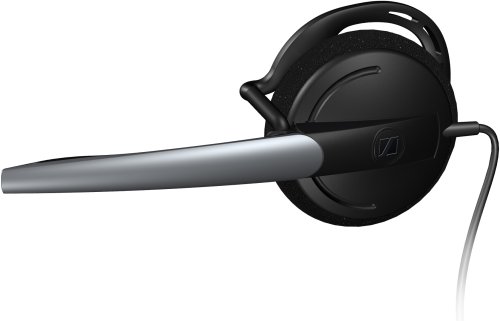
Then I have it set up to have all voice output to go into my mic and tell mumble/ts to put all mic output though there, so then I hear all my ingame sounds on my speakers and all my mumble/ts sounds on my headset.
There are a few small problems. I've yet not worked out any way of getting ingame VOIP to come out of my 2nd sound card while still having the ingame sounds coming out of your main sound card (not looked into it quite hard but pretty sure it aint possible) and as such, you need your voice input and your mic plugged into your main sound card in order to be able to talk both over VOIP and mumble/ts.
The other small problem is with only using a 1 bit head set, positional audio with mumble isn't really possible since if you have a sound on your left and your headset is on your right ear, you can't hear anything in your left since there is no left headphone. As such I have to set my audio up to be mono so I hear everything out of my headset but you can still gauge distance in volume and still have the main advantage of mumble with being able to talk to people close to you. You could get a 2 bit head set or even a full 5.1 headset but then you wont be able to hear your speakers so well, kinda defeating the entire point IMO.
But ye its possible, you just need two sound cards.
Then I have it set up to have all voice output to go into my mic and tell mumble/ts to put all mic output though there, so then I hear all my ingame sounds on my speakers and all my mumble/ts sounds on my headset.
There are a few small problems. I've yet not worked out any way of getting ingame VOIP to come out of my 2nd sound card while still having the ingame sounds coming out of your main sound card (not looked into it quite hard but pretty sure it aint possible) and as such, you need your voice input and your mic plugged into your main sound card in order to be able to talk both over VOIP and mumble/ts.
The other small problem is with only using a 1 bit head set, positional audio with mumble isn't really possible since if you have a sound on your left and your headset is on your right ear, you can't hear anything in your left since there is no left headphone. As such I have to set my audio up to be mono so I hear everything out of my headset but you can still gauge distance in volume and still have the main advantage of mumble with being able to talk to people close to you. You could get a 2 bit head set or even a full 5.1 headset but then you wont be able to hear your speakers so well, kinda defeating the entire point IMO.
But ye its possible, you just need two sound cards.

-
Dev1200
- Posts: 1708
- Joined: 2008-11-30 23:01
Re: Separate game sound and Voip!
Advanced sound cards, and use TS3 instead of voip. You can set your TS3 through your soundcard/headphones, and set everything else to speakers.PatrickLA_CA wrote:I love the sound more on my speakers than my headphones but I cant understand anyone talking by VoiP or TS or Mumble when on the speakers so my question is:
Is it possible to separate the game sounds to be on the speakers and VoIP and other Voice software on the headphones??
