Looks good although I think you have gone OTT on the smoothing of the wheels, looks like you have done a 90degs smooth on that inner edge?Zemciugas wrote:
Have a finished Lav25 and M1A1 AIM abrams if you're interested. Just the 2 aren't textured.
Show your models thread...(IMAGE HEAVY)
-
Rhino
- Retired PR Developer
- Posts: 47909
- Joined: 2005-12-13 20:00
Re: Show your models thread...(IMAGE HEAVY)
Some nice work you have there, may I also ask why your not working with the MC Mod? Dunno the CoHs modding scene very well but it seams you guys are making the same thing pretty much?


-
Zemciugas
- Posts: 2116
- Joined: 2010-04-05 15:13
Re: Show your models thread...(IMAGE HEAVY)
I'm not too good with smoothing so don't punish me for it 
No I'm not working with MC, too late anyway and I tried to offer my Stryker to them, but they chose their retextured one. This was made for Coh Zombie mod and the modding community. This one is much more detailed and accurate tho. We just didn't want to wait for Mc's Stryker and didn't like because its just underdetailed, but I understand why it's so, to keep performance up, because its all out war for MC and only special call in for us.
If the pr team are interested in the Stryker I can give it, but I won't do anythign for it, won't model any lods or insides or anything, I'm done with it. There's a wreck modeled and textured for it aswell and Slat armor, but slat isn't textured.
No I'm not working with MC, too late anyway and I tried to offer my Stryker to them, but they chose their retextured one. This was made for Coh Zombie mod and the modding community. This one is much more detailed and accurate tho. We just didn't want to wait for Mc's Stryker and didn't like because its just underdetailed, but I understand why it's so, to keep performance up, because its all out war for MC and only special call in for us.
If the pr team are interested in the Stryker I can give it, but I won't do anythign for it, won't model any lods or insides or anything, I'm done with it. There's a wreck modeled and textured for it aswell and Slat armor, but slat isn't textured.


-
Rhino
- Retired PR Developer
- Posts: 47909
- Joined: 2005-12-13 20:00
Re: Show your models thread...(IMAGE HEAVY)
Pretty good tut on smoothing here, its important to get it right 
For some reason I thought the CoH ZM was made from MC but obviously not
Your Stryker is unfortunately too low poly for use in PR so it wouldn't be worth replacing our current one with it.
For some reason I thought the CoH ZM was made from MC but obviously not
Your Stryker is unfortunately too low poly for use in PR so it wouldn't be worth replacing our current one with it.
-
-GER-flyinguy
- Posts: 19
- Joined: 2010-07-21 17:33
Re: Show your models thread...(IMAGE HEAVY)
Good tut What ur guys thinks about Mudbox ?
What ur guys thinks about Mudbox ?I Know -Ger-flyinguy is completly wrong but that's special on the name =p
-
WelshManDan
- Posts: 4381
- Joined: 2009-06-30 20:19
Re: Show your models thread...(IMAGE HEAVY)
I didnt quite think the actual idea through yet[R-DEV]Rhino wrote:@WMD, looks all right tbh for a low poly model, although I would add more sides to your tower and the cannons, ladder etc look a little high poly in comparison and I would look into using more normal maps on them
Also shouldn't the cannon be on wheels so they can be pushed back after firing? That's if they don't fall down the hole
Will add wheels to the carriage, and also make it a lot more detailed, the only thing which is actually finished (model wise) is the cannon piece itself, and the ladder I guess
[R-DEV]motherdear wrote:@WelshManDan
Gotta say that i am impressed by that texture being your first, any chance we can see the uv sheet ?

My placement is pretty bad I agree, although this was literally my first ever UV Map completed (usually I rage quit and turn my computer off
 ).
). I should of spaced it out, and made the individual UVs bigger for the higher res but tbh this was literally a tester just to see how you make textures properly (i once actually tried using a real life image as the full texture, boy that didnt turn out well!
Not exactly great (UV or texture) but im hoping to improve on these aspects increasingly over the next few months (focused almost solely on learning to model rather than UV/Texturing at the same time)
Thank you for that tutorial, love Racer445 and havent been able to find any of his tuts since his site went offline (only managed to catch the first few bits of his AK tut).'[R-DEV wrote:motherdear;1612760']Critique wise there are however a few things you need to think about and it is mostly to do with material definition and edge wear (placement is rather good, but the brush quite honestly looks bad)
A way to improve in those aspects would be to watch this tut Next-Gen Hard Surface - Racer445 Tutorial
Be aware however that there a quite a few things you have probably have not been introduced to yet, so it might be a big mouthfull. But it introduces you to thinking materials through before making them.
This has personally helped me a lot.
About the brush, yeah I absolutely agree, its a default Photoshop brush as im not really very "well-informed" about this type of thing, its actually an awful brush tbh and I had to do a lot to make it look anywhere as good as it already does (and even that doesnt look that good)
Thank you, will most likely take you up on that sometime in the near future[R-DEV]motherdear wrote:If you want any help then hit me up on xfire @ prmotherdear
-
motherdear
- Retired PR Developer
- Posts: 2637
- Joined: 2007-03-20 14:09
Re: Show your models thread...(IMAGE HEAVY)
As you suspected the uvw sheet is not really up to par and could be packed much better
First thing i would do, would be to have the two sides of the blade overlayed on each other, if you think about it you will only ever be able to see one side of the weapon at a time, and scratches will tend to be mirrored on these kind of things. This gives you a better flow of scratches than your current texture, but it also gives you more room to add important details, or scale up the uv islands
Secondly:
I don't know the exact shape of your handle, but it seems you have just unpacked the uvw of the handle with a cylinder modifier giving you swaying edges and therefore a swaying texture. Try and use relax (found in tools --> relax, in the uvw window) if that does not work, go through it manually and fix it up.
Thirdly:
if you are trying your hand on material creation down the line, and strugling with it. Then try and uv a cube and then try and create a few different materials for it, that be metals, plastics or whatever.
Hope it helps, biggest fault so far is the curvy handle uv
First thing i would do, would be to have the two sides of the blade overlayed on each other, if you think about it you will only ever be able to see one side of the weapon at a time, and scratches will tend to be mirrored on these kind of things. This gives you a better flow of scratches than your current texture, but it also gives you more room to add important details, or scale up the uv islands
Secondly:
I don't know the exact shape of your handle, but it seems you have just unpacked the uvw of the handle with a cylinder modifier giving you swaying edges and therefore a swaying texture. Try and use relax (found in tools --> relax, in the uvw window) if that does not work, go through it manually and fix it up.
Thirdly:
if you are trying your hand on material creation down the line, and strugling with it. Then try and uv a cube and then try and create a few different materials for it, that be metals, plastics or whatever.
Hope it helps, biggest fault so far is the curvy handle uv
[R-DEV]OkitaMakoto: "Talking squad level tactics in bed is actually a little known aphrodisiac"
[R-CON]Pantera : "maybe you might learn that we are not super intelligent beings chained in UKF's basement being forced to work on this".
-
Tomato-Rifle
- Posts: 2091
- Joined: 2007-12-31 22:24
Re: Show your models thread...(IMAGE HEAVY)
Heh Zemciugas, i use the same blue for my models. Did it stick to you from the Beretta tutorial?

-
Adriaan
- Retired PR Developer
- Posts: 5150
- Joined: 2008-10-22 21:47
Re: Show your models thread...(IMAGE HEAVY)
I think it was the Glock tutorial that had the blue material, the Beretta 9000 one used default gray.[R-CON]Tomato-Rifle wrote:Heh Zemciugas, i use the same blue for my models. Did it stick to you from the Beretta tutorial?

-
Zemciugas
- Posts: 2116
- Joined: 2010-04-05 15:13
Re: Show your models thread...(IMAGE HEAVY)
Yeah, glock tutorial, helped me quite a lot Can you show me the beretta one?
Can you show me the beretta one?
-
Adriaan
- Retired PR Developer
- Posts: 5150
- Joined: 2008-10-22 21:47
-
Zemciugas
- Posts: 2116
- Joined: 2010-04-05 15:13
-
Tomato-Rifle
- Posts: 2091
- Joined: 2007-12-31 22:24
Re: Show your models thread...(IMAGE HEAVY)
Ohh that's right, my mistake[R-CON]Adriaan wrote:I think it was the Glock tutorial that had the blue material, the Beretta 9000 one used default gray.
-
karambaitos
- Posts: 3788
- Joined: 2008-08-02 14:14
Re: Show your models thread...(IMAGE HEAVY)
can i please have a link to that glock tut?
im doing the RPG one, pretty fun
Model a High-Poly RPG Rocket Launcher in 3ds Max – Day 1
im doing the RPG one, pretty fun
Model a High-Poly RPG Rocket Launcher in 3ds Max – Day 1
There is only one unforgivable lie That is the lie that says, This is the end, you are the conqueror, you have achieved it and now all that remains is to build walls higher and shelter behind them. Now, the lie says, the world is safe.? The Great Khan.
40k is deep like that.
40k is deep like that.
-
Tomato-Rifle
- Posts: 2091
- Joined: 2007-12-31 22:24
Re: Show your models thread...(IMAGE HEAVY)
Game Artist - Creating a Weapon for Source - Part 1
EDIT: Old link, downloads no longer work.
Here, http://www.moddb.com/downloads/model-a-3d-glock-weapon
EDIT: Old link, downloads no longer work.
Here, http://www.moddb.com/downloads/model-a-3d-glock-weapon
-
Tim270
- PR:BF2 Developer
- Posts: 5166
- Joined: 2009-02-28 20:05
Re: Show your models thread...(IMAGE HEAVY)
http://i.imgur.com/ybnQe.jpg
http://i.imgur.com/i0xv9.jpg
pre going crazy putting floaters on it.
http://i.imgur.com/OK3qF.jpg
baked. smooothing errors to kill.

http://i.imgur.com/i0xv9.jpg

pre going crazy putting floaters on it.
http://i.imgur.com/OK3qF.jpg

baked. smooothing errors to kill.
-
Rhino
- Retired PR Developer
- Posts: 47909
- Joined: 2005-12-13 20:00
Re: Show your models thread...(IMAGE HEAVY)
Very nice smooth work on the rifle and the grenade is looking very good toTim270 wrote:http://i.imgur.com/ybnQe.jpg
http://i.imgur.com/i0xv9.jpg
pre going crazy putting floaters on it.
http://i.imgur.com/OK3qF.jpg
baked. smooothing errors to kill.
-
Tim270
- PR:BF2 Developer
- Posts: 5166
- Joined: 2009-02-28 20:05
Re: Show your models thread...(IMAGE HEAVY)
Baked the Martini Henry today. Quite a few problems but nothing photoshop cant fix. (normal applied only, red is Fresnel in the shader, not huge ray misses)

Last edited by Tim270 on 2011-07-15 16:58, edited 1 time in total.
-
Tim270
- PR:BF2 Developer
- Posts: 5166
- Joined: 2009-02-28 20:05
Re: Show your models thread...(IMAGE HEAVY)
Quick hp prop.

-
HarryO)))
- Posts: 1
- Joined: 2011-08-07 08:06
Re: Show your models thread...(IMAGE HEAVY)
I'd like to get this functioning in bf2 but i'm totally un-initiated in modding for it. If anyone can help me out itd be great to add eachother on steam or something.

tricount is 3,321 and if it wasn't already clear, it's a WIP.
tricount is 3,321 and if it wasn't already clear, it's a WIP.
-
Tepli
- Posts: 4
- Joined: 2011-08-15 23:14
Re: Show your models thread...(IMAGE HEAVY)
You people are insane at creating these things, I'm glad i pulled this one of to night.
Was trying to make a own static (maybe more) for a map i might work at.
well this is what i have done to get in touch. i know very low LOD/qaulity also, was more a practice run. ah and i see i erased a bit of texture.
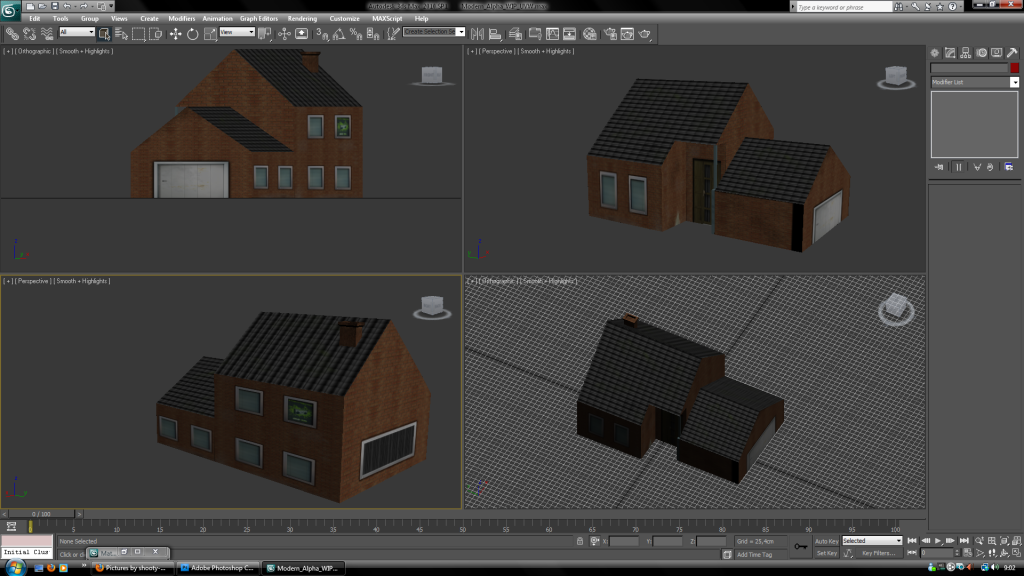
(My first 3Dmax thing i actually ever finished :') so Happy!!)
Was trying to make a own static (maybe more) for a map i might work at.
well this is what i have done to get in touch. i know very low LOD/qaulity also, was more a practice run. ah and i see i erased a bit of texture.
(My first 3Dmax thing i actually ever finished :') so Happy!!)