Mumble not releasing memory

Help and support regarding PR:BF2 installation and in-game issues
Post Reply
Boris
Posts: 223
Joined: 2006-11-11 22:18

Mumble not releasing memory

Post by Boris »

Got a problem here with mumble failing to release/clear page file memory after use on XP 64. I've 4GB of RAM installed (which should be plenty) so I run with vmem disabled. This works great normally, but I'm seeing a problem now when using mumble as it's progressively eating up the RAM. It remains consumed even after exiting the process forcing me to have to reboot the system to clear it.

Image

In the above image it shows a peak page file usage around 3.7 GB with BF2 running, but only drops to 2.00 GB after exiting (1.7 GB is typical ram usage for me for the BF2 process). It's around 1.5 GB higher that it should be (system uses around 450 MB typically). It appears the mumble application is failing to clean up after itself up for some reason.

Anyone else seen/seeing this?
Last edited by Boris on 2012-07-10 22:41, edited 1 time in total.
LITOralis.nMd
Retired PR Developer
Posts: 5658
Joined: 2010-04-10 16:15

Re: Mumble not releasing memory

Post by LITOralis.nMd »

Not sure why this is happening.

I can give you a few tools to better look at your RAM and Page file, but you'll have to figure out how to use them for your needs here.

Process Explorer
Process Explorer

Process Monitor
Process Monitor

Run those both, you can select the columns displayed in both, you need to add the columns for Page File, virtual memory, allocated virtual memory, peak memory etc to find the problematic process(es) stealing your RAM and/or page file.

Run PR and PRMumble, alt-tab out, see what is using what, alt-tab back in and close PRmumble and PR, and again see what is holding the RAM and page file.
Boris
Posts: 223
Joined: 2006-11-11 22:18

Re: Mumble not releasing memory

Post by Boris »

Thanks for the reply.

I am familiar with both those tools and did use procexp at the time to try to see what was happening, enabling all the memory columns to see what showed, but nothing really shows up oddly enough, same as with windows task manager. Neither indicate who's responsible for the consumption, as if it's been orphaned at some point, no longer belonging to any process. For instance, if I exit BF2/PR/Mumble, then there's no longer a process listed in taskman/procexp to associate the usage to. I need a way to view memory details more deeply.

I'm still trying to pin down the procedure or process that actually causes the memory climb at this point. I'm not sure if it happens as a consequence of restarting mumble a lot (it likes to crash in game around once per session), or bf2 (leaving mumble running in the tray but restarting bf2 multiple times), or if maybe it's a problem related to overlay (will try running with it disabled later on), etc. But whatever it is it doesn't seem too obvious.

I did as you mentioned and got the following (relevant columns only - taken at different times during gameplay):

Code: Select all

Process		Private Bytes	Working Set	Virtual Size
pr.exe		35,476 K	628 K		582,244 K
BF2.exe		1,136,252 K	1,191,820 K	1,745,744 K
tr.exe		7,532 K		744 K		108,636 K
pr_mumble.exe	46,252 K	18,296 K	201,120 K

Code: Select all

Process		Private Bytes	Working Set	Virtual Size
pr.exe		35,476 K	36,212 K	582,244 K
BF2.exe		1,276,396 K	1,332,264 K	1,822,456 K
tr.exe		7,532 K		816 K		108,636 K
pr_mumble.exe	57,068 K	26,700 K	201,120 K

Code: Select all

Process		Private Bytes	Working Set	Virtual Size
pr.exe		35,476 K	628 K		582,244 K
BF2.exe		1,209,584 K	1,265,508 K	1,873,640 K
tr.exe		7,532 K		724 K		108,636 K
pr_mumble.exe	51,596 K	20,460 K	201,120 K

Code: Select all

Process		Private Bytes	Working Set	Virtual Size
pr.exe		35,476 K	36,212 K	582,244 K
BF2.exe		1,198,072 K	1,254,768 K	1,895,208 K
tr.exe		7,532 K		816 K		108,636 K
pr_mumble.exe	53,772 K	32,584 K	201,120 K

Code: Select all

Process		Private Bytes	Working Set	Virtual Size
pr_mumble.exe	29,556 K	26,840 K	194,900 K

(snapshot after exiting bf2)
Nothing really shows up as wrong there to me, though this session I didn't see so many MB being left consumed in task manager after exiting both apps. As I write this the system has only about 300MB I can't account for.

Think I'll have to have a play about some more and see what else I can figure later on.

Boris
Posts: 223
Joined: 2006-11-11 22:18

Re: Mumble not releasing memory

Post by Boris »

OK, a little test I did just opening and closing mumble on the desktop:

Code: Select all

Mumble		PF Usage
closed		 846 MB
open		 903 MB
closed		 876 MB
open		 933 MB
closed		 906 MB
open		 963 MB
closed		 936 MB
open		 993 MB
closed		 966 MB
open		1014 MB
closed		 996 MB
open		1044 MB
closed		1024 MB
open		1075 MB
closed		1055 MB
open		1106 MB
closed		1085 MB
open		1137 MB
closed		1106 MB
Or just the climb from above:

Code: Select all

Mumble		PF Usage
open		 903 MB
open		 933 MB
open		 963 MB
open		 993 MB
open		1014 MB
open		1044 MB
open		1075 MB
open		1106 MB
open		1137 MB
So there it seems to be leaving 30 MB behind in the page file each time it exits. I'm guessing it's probably leaving more behind after a few hours on PR.

Image
MaSSive
Posts: 4502
Joined: 2011-02-19 15:02

Re: Mumble not releasing memory

Post by MaSSive »

Ram leaks? Nothing new I guess. And nothing we can do about it.
Image
CATA4TW!

"People never lie so much as before an election, during a war, or after a hunt."
"God has a special providence for fools, drunks, and the United States of America."
― Otto von Bismarck
LITOralis.nMd
Retired PR Developer
Posts: 5658
Joined: 2010-04-10 16:15

Re: Mumble not releasing memory

Post by LITOralis.nMd »

As volunteer tech support guys there isn't anything we can do, I'll send this thread to the guys who work on PRMumble, but this might be a problem at t the Mumble source trunk, and not at the BF2 plugin and PRMumble forks. I just don't know.

You can install any of the free RAM cleaners, but tbh I have not used one in a few years, my standby for WinXP was Cacheman by Outertech, How to speed up your computer | Free trial
it will clean the RAM and Virtual Memory at user designated time intervals. I do not know if it has become bloatware or anything in th elast 5 years. So here is a list of alternatives that might help:
Cacheman Alternatives for Windows - AlternativeTo.net


The other option is to create a desktop shortcut that Clears your RAM cache using a command line.
Here is the tutorial, http://www.windows7hacker.com/index.php ... windows-7/
Boris
Posts: 223
Joined: 2006-11-11 22:18

Re: Mumble not releasing memory

Post by Boris »

@ [R-COM]MaSSive:

Well, the idea was that the people who do work on it might see the thread, or others here could advise. I'm not aware of a specific PRMumble beta forum anywhere, so I put it here. This is part of the process of asking for help with a problem, and with any luck, contributing towards make Mumble better. *Beta test feedback, ya know?.* Or what do you suggest? Nothing? :rolleyes:

@ [R-COM]LITOralis.nMd:

Understood, and thanks for passing the message on. I don't know who works on PRMumble, but assumed they'd be around here.

I'll keep your tips in mind for if it becomes a frequent problem. I'm wondering though now if it was just that noticeable because I was doing a lot of configuring at the time, trying to sort the shortcuts/overlay and such, plus crashes that were occurring, so it's possible I just clocked up a lot that way through constant restarting of the program. If this is the case, then I guess it might not be a problem now I've got it mostly working right.

Cheers.
BloodyDeed
Retired PR Developer
Posts: 4452
Joined: 2008-05-07 17:43

Re: Mumble not releasing memory

Post by BloodyDeed »

Please be patient until 1.0. This issue will most likely be fixed there.
Image
Boris
Posts: 223
Joined: 2006-11-11 22:18

Re: Mumble not releasing memory

Post by Boris »

[R-DEV]BloodyDeed wrote:Please be patient until 1.0. This issue will most likely be fixed there.
OK, I've been patient, but the problem still exists in the new client.
LITOralis.nMd
Retired PR Developer
Posts: 5658
Joined: 2010-04-10 16:15

Re: Mumble not releasing memory

Post by LITOralis.nMd »

I'll put in a bug report to the PRMumble Devs, can you be so kind as to post some more info and pics again, showing the problem.

Also, in the PRlauncher, can you click Support, then copy and paste your system info, so we know what we're dealing with,
Brutto
Posts: 5
Joined: 2008-01-23 16:32

Re: Mumble not releasing memory

Post by Brutto »

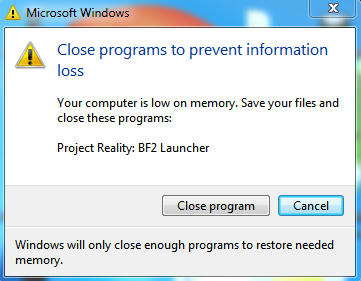
Image
Win7 hp 64bit
Ram 4 GB
PR v1.0.36.0
Last edited by Brutto on 2013-08-29 17:44, edited 1 time in total.
Post Reply

Return to “PR:BF2 Support”