
Project Reality Background Menu Videos

General discussion of the Project Reality: BF2 modification.
Post Reply
M.Warren
Posts: 633
Joined: 2007-12-24 13:37

Project Reality Background Menu Videos

Post by M.Warren »

Have you ever simply just disliked the movies in the background. Not that the Project Reality movies are bad, but after awhile I'm sure you have just seen them enough.

Heres alittle fix that'll reduce some computer lag, improve performance slightly, and even help you load up your maplists faster. --- While still keeping Project Reality in good taste.

Make sure that Project Reality is not running while you perform this.

________________________________________

1. First, go to your BF2 directory. (Default is the following)
  • C:\Program Files\EA GAMES\Battlefield 2\mods\pr\movies
2. You will notice the following 6 .bik files in that directory.
  • bss_intro.bik
  • menu.bik
  • menu_loggedin.bik
  • pr_intro.bik
  • warning.bik
3. Create a new folder inside that directory. Name it something simple that you will remember, so let's call it the "Movie Removal Folder" this now becomes:
  • C:\Program Files\EA GAMES\Battlefield 2\mods\pr\movies\Movie Removal Folder
4. Next, simply cut and paste the menu_loggedin.bik file into the newly made "Movie Removal Folder". The purpose of this is to remove this video from the directory so they will not be utilized while running the game. This file is called:
  • menu_loggedin.bik
5. Now, that the above mentioned .bik file have been moved from it's origional directory. Return back to the main folder:
  • C:\Program Files\EA GAMES\Battlefield 2\mods\pr\movies\
6. Make an identical copy of the following .bik file:
  • menu.bik
7. Take the copy of the menu.bik file that is in the origional directory, and rename it the following:
  • Copy of menu.bik -----> menu_loggedin.bik
8. You're done!


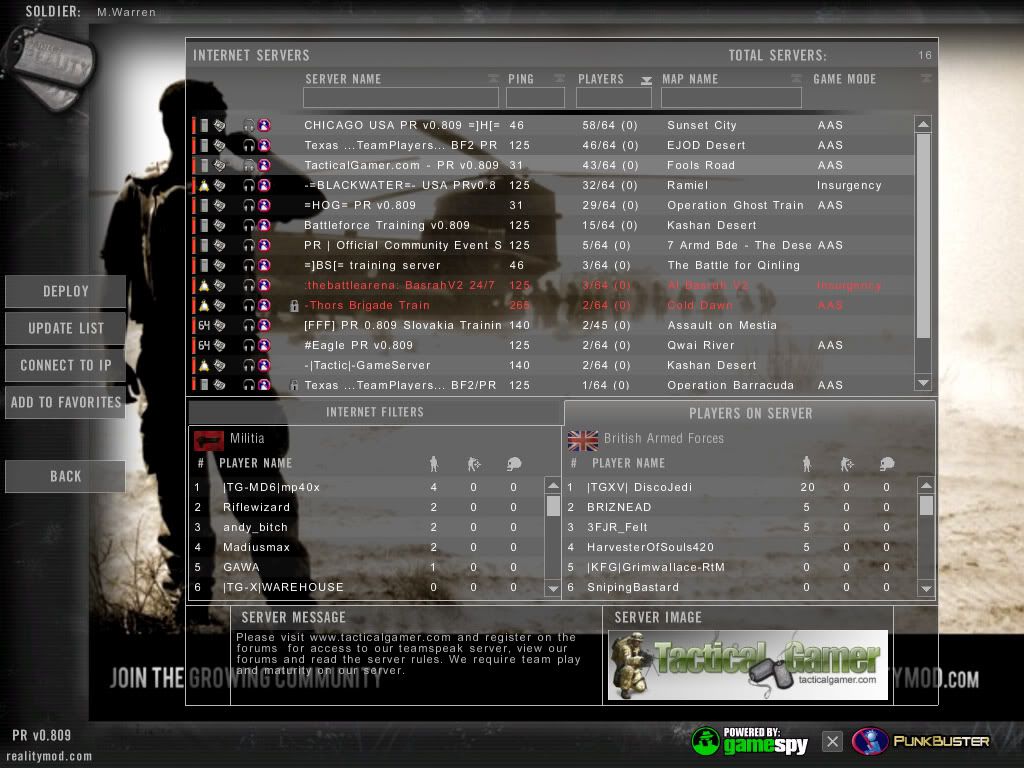
If you have done this correctly, you will have the standard login screen of the British Soldier with the Chinook in the background remain as it is, and also become the new "video background" that you would usually see while you are logging in.

Basically if you did it right... This is what you will see.

Image

Still works out well doesn't it? A simple and completely harmless change in the PR human interface.

As you can see, it doesn't damage the essence of Project Reality and it helps improve performance slightly. Most likely reduces the amount of time it takes to enter the options mode after pressin the escape button aswell.

________________________________________

Uninstallation:

1. To undo this action, simply go to the "Movie Removal Folder"
  • C:\Program Files\EA GAMES\Battlefield 2\mods\pr\movies\Movie Removal Folder
2. Copy the file:
  • menu_loggedin.bik
3. Paste it back into it's original directory of:
  • C:\Program Files\EA GAMES\Battlefield 2\mods\pr\movies
4. A confirmation dialog box will appear:

This folder already contains a file named 'menu_loggedin.bik'

Would you like to replace the existing file
243KB
with this one?
140MB


5. Click "Yes", this will replace the altered file you created with the original one.

6. You're done!
________________________________________

What happens when you perform this action, is that you remove the .bik movie files from the directory in which they are played from when the game is running. Creating an additional folder in that directory basically "hides" it from the program so that they are not used.

When you drag the copy of the menu.bik file, it is the picture of the British Soldier with the Chinook in the background. Now you rename this file to the menu_loggedin.bik so that you trick the game into thinking that it's the animated background video.

If you simply just remove the original menu_loggedin.bik without replacing it, it will then default to the standard BF2 background video of a panoramic view of "Strike at Karkand" from a satellite. A video that we've all seen in our lifetime.
Take the Blue Pill or take the Red Pill?

Image
AncientMan
Retired PR Developer
Posts: 5111
Joined: 2007-05-22 07:42

Re: Project Reality Background Menu Videos

Post by AncientMan »

Or you could just click in the top right hand corner of the menu...
Image
M.Warren
Posts: 633
Joined: 2007-12-24 13:37

Re: Project Reality Background Menu Videos

Post by M.Warren »

That too.

But, there are a few other reasons why this was posted. Off the record. Still, even after you click the top right hand cornor of the window, the fixed image doesn't remain. Thusly the video loads each and every time you access the options screen through the Escape menu.
Last edited by M.Warren on 2008-12-15 05:40, edited 2 times in total.
Take the Blue Pill or take the Red Pill?

Image
AfterDune
Retired PR Developer
Posts: 17094
Joined: 2007-02-08 07:19

Re: Project Reality Background Menu Videos

Post by AfterDune »

If you download bink&smacker, you can just set your own image or video there :D .
Image
Gore
Retired PR Developer
Posts: 2491
Joined: 2008-02-15 21:39

Re: Project Reality Background Menu Videos

Post by Gore »

I don't have a problem with it, love the music track and I generally just try to find a game, instead of watching the video. AfterDune's videos are all great, maybe you shuld put PR Specops in there? ;)
Post Reply

Return to “PR:BF2 General Discussion”
