Page 58 of 102
Re: Show your models thread...(IMAGE HEAVY)
Posted: 2010-04-21 20:08
by BloodBane611
Something I've been working on to get into modeling (exterior only):

Ref pic:

Re: Show your models thread...(IMAGE HEAVY)
Posted: 2010-04-21 20:18
by DankE_SPB
[R-COM]BloodBane611 wrote:Something I've been working on to get into modeling (exterior only):
dont get derailed if you dont like it, try modelling something else
at least for me, trying modelling a building was a bad, not interesting at all experience

Re: Show your models thread...(IMAGE HEAVY)
Posted: 2010-04-21 20:28
by Z-trooper
[R-CON]DankE_SPB wrote:trying modelling a building was a bad, not interesting at all experience
And now you know why so few CONs/DEVs make statics

Not exactly as thrilling as when Chuc releases a new screenshot of some weapon or animation eh?
Re: Show your models thread...(IMAGE HEAVY)
Posted: 2010-04-21 20:37
by DankE_SPB
you're right about "thrilling" thing too, but i'm still far from that point anyway, so it wasn't a big deal hehe
the process on its own didn't go well and was rather boring, workflow is also different, maybe will give another try to it when i'll have more knowledge and experience
i also looked into animation thing, its very hard, but unlike the buildings wasn't boring

like always, each to his own
Re: Show your models thread...(IMAGE HEAVY)
Posted: 2010-04-21 20:39
by Hauteclocque
You should learn vehicle export, this is not for noobs.

@BloodBane : promising.

Re: Show your models thread...(IMAGE HEAVY)
Posted: 2010-04-21 20:51
by Wilkinson
[R-COM]Hauteclocque wrote:You should learn vehicle export, this is not for noobs.
@BloodBane : promising.
Wait til you get exporting down to the letter. Then you'll say its for noobs
I'll one day venture into modeling. Should I try High Poly or Low Poly. I know the benefits of High to Low Poly but Idk what the learning curve will be like
Re: Show your models thread...(IMAGE HEAVY)
Posted: 2010-04-21 22:19
by Rhino
If your planning on using that in BF2 you should consider how the textures are going to go on it and what textures your going to use, with making no to as few new textures as possible.
Re: Show your models thread...(IMAGE HEAVY)
Posted: 2010-04-21 22:20
by AquaticPenguin
Wilkinson wrote:Wait til you get exporting down to the letter. Then you'll say its for noobs
I'll one day venture into modeling. Should I try High Poly or Low Poly. I know the benefits of High to Low Poly but Idk what the learning curve will be like
With both of them it will really just come down to practice. Myself I would suggest high poly, since once you've created a high poly model it's very easy to create a low poly object by retopo-ing, or hand optimising.
Re: Show your models thread...(IMAGE HEAVY)
Posted: 2010-04-21 23:34
by BloodBane611
[R-DEV]Rhino wrote:If your planning on using that in BF2 you should consider how the textures are going to go on it and what textures your going to use, with making no to as few new textures as possible.
Yeah, I've been doing that. I think I can almost entirely avoid custom textures, probably just a reasonably small one that will be used for all the non-rectangular windows.
Re: Show your models thread...(IMAGE HEAVY)
Posted: 2010-04-22 15:34
by Tim270
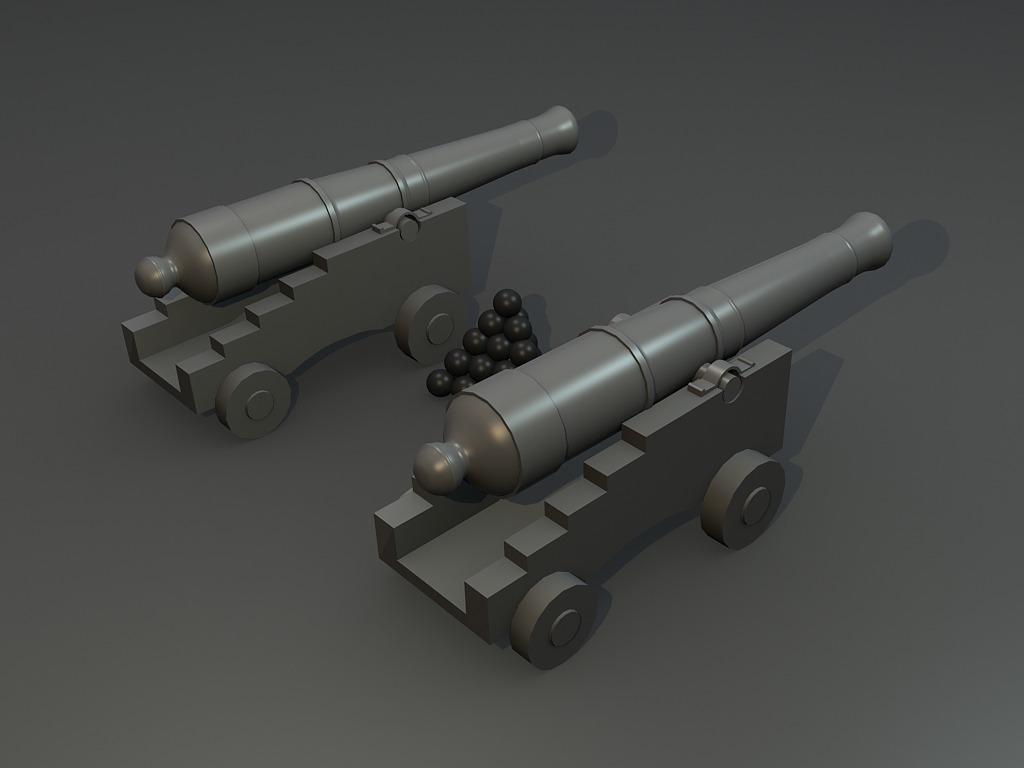
Took longer to place all those spheres than the cannon lol. Going to hp/lp bake the barrel at some point and detail the rest.
Re: Show your models thread...(IMAGE HEAVY)
Posted: 2010-04-27 21:26
by BloodBane611
Haha tim I understand your pain. Those are looking pretty great.
My newest render:

Is there any way for me to copy the faces I've already done around the model? Most of the building is the same, I'm getting bored of creating the same pattern
Re: Show your models thread...(IMAGE HEAVY)
Posted: 2010-04-28 15:43
by motherdear
click the faces you want, press "detach" detach as element and clone. profit. if many parts are needed in a row detach the polygons, drag with the shift key, until it fits where you want it and then put in whatever number of clones you want.
when that is done, just select all the vertices of the polygons and weld at the lowest threshold.
if you want to copy a whole section of a building (say you build half and it's symmetric) you can also just detach it and apply a symmetry modifier which mirrors the model and welds it.
Re: Show your models thread...(IMAGE HEAVY)
Posted: 2010-04-28 15:55
by Rhino
ye, and then there is also the Array tool which I use a lot in thous kinda situations.
Re: Show your models thread...(IMAGE HEAVY)
Posted: 2010-04-28 18:47
by BloodBane611
Thanks gents. I know about symmetry, just damn cluelesshow to do something similar with an asymmetrical model. I'll see how it goes
Re: Show your models thread...(IMAGE HEAVY)
Posted: 2010-05-04 20:43
by Z-trooper
This old bird is almost done. Just need to sort out the final teeth and fix up a bunch of texture things I want to correct. While I do that it is off being rigged and animated (for real, not my quick n' dirty ones here), the guy is brilliant, so I am looking forward to seeing this come to life for real.
It is truly scary in game, I hope I am soon able to share the in game shots.


Almost final normal map:

Re: Show your models thread...(IMAGE HEAVY)
Posted: 2010-05-04 20:46
by Amok@ndy
nice one but dont forget that they dont know teethbrushing
maybe some yellow/brown dirt
Re: Show your models thread...(IMAGE HEAVY)
Posted: 2010-05-04 20:58
by Hauteclocque
Impressive.
Re: Show your models thread...(IMAGE HEAVY)
Posted: 2010-05-04 22:32
by Rhino
DON'T EAT ME!!!
Looks really nice as always Z

Re: Show your models thread...(IMAGE HEAVY)
Posted: 2010-05-05 15:53
by AquaticPenguin

New model, to go alongside my soldier model. An L85A2 with vertical foregrip and the specter OS4X scope - Just below 5k triangles altogether with room for more optimisation.
