Making a Real Black Hawk Down Map PR and vBF2 (after PR version) Suggestions?

Suggestions from our community members for PR:BF2. Read the stickies before posting.
Post Reply
OkitaMakoto
Retired PR Developer
Posts: 9368
Joined: 2006-05-25 20:57

Post by OkitaMakoto »

Image
Image
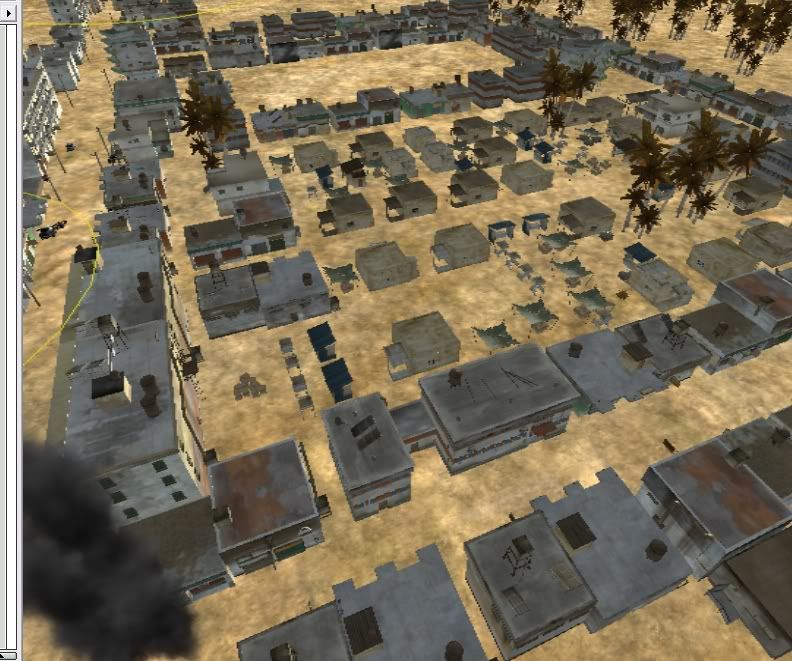
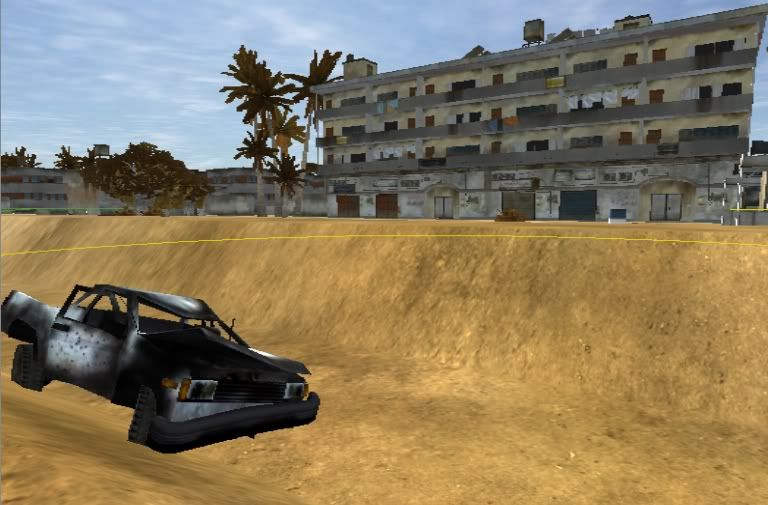
Just to show some progress. The first one is a bit old but it shows how the city is progressing.
The second picture came from inspiration from the movie (where cptn steele and his rangers along with some delta get pinned down by a guy in a window)
Needs work, but its moving along...
Desertfox
Posts: 5886
Joined: 2006-08-15 06:41

Post by Desertfox »

Looking great!
Image
S.A.S jackwebsterdunstan
Posts: 294
Joined: 2007-02-18 23:30

Post by S.A.S jackwebsterdunstan »

OkitaMakoto wrote:Image
Image
pic 1) in the first picture you have used some of the same statics three or four times next to each other, as a mapper i appreciate theres not many statics but try and mix them up abit, especialy in places like where your map is set i dont the think you could get away with estates of similar lookng houses

pic 2) i dont know if that bank where the burnt out car is supposed to be man made or not, but if it isnt the 'smooth' tool on a low strength will make it look that much better.

all pics) i was wondering if those yellow circles are your capture radius of the control points or trigger areas, because if they are CP radiuses there a bit too big.

your map is looking bloody amazing for your first map and i hope you can appreciate that my points are just trying to help :wink:


edit - got bored so read through most of the posts, if you still want the concrete blocks they are in roads>statics

and if you still dont know how to put darker sand for roads (did you use Tpaint for texturing?)
in terrain editor click on texture (the brush) then go down to textures and click on color textures instead of detail, go across to the layers and tweak bar and change the color on there, can also change ground properties to make sure you get the right effects from shooting the ground - then just paint it on the ground.

or if you want to put real roads, in level editor go to roads, then right click where you want the road to start and click apply new spline (migh be create new spline, cant remeber) this will be the anchor for your road so right click really close to that one in the way you want your road to go and click create control point (make sure you make a control point because if you click spline it will make a new road) the keep aplpying control points along where you want the road to go, they can be fairly spaced out. when youre done, on the left hand side of the screen click roads>road templates and keep looking through them for what you want ( 'dirt road' texture should suit your needs) once youve chosen the texture you want click 'connect' on the right hand side and give your road a name (something like 'airport') and your done! once youve laid all your roads like this you can click 'build all final roads to lay them down and get rid of flickering and such like.

Last edited by S.A.S jackwebsterdunstan on 2007-06-02 15:36, edited 1 time in total.
QOTY - "Oh sh*t, Plane! Left o'clock!" - [R-DEV]Rhino
Quote ~Long Bow~ 'if you would like to "touch me up" please e-mail your personal pics and we will talk'
some guy off totalbf2-
"OMFG

The Devs have been working on this mod for over a year and they STILL havent added crosshairs! Wtf!!!!!!!!"
OkitaMakoto
Retired PR Developer
Posts: 9368
Joined: 2006-05-25 20:57

Post by OkitaMakoto »

Wow, great. Thank you SAS Jackdfggfg..sorry, your name is way long :)
I really appreciate it, and that is jsut the type of comments I am looking for.
Ill do the smoothing, that does look kinda blocky as it is now.

Im working on not reusing statics, but god, there just dont seem to be enough of the lower office/business type buildings. Ill change it up though, or at least, try as hard as i can.

I didnt know you could change the color manually, i knew you could choose a texture and detail, bbut not tweak the color. Ill get on that, it will make the roads i have put in look much better.

I have had a ton of trouble getting the actual roads/splines to work though...
Ill try some more later today. Right now, I really wanna play .605 OB :)

***edit*** oh yeah, it might just be the really low angle of the shots, but those ARE the control points. i read in the stickied map making thread that CP's should be at least 50 meters radius I think. So yeah, Ive been trying ot stick with that. Some are 60 maybe or something. They said they are trying to get away from flag capping and more to Sector/Area Control.

Thanks for the great comments though. I took them all to heart!
S.A.S jackwebsterdunstan
Posts: 294
Joined: 2007-02-18 23:30

Post by S.A.S jackwebsterdunstan »

thats alright, my name doesnt fit on my exam papers :wink:

i understand you've got the SF xpack objects so that must be cool, ive only got some xpack objects from the .6 OB client side folders and put them into my pr_edit (i used rhinos guide too)

am i right i'm assuming youve got snap to terrain grid on? its good for keeping your roads straight but a little informality and messiness(sp?) in your markets wouldnt hurt

(wow - gunfire outside my house)

umm...yeah, for smoothing something the size of that use like strength 8 or 9 only for a second with a small brush - something like 4; otherwise it'll be flatened.

found a simple tut for roads for ya :wink:

http://www.skribbulz.com/arooster/Tutor ... /roads.htm

and one for undergrowth/overgrowth

http://www.skribbulz.com/arooster/Tutor ... growth.htm

have fun, and im looking forward to your points on my map, 'Dashunbe'
QOTY - "Oh sh*t, Plane! Left o'clock!" - [R-DEV]Rhino
Quote ~Long Bow~ 'if you would like to "touch me up" please e-mail your personal pics and we will talk'
some guy off totalbf2-
"OMFG

The Devs have been working on this mod for over a year and they STILL havent added crosshairs! Wtf!!!!!!!!"
OkitaMakoto
Retired PR Developer
Posts: 9368
Joined: 2006-05-25 20:57

Post by OkitaMakoto »

Umm.. actually snap to terain is mostly on off. It snaps to the ground, but I dont have the 1/2 or 1 snap on. It always bugged me. Of course, I use it when I feel I need to. But I figured the markets and stuff, yeah, they should be kinda thrown together a bit.

Ive looked at tuts on roads, and I must be doing something wrong. Havent tried in awhile, but yeah, I'll take another look sooner or later...

gunfire outside? uhoh... thats never good. haha

Ill look at your map, but I dont think I have the skills to comment any sort of criticism : ) But yeah. Is it on the modding forum? ill take a look
S.A.S jackwebsterdunstan
Posts: 294
Joined: 2007-02-18 23:30

Post by S.A.S jackwebsterdunstan »

naah, my house backs onto the common, the GB armys always practising. it just sounded like the were having a victory party like at the end of jarhead.

no, its not in the community modding section yet - i dont thinks at the stage were i'll get muich constructive critisism - ive only done terrain, some texturung, couple of roads, and two bases (airport and S.A.S base)
I'm rather fond of my SAS base.
it's going really slowly ATM because im on study leave and my exams are in full swing now. the kind of exams you'd have at the end of high school, so alot of revision atm.

i reckon I'll open up a thread in about a week/2 weeks

its GB Vs. PLA, theres an edge of a real size airport in the top left of the map where the GB start, the SAS base where there are some farm houses in the top right surounded by land like in helmand province, then theres a river througth the middle with loads of sand bars and stuff and loads or housing around the river, south of the river theres a massive crossroads which have been fortified by the PLA so it'll look abit like the vehicle checkpoint in Basrah.
look out for it :wink:
QOTY - "Oh sh*t, Plane! Left o'clock!" - [R-DEV]Rhino
Quote ~Long Bow~ 'if you would like to "touch me up" please e-mail your personal pics and we will talk'
some guy off totalbf2-
"OMFG

The Devs have been working on this mod for over a year and they STILL havent added crosshairs! Wtf!!!!!!!!"
OkitaMakoto
Retired PR Developer
Posts: 9368
Joined: 2006-05-25 20:57

Post by OkitaMakoto »

As of right now, the airport isnt my main concern. I mentioned it a bit back (although I dont want to make anyone look for it)
It will eventually get as accurate as possible. The main problem I had was that the Airport is at an angle to the North,South, East, West. And since the Airport was where i started, I was having a terrible time lining things up. The snap-to doesnt work at angles like that and things were just slightly overlapping and doin that annoying little glitch...

All in all, the Airport will be changed later, but for now, its the city I am focusing on. The whole thing is I place things, learn more, get a bit moer skilled, go back, re-work, repeat... :)
Thanks,
Okita

PS That google map pic should be a help, the ones I had werent as zoomed in. And thanks for marking them in, thatll help a lot!
:)

and Eddie, fast roping is out of the question. Thats been something everyone has wanted since the beginning of the PR mod. Theres actually an announcement about how EA might have put it in BF2 way way back in the PR announcement thread (the posts that show on the main page)

I actually had a friend think of a possible way, but Ims sure its been mentioned. His idea was to attach Grapple Hook ropes to the Blackhawk and somehow let people attach to those and rappel down... but i am pretty sure this idea was thought of already too... so yeah, im pretty sure its a definite "no go". We can all hope someone somehow will get it modded though...lol
eddie
Posts: 5495
Joined: 2005-05-09 20:42

Post by eddie »

It was. It doesn't work. Nice map though!
Image
S.A.S jackwebsterdunstan
Posts: 294
Joined: 2007-02-18 23:30

Post by S.A.S jackwebsterdunstan »

okitamakoto, put all the statics in by hand that you want then select all of the statics in the airport area and rotate them sll out once, if they were snapped befor rotating they will stay in perfect allignment; if you want to add any more statics after youve rotated the airfield then just double click a runway static (or something already rotated) and find the angle youve rotated it by, then double click the new static and type in the same number to get them aligned.
the flickering goes ingame - have you played your map yet? the map looks alot different to how it does in the editor.
QOTY - "Oh sh*t, Plane! Left o'clock!" - [R-DEV]Rhino
Quote ~Long Bow~ 'if you would like to "touch me up" please e-mail your personal pics and we will talk'
some guy off totalbf2-
"OMFG

The Devs have been working on this mod for over a year and they STILL havent added crosshairs! Wtf!!!!!!!!"
OkitaMakoto
Retired PR Developer
Posts: 9368
Joined: 2006-05-25 20:57

Post by OkitaMakoto »

S.A.S jackwebsterdunstan wrote:okitamakoto, put all the statics in by hand that you want then select all of the statics in the airport area and rotate them sll out once, if they were snapped befor rotating they will stay in perfect allignment; if you want to add any more statics after youve rotated the airfield then just double click a runway static (or something already rotated) and find the angle youve rotated it by, then double click the new static and type in the same number to get them aligned.
the flickering goes ingame - have you played your map yet? the map looks alot different to how it does in the editor.
Hey, you sure that thatll work? Maybe I didnt do the snapped thing... but when I normally rotate a selection of items, they all rotate in place (therefore losing their position relative to everything else selected) But then again, I dont know if I did it how you are suggesting...

I havent played yet. How exactly can i set it up to see it in game without fully being finished? "Package mod" or something?
Im sure after I look at it in game Ill want to change a lot! :) im sure thats how it goes mnyway... half the time im seeing it from the top... probably a lot different on the ground!

Hey, since you seem to be an expert on mapping ;) do you know where the paper trash static is located? is it a texture? or a static... i couldnt find it... prolly looking in the wrong place... :)
thanks for all the help, and Im glad those gunshots were from friendlies, not a gang or something (I say this because I live relatively close to Gary, Indiana :) )
Thanks again,
Okita
MichSt-Spartan
Posts: 180
Joined: 2007-05-13 16:02

Post by MichSt-Spartan »

OkitaMakoto wrote:Hey, you sure that thatll work? Maybe I didnt do the snapped thing... but when I normally rotate a selection of items, they all rotate in place (therefore losing their position relative to everything else selected) But then again, I dont know if I did it how you are suggesting...

I havent played yet. How exactly can i set it up to see it in game without fully being finished? "Package mod" or something?
Im sure after I look at it in game Ill want to change a lot! :) im sure thats how it goes mnyway... half the time im seeing it from the top... probably a lot different on the ground!

Hey, since you seem to be an expert on mapping ;) do you know where the paper trash static is located? is it a texture? or a static... i couldnt find it... prolly looking in the wrong place... :)
thanks for all the help, and Im glad those gunshots were from friendlies, not a gang or something (I say this because I live relatively close to Gary, Indiana :) )
Thanks again,
Okita
Undergrowth for the trash. Make sure you set sway to zero.
OkitaMakoto
Retired PR Developer
Posts: 9368
Joined: 2006-05-25 20:57

Post by OkitaMakoto »

MichSt-Spartan wrote:Undergrowth for the trash. Make sure you set sway to zero.
Hey, thanks, I owe you one.
Okita
-=ToD=-KNIFE
Posts: 268
Joined: 2006-12-04 22:41

Post by -=ToD=-KNIFE »

Im Thinking this Map would be Awsome for Insurgency, would be even More Fun with No Markers at all, Then youl have the Real Life Marine Patrols in the Hummves, god that would be fun and Bring Teamwork, can never get enough of Teamwork.
S.A.S jackwebsterdunstan
Posts: 294
Joined: 2007-02-18 23:30

Post by S.A.S jackwebsterdunstan »

OkitaMakoto wrote:Hey, you sure that thatll work? Maybe I didnt do the snapped thing... but when I normally rotate a selection of items, they all rotate in place (therefore losing their position relative to everything else selected) But then again, I dont know if I did it how you are suggesting...

I havent played yet. How exactly can i set it up to see it in game without fully being finished? "Package mod" or something?
Im sure after I look at it in game Ill want to change a lot! :) im sure thats how it goes mnyway... half the time im seeing it from the top... probably a lot different on the ground!

Hey, since you seem to be an expert on mapping ;) do you know where the paper trash static is located? is it a texture? or a static... i couldnt find it... prolly looking in the wrong place... :)
thanks for all the help, and Im glad those gunshots were from friendlies, not a gang or something (I say this because I live relatively close to Gary, Indiana :) )
Thanks again,
Okita

yeah, what he said - its a texture in undergrowth, and yes make sure your sway is at zero, put the random size scale down as well but you could then prob turn the density up a little bit.
theres a rock texture as well in there :wink:
QOTY - "Oh sh*t, Plane! Left o'clock!" - [R-DEV]Rhino
Quote ~Long Bow~ 'if you would like to "touch me up" please e-mail your personal pics and we will talk'
some guy off totalbf2-
"OMFG

The Devs have been working on this mod for over a year and they STILL havent added crosshairs! Wtf!!!!!!!!"
OkitaMakoto
Retired PR Developer
Posts: 9368
Joined: 2006-05-25 20:57

Post by OkitaMakoto »

Great, just got off work, and I'm about to start crackin' on it some more for a few hours.. we'll see what I can get done in a few...
:)
and yes, its gonna be insurgent and USMC, and I dont think I can turn off markers, but im sure you could on your own :) --> renderer.drawnametags 0 , but it will also remove player nametags...
but thatll confuse you and put you in the middle of nowhere right quick, eh?

<3
Okita
OkitaMakoto
Retired PR Developer
Posts: 9368
Joined: 2006-05-25 20:57

Post by OkitaMakoto »

Amazing update!
Kind of.
I got undergrowth sorted out, it still needs tweaking... its on a set variant, but still, it either seems to dense or too sparse.. I'll keep working on it...
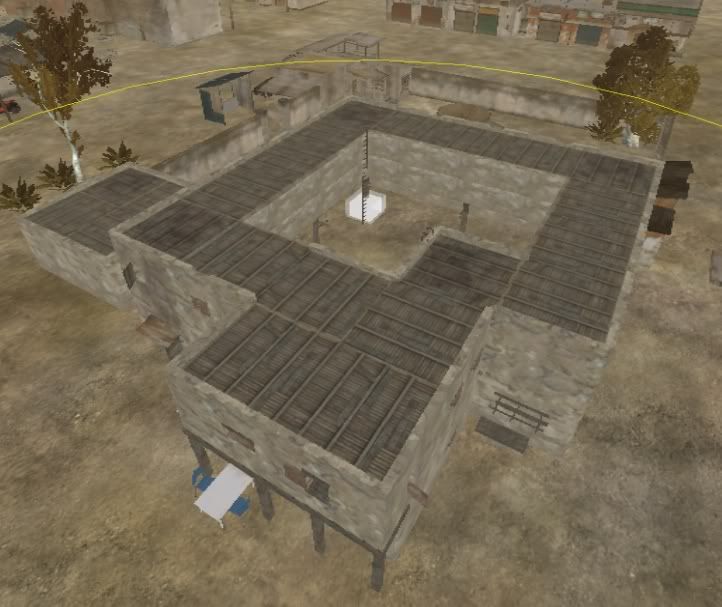
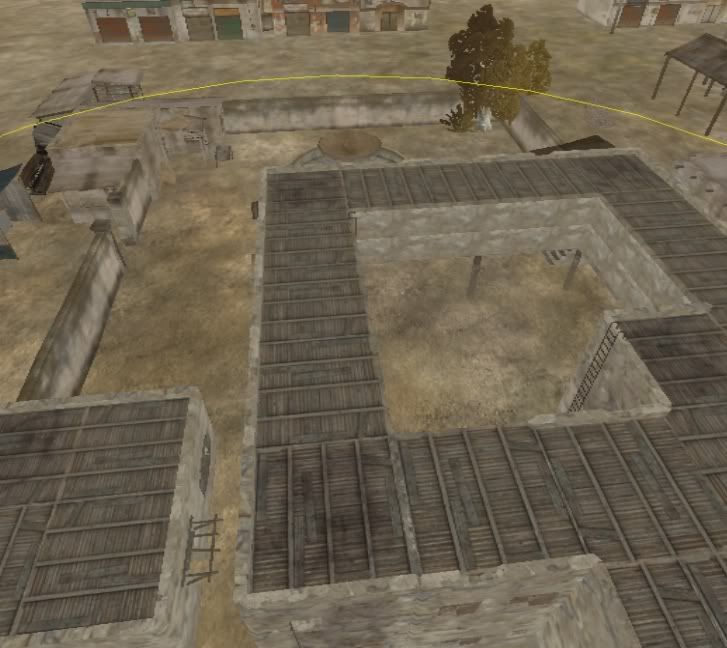
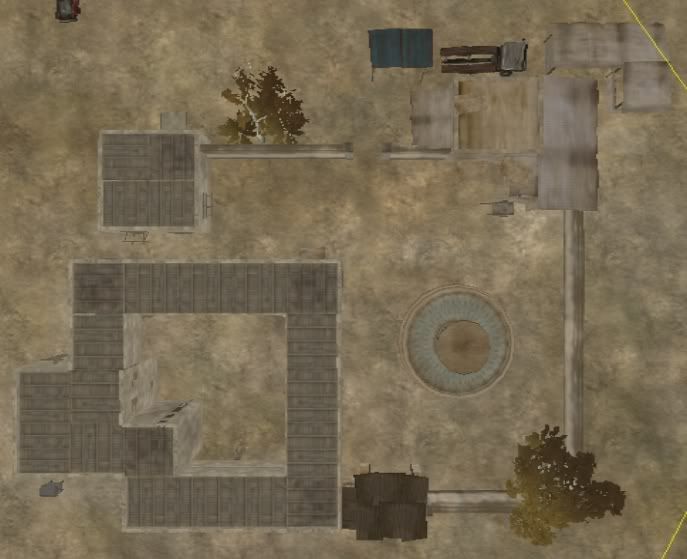
and.... I remade the target building!! using the advice of...someone on this forum, i made it out of various destructible statics!!! 2 floors, ladders to roof, stairs to second floor, sorry no windows to courtyard(unless i figure out how and have it still look decent) ummm... yeah... did i mention I like it? more so than the old one... :) i think it was desert fox who suggested it... or he commented on whoever suggested it... someone put an aerial pic of someones map...yeah...
so.... here you go! (the white box is the Control Point) and its just the building, Ill rework trees and statics around it later... maybe after work tomorrow...
Image
Image
Image

Comment and such... no pics of undergrowth... who wants to see that!?
Post Reply

Return to “PR:BF2 Suggestions”