Page 8 of 8
Re: Windows Vista Users - Troubleshooting Guide for PR
Posted: 2010-05-29 09:22
by Pappsen
Hi
I got this problem on my laptop (asus G50V GF 9700M GT driver: 197.16) after being away abroad for 5 weeks. (I only playe here where I got enough speed on the broadband)
I cant even get the game to start! Black screen for a sec. then back to desktop. Same for BF2 and so on. (only who cares for BF? :b )
Blackscreen-crash makes me suspect grafic-card issue, but latest driver and all set as last time I played.. I dunno what else?
Anyways, I have googled the issue but cant find any adwice that I could apply on this.
Plz advice me.
Ps. I did play 0.9 a lot before i went abroad...no crashes no probs. Ds
Kindly
Pappsen
Re: Windows Vista Users - Troubleshooting Guide for PR
Posted: 2010-06-02 00:45
by icelock
Natemo wrote:Dont feel alone we have the same problem.
I'm having this problem too.
Do you think it's pervasive enough that a hotfix will be issued?
Re: Windows Vista Users - Troubleshooting Guide for PR
Posted: 2010-06-05 13:54
by Tanner
I am running BF2 on Vista 32bit and i am having problems with the pr.exe. I have installed it correctly into its default location however iv tried everything on the foroms and nothing seems to work. This is the code i get when i open prError
System.MissingMethodException: Method not found: 'System.String System.Windows.Forms.OpenFileDialog.get_SafeFileName()'.
at o.i()
at e.a(String[] A_0)
Re: Windows Vista Users - Troubleshooting Guide for PR
Posted: 2010-06-18 01:10
by GeorgRavioli
I'm using Vista Home Premium 32bit and the game froze, forcing me to restart my computer. When i restarted PR, I noticed my account was gone (CommunistColby71). I tried everything to get it back, I typed the correct password for it about 3 times and it still said it was incorrect.
Re: Windows Vista Users - Troubleshooting Guide for PR
Posted: 2010-07-06 16:42
by Battle360
I downloaded and installed PR .91 but it doesn't work! This has been happening since version .86 came out and I haven't been able to pay PR since then!!

It's like this, I attempt to start PR from its shortcut and it starts up. The screen flickers black and shows the cursor for PR. Then it reverts back to the desktop!!?? I then try to start the game from the custom games menu in vanilla BF2. It goes to the PR menu like it should but all it says is this:
You must use "pr.exe" to run Project Reality.
Please update you shortcuts as required.
Exapmle:
"C:\Program Files\EA Games\Battlefield 2\mods\pr\pr.exe"
Instead of :
"C:\Program Files\EA Games\Battlefield 2\bf2.exe"
Help is greatly appreciated and somebody PLEASE REPLY TO THIS PR IS THE BEST MOD/GAME EVR AND I REALLY WANT TO PLAY IT AGAIN INSTAED OF WATCHING VIDS IN YOUTUBE!!!!!!!!!!!!!!!
Re: Windows Vista Users - Troubleshooting Guide for PR
Posted: 2010-07-06 16:43
by Battle360
Battle360 wrote:I downloaded and installed PR .91 but it doesn't work! This has been happening since version .86 came out and I haven't been able to pay PR since then!!
It's like this, I attempt to start PR from its shortcut and it starts up. The screen flickers black and shows the cursor for PR. Then it reverts back to the desktop!!?? I then try to start the game from the custom games menu in vanilla BF2. It goes to the PR menu like it should but all it says is this:
You must use "pr.exe" to run Project Reality.
Please update you shortcuts as required.
Exapmle:
"C:\Program Files\EA Games\Battlefield 2\mods\pr\pr.exe"
Instead of :
"C:\Program Files\EA Games\Battlefield 2\bf2.exe"
Help is greatly appreciated and somebody PLEASE REPLY TO THIS PR IS THE BEST MOD/GAME EVR AND I REALLY WANT TO PLAY IT AGAIN INSTAED OF WATCHING VIDS IN YOUTUBE!!!!!!!!!!!!!!!
"Every problem is just another gatway to the solution."
Re: Windows Vista Users - Troubleshooting Guide for PR
Posted: 2010-08-12 14:28
by shutdo
Pappsen wrote:Hi
I got this problem on my laptop (asus G50V GF 9700M GT driver: 197.16) after being away abroad for 5 weeks. (I only playe here where I got enough speed on the broadband)
I cant even get the game to start! Black screen for a sec. then back to desktop. Same for BF2 and so on. (only who cares for BF? :b )
Blackscreen-crash makes me suspect grafic-card issue, but latest driver and all set as last time I played.. I dunno what else?
Anyways, I have googled the issue but cant find any adwice that I could apply on this.
Plz advice me.
Ps. I did play 0.9 a lot before i went abroad...no crashes no probs. Ds
Kindly
Pappsen
Your laptop should be capable if not more than enough to handle PR. so the problem may be simply the result of trying to run the game with setting different from the default monitor refresh rate setting. In another words, BF2 first launch with a 60 Hz screen refresh rate setting, and your default monitor refresh rate is either higher or lower than 60 Hz, which results in a black screen followed by a crash to desktop when attempting to run the game.
The solution is simple, you should check your monitor's refresh rate.
Go to
: Control Panel-->personalization-->Display Settings-->Advanced settings
under "monitor tab", you can see refresh rate of your monitor.
Under the directory "
C:\Users\\Documents\Battlefield 2\Profiles\default"
there is a "video.con" file, open it with notepad, and edit the line "VideoSettings.setResolution 800x600@60Hz"
replace "60Hz" by whatever value your monitor supports.
for example, if your monitor has a refresh rate of 61Hz, the line becomes
"VideoSettings.setResolution 800x600@61Hz"
when you're done, save it and you may now try to run the game.
For more info, visit http://www.tweakguides.com/BF2_7.html
Hope this solves your problem. 
Re: Windows Vista Users - Troubleshooting Guide for PR
Posted: 2010-08-14 11:13
by Sgt.Desert Tiger[TR]
My pc:
gtx295
ddr3 1333mhz 3x1gb ram
MSI x58 pro motherboard
Crash times depends one time 10 min after playing on time 1-2 hour.How can I fix it?
Also 30 pages odf pll sent dxdiag to ea bf2 forum but ea dont answer -_-
Battlefield Crashing to Desktop (Multiplayer) - Battlefield 2 Members Helping Members - Battlefield 2: EA Forums
Re: Windows Vista Users - Troubleshooting Guide for PR
Posted: 2010-09-15 08:21
by guru951
My issue is this,
I'm having problems at
1. Map switch-while switching maps from one round to the next it crashes to desktop 95% of the time.
2. during game play-gets a loud error ding sound, crashes and gives me a memory error, it reads "memory.dll.all alloc attempts failed for size 262602"
I'm running PR, xfire, ventrilo and mumble in admin mode, Vista Home Premium
Re: Windows Vista Users - Troubleshooting Guide for PR
Posted: 2010-09-18 16:04
by Pancakes805
I Have a solution to the SHORTCUT PROBLEM.......you have to restart after you have finished installing PR
oh and 1 more thing you have to run PR as administrator
Re: Windows Vista Users - Troubleshooting Guide for PR
Posted: 2010-10-24 16:25
by iwillkillyouhun
guru951 wrote:My issue is this,
I'm having problems at
1. Map switch-while switching maps from one round to the next it crashes to desktop 95% of the time.
2. during game play-gets a loud error ding sound, crashes and gives me a memory error, it reads "memory.dll.all alloc attempts failed for size 262602"
I'm running PR, xfire, ventrilo and mumble in admin mode, Vista Home Premium
hi man you might want to lower your setting a lill bit like it crashes for me 2 on high but on medium i have no problems

try it and let us know what happens than
i am using the same exact system
Re: Windows Vista Users - Troubleshooting Guide for PR
Posted: 2010-10-31 16:18
by Echo121
I'm having a bugger of a time getting PR to run when it does I have about 10 to 20 minutes of game play and then I get Amemory.dll.all alloc attempts failed for size 262602 (The other one is PR just CTD's with no consistency what so ever and it get kind of annoying any help would be appreciable.
Went through and lowered graphic settings no more memory crash but still randomly CTD's
System Specs
Processor AMD Phenom X4 955 Processor
RAM 500GB installed 3.25 Usable
Windows 7 32-bit
2TB memory.
Re: Windows Vista Users - Troubleshooting Guide for PR
Posted: 2010-12-05 23:57
by zenarion
Hi!
I've been playing Project Reality for almost 2 years now.
Got this issue today, when I uptaded my videocard drivers.
I also switched to using my 32" tv instead of my old monitor, so I have to play at a different resolution
Old resolution was 1366*768
New res is 1920*1080
When I start the game, by either shortcut or whatever, it crashes. So i ran it in windowed mode to see what is causing my problems. This happens:
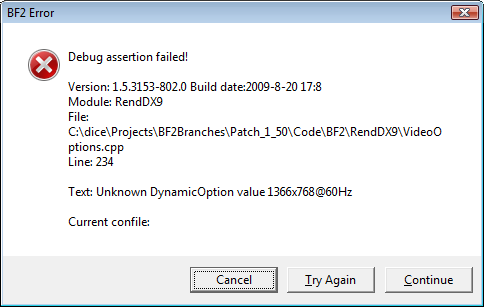 Edit: fixed this. Apparently had some conflicting resolution settings in the Video.con file. Finding the conflict and rooting it out worked like a charm. Now enjoying glorious PR in glorious HD, on a bigger screen
Re: Windows Vista Users - Troubleshooting Guide for PR
Posted: 2010-12-29 12:15
by Ado
Im running Vista on my computer and i get kicked out on the second map load. The first map loads fine. In the middle of the second on i get kicked out to the desktop. I need some help!!!!!
Re: Windows Vista Users - Troubleshooting Guide for PR
Posted: 2011-01-25 16:57
by TheSojin
Ive been reading throw this thread and i still have found nothing that fixed my problem. I just got battlefield 2 and it still works but when i try PR it shows the start up pic then goes to a black screen and back to my desktop. I have windows vista 32bit. i tried running it on administrator nothing ive tried this
WARNING! You must run Project Reality by running PR.exe, not BF2.exe.
Press ALT+F4 and update your shortcuts!
I have a solution to this that will most likely work. I recently got a new PC that has windows vista and had to struggle with this problem for long. Here's what you should do.
1. Move your pr.exe (text file and launcher) to Program files (x86) --> EA Games --> Battlefield 2 - folder (or wherever your BF2 is installed)
2. Then right click on the pr.exe game launcher and choose properties. Then click on compatibility from the upper bar. Click a check mark on the box that says something like "Run in a compatibility mode" (Don't know the exact words as my vista is in Finnish) and choose windows XP service pack 2.
3. Just to be sure, do the step 2 to any pr.exe launchers you have.
4. Also don't forget to check that your PR shortcut's path is to ""C:\Program Files (x86)\EA GAMES\Battlefield 2\mods\pr\pr.exe" +modPath mods/pr +menu 1 +fullscreen 1"
and still nothing can anyone help
Re: Windows Vista Users - Troubleshooting Guide for PR
Posted: 2011-03-29 05:28
by Griffmeister423
I have figured out the problem....... (even though i am the creator of this post:twisted

it turns out that certain version of PR doesent like Vista..... and some maps are to large of a scale for the vista computers motherboard to load(ex. ramauel and the one with the chinooks its Canadian army VS talibian i think) anyways the motherboards programing is to old (ex. 32 bit has a harder time loading maps than a 64bit) there for a computer like my inspiron 530(with out extra power running to grafics card) could not work on certain versions of PR(versions under .957 are more likly to not work so i suggest getting a better grafics card or more energy going to your current one if you wanna play under Version .957 or PR)
Re: Windows Vista Users - Troubleshooting Guide for PR
Posted: 2011-05-06 14:46
by truckilleruk
Battle360 wrote:"Every problem is just another gatway to the solution."
Not the place for intro's but never mind......This is the only post i've found that is remotely close to my issue, that being said i've yet (unless i'm corrected on this) to find anyone who uses STEAM to play BF2....Many years ago i had all the disc's and stuff (but we wont go there), so anyway i now use STEAM...the line of code/path is nearly the same except for the STEAM bit instead of EA Games... I've tried altering things and moving things and that went completely pear shaped!! so ended up deleting BF2 and re-D/L it..
After being told about PR and how good it is, and was looking forward to having a go, but i'm not clever with figuring probs out despite my age.....

ops:
Any help spelt out in a kind of idiots guide would be very much appreciated...
Re: Windows Vista Users - Troubleshooting Guide for PR
Posted: 2011-06-11 12:04
by sniperi
Hi guys, can anyone help me. I have finally solved my problem with ctd. But now i face another problem. To acces the game u must create an account an when i do that it shows the message "creating account" and doesnt proceed. What am i doing wrong ???
Re: Windows Vista Users - Troubleshooting Guide for PR
Posted: 2011-07-05 00:47
by Scruff
Installed BF2 via Steam. All up to date.
Installed PR.
Launch from desktop.
.exe starts running.
PR logo graphic appears on screen for 10-30 seconds.
.exe terminates, graphic disappears.
Any solution to this?