Page 2 of 5
Re: FPS Issues
Posted: 2013-07-01 22:45
by a3dboy1
So I will add my 5 cents here.
I used to get constant 40+ fps in .98 on every map and layout.
Now I usually get 20-40 fps.
IMO, I think it is caused by number of players and accordingly increased actions on the server/game screen.
Code: Select all
System Information
------------------
  Operating System: Microsoft Windows 7 Ultimate  (6.1.7600)
      Architecture: 64-bit
          Language: Polish (Poland)
       Motherboard: MSI MS-1722
         Processor: Intel(R) Core(TM)2 Duo CPU     P8400  @ 2.26GHz (Physical: 2, Logical: 2)
            Memory: 4,00 GB
         Page File: 4,00 GB
    .NET Framework: 4.0

Display Information
-------------------
 Display Device(s): Algemeen PnP-beeldscherm on NVIDIA GeForce 9600M GT
   Display Mode(s): 1680 x 1050 (32 bit) @ 60 Hz
    Driver Version: 9.18.13.2049 (320.49)
    Display Memory: 512,00 MB
     Multisampling: 2, 4, 8
               DPI: 96 (100%)

Audio Information
-----------------
  Primary Playback: Creative Labs Inc. Software
 Primary Recording: Microfoon (Realtek High Definit
               EAX: True
           EAX 1.0: False
           EAX 2.0: True
           EAX 3.0: False
           EAX 4.0: False
           EAX 5.0: False
             X-RAM: False

Disk Information
----------------
      Install Path: C:\Battlefield 2
                    Free: 12,43 GB, Total: 111,69 GB, NTFS
          Mod Path: C:\Battlefield 2\mods\pr_beta
                    Free: 12,43 GB, Total: 111,69 GB, NTFS
     Profiles Path: C:\Users\Andriej\Documents\ProjectReality\Profiles
                    Free: 12,43 GB, Total: 111,69 GB, NTFS
    Update DL Path: C:\Users\Andriej\AppData\Local\Project Reality\Project Reality BF2\Downloads
                    Free: 12,43 GB, Total: 111,69 GB, NTFS
   Update Log Path: C:\Users\Andriej\AppData\Local\Project Reality\Project Reality BF2\UpdateLogs
                    Free: 12,43 GB, Total: 111,69 GB, NTFS

Game Information
----------------
      CD Key Valid: True
    Installed Mods: bf2, fh2, pr, pr_beta, xpack
       Current Mod: pr_beta
       BF2 Version: BF2 1.5
        PR Version: 1.0.21.0
          Language: English
   Debug Available: False
     Large Address: True
Supported Hardware: None

Profile Information
-------------------
      Profile 0001: Monk_xx
              Type: Online
 Last Used Profile: True
        View Intro: False
        Fullscreen: True
      Display Mode: 1680x1050@60Hz
Display Mode Valid: True
   Graphics Scheme: High
     Multisampling: Off
             VSync: False
   Terrain Quality: High
   Effects Quality: High
  Geometry Quality: High
   Texture Quality: High
  Lighting Quality: High
   Dynamic Shadows: High
    Dynamic Lights: High
 Texture Filtering: High
    Audio Provider: Hardware
    Provider Valid: True
     Audio Quality: High
               EAX: True
Re: FPS Issues
Posted: 2013-07-01 22:56
by SANGUE-RUIM
here gtx 660ti also had around 20 fps drop compared to 0.98 on ramiel and black gold (night layout)
I installed new NVIDIA driver (320.49) now to see if it helps a little

Re: FPS Issues
Posted: 2013-07-01 23:54
by Steeps
I have no idea why I get anything less than 100 fps with my computer but I do with this beta. I have an overclocked i5-2500k with a GTX 680 and 12GB RAM. I'm not currently on that computer so I can't give the details list but I have noticed poor FPS compared to before.
Re: FPS Issues
Posted: 2013-07-02 00:09
by Inspektura43
I cant get over 30 fps terrible optimizing, atleast make it possible to lower settings pff
Re: FPS Issues
Posted: 2013-07-02 02:27
by =MeRk= Morbo5131
I'm 90% sure the settings it lists for my profile are wrong. I had around 20fps on Black Gold Skirmish after setting it all to high.
Code: Select all
System Information
------------------
  Operating System: Microsoft Windows 7 Ultimate  (6.1.7600)
      Architecture: 32-bit
          Language: English (United Kingdom)
       Motherboard: ASUSTeK Computer INC. P5Q SE2
         Processor: Intel(R) Core(TM)2 Duo CPU     E8500  @ 3.16GHz (Physical: 2, Logical: 2)
            Memory: 4.00 GB
      DIMM Modules: DIMM0: 2.00 GB @ 800 MHz
                    DIMM1: 2.00 GB @ 800 MHz
         Page File: 3.25 GB
    .NET Framework: 4.0

Display Information
-------------------
 Display Device(s): Generic PnP Monitor on NVIDIA GeForce GTX 550 Ti
   Display Mode(s): 1440 x 900 (32 bit) @ 60 Hz
    Driver Version: 9.18.13.1422 (314.22)
    Display Memory: 1023.69 MB
     Multisampling: 2, 4, 8
               DPI: 96 (100%)

Audio Information
-----------------
  Primary Playback: Creative Labs Inc. Software
 Primary Recording: Headset Microphone (2- Microsof
               EAX: True
           EAX 1.0: False
           EAX 2.0: True
           EAX 3.0: False
           EAX 4.0: False
           EAX 5.0: False
             X-RAM: False

Disk Information
----------------
      Install Path: C:\Program Files\EA GAMES\Battlefield 2
                    Free: 68.45 GB, Total: 698.54 GB, NTFS
          Mod Path: C:\Program Files\EA GAMES\Battlefield 2\mods\pr_beta
                    Free: 68.45 GB, Total: 698.54 GB, NTFS
     Profiles Path: C:\Users\Ben\Documents\ProjectReality\Profiles
                    Free: 68.45 GB, Total: 698.54 GB, NTFS
    Update DL Path: C:\Users\Ben\AppData\Local\Project Reality\Project Reality BF2\Downloads
                    Free: 68.45 GB, Total: 698.54 GB, NTFS
   Update Log Path: C:\Users\Ben\AppData\Local\Project Reality\Project Reality BF2\UpdateLogs
                    Free: 68.45 GB, Total: 698.54 GB, NTFS

Game Information
----------------
      CD Key Valid: True
    Installed Mods: AIX2, ap, bf2, pr, pr_beta, stats, xpack
       Current Mod: pr_beta
       BF2 Version: BF2 1.5
        PR Version: 1.0.21.0
          Language: English
   Debug Available: False
     Large Address: True
Supported Hardware: None

Profile Information
-------------------
      Profile 0001: =MeRk=Morbo5131
              Type: Online
        View Intro: True
        Fullscreen: True
      Display Mode:
Display Mode Valid: False
   Graphics Scheme: Custom
     Multisampling: Off
             VSync: False
   Terrain Quality: Low
   Effects Quality: Medium
  Geometry Quality: Low
   Texture Quality: Medium
  Lighting Quality: Low
   Dynamic Shadows: Off
    Dynamic Lights: Off
 Texture Filtering: Medium
    Audio Provider: Software
    Provider Valid: True
     Audio Quality: Low
               EAX: False
Re: FPS Issues
Posted: 2013-07-02 03:55
by Bonetopick
Same issues as everyone else in this thread, it goes down to 25-30 FPS at random times which it shouldn't be cause I ran previous PR versions at 100+
Re: FPS Issues
Posted: 2013-07-02 04:14
by DesmoLocke
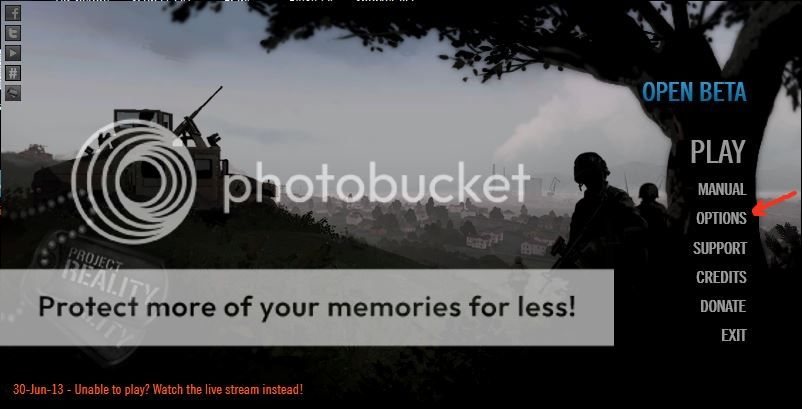
Inspektura43 wrote:I cant get over 30 fps terrible optimizing, atleast make it possible to lower settings pff
You can. Under "Options"
Re: FPS Issues
Posted: 2013-07-02 07:11
by Kothra
I'm getting similar fps drops, especially on Ramiel. My computer isn't quite as powerful so at times it actually went to fairly unplayable frame rates.
Code: Select all
[CODE]
System Information
------------------
  Operating System: Microsoft Windows 7 Home Premium  (6.1.7601)
      Architecture: 64-bit
          Language: English (United States)
       Motherboard: Dell Inc. 0YR8NN
         Processor: Intel(R) Core(TM) i7-2670QM CPU @ 2.20GHz (Physical: 4, Logical: 8)
            Memory: 8.00 GB
      DIMM Modules: ChannelA-DIMM0: 4.00 GB @ 1333 MHz
                    ChannelB-DIMM0: 4.00 GB @ 1333 MHz
         Page File: 7.89 GB
    .NET Framework: 4.0

Display Information
-------------------
 Display Device(s): Generic PnP Monitor on Intel(R) HD Graphics 3000
   Display Mode(s): 1366 x 768 (32 bit) @ 60 Hz
    Driver Version: 9.18.13.2049 (320.49)
    Display Memory: 1024.00 MB
     Multisampling: 2, 4, 8
               DPI: 96 (100%)

Audio Information
-----------------
  Primary Playback: Creative Labs Inc. Software
 Primary Recording: Microphone (Realtek High Defini
               EAX: True
           EAX 1.0: False
           EAX 2.0: True
           EAX 3.0: False
           EAX 4.0: False
           EAX 5.0: False
             X-RAM: False

Disk Information
----------------
      Install Path: C:\Program Files (x86)\Steam\steamapps\common\Battlefield 2
                    Free: 42.78 GB, Total: 911.88 GB, NTFS
          Mod Path: C:\Program Files (x86)\Steam\steamapps\common\Battlefield 2\mods\pr_beta
                    Free: 42.78 GB, Total: 911.88 GB, NTFS
     Profiles Path: C:\Users\Kothra\Documents\ProjectReality\Profiles
                    Free: 42.78 GB, Total: 911.88 GB, NTFS
    Update DL Path: C:\Users\Kothra\AppData\Local\Project Reality\Project Reality BF2\Downloads
                    Free: 42.78 GB, Total: 911.88 GB, NTFS
   Update Log Path: C:\Users\Kothra\AppData\Local\Project Reality\Project Reality BF2\UpdateLogs
                    Free: 42.78 GB, Total: 911.88 GB, NTFS

Game Information
----------------
      CD Key Valid: True
    Installed Mods: bf2, fh2, pr, pr_beta, xpack
       Current Mod: pr_beta
       BF2 Version: BF2 1.5
        PR Version: 1.0.21.0
          Language: English
   Debug Available: False
     Large Address: True
Supported Hardware: None

Profile Information
-------------------
      Profile 0001: Kothra
              Type: Online
 Last Used Profile: True
        View Intro: True
        Fullscreen: True
      Display Mode: 1366x768@60Hz
Display Mode Valid: True
   Graphics Scheme: High
     Multisampling: 8x
             VSync: False
   Terrain Quality: High
   Effects Quality: High
  Geometry Quality: High
   Texture Quality: High
  Lighting Quality: High
   Dynamic Shadows: High
    Dynamic Lights: High
 Texture Filtering: High
    Audio Provider: Software
    Provider Valid: True
     Audio Quality: High
               EAX: True
[/code]
Re: FPS Issues
Posted: 2013-07-02 11:38
by HeadlessChicken86
Im having fps drops aswell but only if the server is full. On almost empty servers theres no problem at all but with more than 60 players its gettin really annoying. Cant play like that.
Edit: The unofficial servers seemed to work better for me somehow. May be its because of mumble?
Code: Select all
System Information
------------------
  Operating System: Microsoft Windows 7 Home Premium  (6.1.7601)
      Architecture: 64-Bit
          Language: German (Germany)
       Motherboard: Intel Corporation DG41WV
         Processor: Intel(R) Core(TM)2 Duo CPU     E6750  @ 2.66GHz (Physical: 2, Logical: 2)
            Memory: 4,00 GB
      DIMM Modules: CHANNEL_A: 2,00 GB @ 1066 MHz
                    CHANNEL_B: 2,00 GB @ 1066 MHz
         Page File: 3,99 GB
    .NET Framework: 4.5

Display Information
-------------------
 Display Device(s): SyncMaster 2243NW/2243NWX on NVIDIA GeForce GTX 560 Ti
   Display Mode(s): 1680 x 1050 (32 bit) @ 60 Hz
    Driver Version: 9.18.13.1407 (314.07)
    Display Memory: 1023,69 MB
     Multisampling: 2, 4, 8
               DPI: 96 (100%)

Audio Information
-----------------
  Primary Playback: Creative Labs Inc. Software
 Primary Recording: Mikrofon (High Definition Audio
               EAX: True
           EAX 1.0: False
           EAX 2.0: True
           EAX 3.0: False
           EAX 4.0: False
           EAX 5.0: False
             X-RAM: False

Disk Information
----------------
      Install Path: C:\Program Files (x86)\EA GAMES\Battlefield 2
                    Free: 70,62 GB, Total: 223,92 GB, NTFS
          Mod Path: C:\Program Files (x86)\EA GAMES\Battlefield 2\mods\pr_beta
                    Free: 70,62 GB, Total: 223,92 GB, NTFS
     Profiles Path: C:\Users\Chicken1\Documents\ProjectReality\Profiles
                    Free: 70,62 GB, Total: 223,92 GB, NTFS
    Update DL Path: C:\Users\Chicken1\AppData\Local\Project Reality\Project Reality BF2\Downloads
                    Free: 70,62 GB, Total: 223,92 GB, NTFS
   Update Log Path: C:\Users\Chicken1\AppData\Local\Project Reality\Project Reality BF2\UpdateLogs
                    Free: 70,62 GB, Total: 223,92 GB, NTFS

Game Information
----------------
      CD Key Valid: True
    Installed Mods: bf2, pr, prv, pr_beta, xpack
       Current Mod: pr_beta
       BF2 Version: BF2 1.5
        PR Version: 1.0.21.0
          Language: German
   Debug Available: False
     Large Address: True
Supported Hardware: None

Profile Information
-------------------
      Profile 0001: Nemo1676
              Type: Online
 Last Used Profile: True
        View Intro: True
        Fullscreen: True
      Display Mode: 1680x1050@60Hz
Display Mode Valid: True
   Graphics Scheme: Custom
     Multisampling: 8x
             VSync: False
   Terrain Quality: Low
   Effects Quality: High
  Geometry Quality: Low
   Texture Quality: High
  Lighting Quality: Low
   Dynamic Shadows: Off
    Dynamic Lights: Off
 Texture Filtering: Low
    Audio Provider: Software
    Provider Valid: True
     Audio Quality: Medium
               EAX: True
Re: FPS Issues
Posted: 2013-07-02 11:47
by camo
I've got massive drops in fps too, but funny thing was it completely fine first day of beta, 50+ fps all the time but when the .21 patch came out it all went to shit so now i get about no higher than 30.
Re: FPS Issues
Posted: 2013-07-02 12:01
by Heavy Death
I player .98 with everything maxed out, 1.0 gave me trouble with 100p on saaremaa and ramiel, was around 20 fps, barely playable. Lowering the AA from 8x to 4x did the trick, now i have sufficient framerate.
Re: FPS Issues
Posted: 2013-07-02 14:02
by camo
I just want to know what went into the latest patch, it was so small but it completely ruined the game for me.
Re: FPS Issues
Posted: 2013-07-02 14:08
by karlis1989
I noticed an option to launch PR "without Mumble" so i gave that a try ... in the result i had NO fps problems, NO game minimizing... and NO Mumble problems
Re: FPS Issues
Posted: 2013-07-02 14:19
by AfterDune
karlis1989 wrote:I noticed an option to launch PR "without Mumble" so i gave that a try ... in the result i had NO fps problems, NO game minimizing... and NO Mumble problems
Don't know about the fps issues, will give that a go myself.
The no game minimizing and no mumble problems is pretty obvious - mumble doesn't run, lol

.
Re: FPS Issues
Posted: 2013-07-02 14:27
by camo
karlis1989 wrote:I noticed an option to launch PR "without Mumble" so i gave that a try ... in the result i had NO fps problems, NO game minimizing... and NO Mumble problems
I tried this and it works. One question tho, did you start mumble after you got in game? I have yet to try for fear of losing all the fps i gained and having to restart.
Re: FPS Issues
Posted: 2013-07-02 14:35
by Unhealed
Just tried it without mumble and got like 10-15 fps boost, and I was wondering why fps was better few days ago.

One question tho, did you start mumble after you got in game?
It doesn't work, sadly.
Re: FPS Issues
Posted: 2013-07-02 14:57
by camo
AAH this is driving me crazy, have mumble but have terrible fps, or have no mumble and actually be able to move around and aim.
EDIT: Can i ask what it is you changed in the recent updates? Because these issues only came up after .20 and .21.
Re: FPS Issues
Posted: 2013-07-02 15:08
by Unhealed
camo_jnr_jnr wrote:AAH this is driving me crazy, have mumble but have terrible fps, or have no mumble and actually be able to move around and aim.
EDIT: Can i ask what it is you changed in the recent updates? Because these issues only came up after .20 and .21.
Don't worry, now when they know a reason the devs are probably already fixing it or think how to fix it.
Re: FPS Issues
Posted: 2013-07-02 15:14
by camo
Unhealed wrote:Don't worry, now when they know a reason the devs are probably already fixing it or think how to fix it.
jeez i hope so. If not back to pr .98

Re: FPS Issues
Posted: 2013-07-02 16:45
by knightaxl27
yep, not starting with mumble totally worked for me...still have some fps drop on black gold city tho..but atleast its playable now..