Page 2 of 2
Posted: 2007-10-13 05:45
by ZZEZ
Z-trooper wrote:Ok. I'm pretty new to this modelling thing

but we have to learn at some point right?

Let me see if I got this right:
The only things I should make are the unique stuff like the nails and the text, for the wooden part I should use vbf2 texture pallets?
if that is correct, I know very little of how to proceed. I can imagine I sould open the BF editor

But how to save my 3ds max model and import it into the editor, along with saving the unique texture bits and loading them in aswell - I have no idea on how get start. Not even thinking about how to edit it when I finally get that done.
I guess I should just spend some time searching the web for tutorials, reading them, but that will have to wait a bit cause its getting late now.
Anyway, thanks for spotting my errors at this stage. I could just imagine I had finished it and then got shot to pieces
I'm just trying to learn, thats all.
Make sure the model is only 1 item, then clone it 3 times with the following names - keep them at same place as original
col0 col1 col2
Select everything, the sign & cols, bf utilities in max -> bf2 utilities, select static object from the dropdown menu, click on run.
Now while everything is still selected, run the exporter, assign it a folder[make sure you create it before actually exporting] and export.
Posted: 2007-10-13 09:30
by Z-trooper
[quote=""'[R-DEV"]Rhino;507124']its hard to exsplain, espicaly since my knowlage on this subject is very limited, i only got into doing statics a while back but have had alot of background info before going into them which helped me alot.
check bfeditor.org, sure they have lots of tuts etc.[/quote]
Ok I'll try
[quote="ZZEZ""]Make sure the model is only 1 item, then clone it 3 times with the following names - keep them at same place as original
col0 col1 col2
Select everything, the sign & cols, bf utilities in max -> bf2 utilities, select static object from the dropdown menu, click on run.
Now while everything is still selected, run the exporter, assign it a folder[make sure you create it before actually exporting] and export.[/quote]
Some of it made sence to me, and some of it didnt.
I'll have a look at it sometime later today.
Posted: 2007-10-13 14:29
by Rhino
ZZEZ wrote:Make sure the model is only 1 item, then clone it 3 times with the following names - keep them at same place as original
col0 col1 col2
Select everything, the sign & cols, bf utilities in max -> bf2 utilities, select static object from the dropdown menu, click on run.
Now while everything is still selected, run the exporter, assign it a folder[make sure you create it before actually exporting] and export.
well really you should try and make your col meshes as low detail as possible. so just cloning the LOD0 3 times aint the best idea most of the time.
best thing for this, col0 for this object should just be a clone on the lod0, then col1 and col2 I would probaly just make as a triangle, pointing downwards so like this
Then you have the sign in the middle of that
Posted: 2007-10-13 16:39
by Z-trooper
'[R-DEV wrote:Rhino;507389']well really you should try and make your col meshes as low detail as possible. so just cloning the LOD0 3 times aint the best idea most of the time.
best thing for this, col0 for this object should just be a clone on the lod0, then col1 and col2 I would probaly just make as a triangle, pointing downwards so like this
Then you have the sign in the middle of that
It all sounds great.
but what I've been reading so far, I havent got to the point where I know where "col" is, I'm guessing its a column, but thats a shot in the dark. I'll see when I get some more time to read on this matter.
Posted: 2007-10-13 16:44
by Rhino
I wouldn't worrie about cols for now, just get the object looking nice, low poly and detail but still looking gd etc.
Posted: 2007-10-13 17:04
by Z-trooper
[R-DEV]Rhino wrote:I wouldn't worrie about cols for now, just get the object looking nice, low poly and detail but still looking gd etc.
Alright.. I'm taking baby steps
What was the conclusion on the wood texture? should I use BF editor to find that or should I make it myself?
You dont have to answer right away cause I'm out for the night, I'll be online tomorrow some time.
Posted: 2007-10-13 17:29
by Rhino
http://bfeditor.org/forums/index.php?showtopic=5980
download the bf2 3dsmax tools first before you start to do anything and install them.
then from there you can use the right kind of material things. you will want to use bf2staticmesh think its called.
then brows though the BF2 static textuer pallets and look for a wood textuer that will suit your sign.
Posted: 2007-10-13 22:33
by Z-trooper
'[R-DEV wrote:Rhino;507536']
http://bfeditor.org/forums/index.php?showtopic=5980
download the bf2 3dsmax tools first before you start to do anything and install them.
then from there you can use the right kind of material things. you will want to use bf2staticmesh think its called.
then brows though the BF2 static textuer pallets and look for a wood textuer that will suit your sign.
Alright. Just came back.
Thank you. and thank you for all the help and advice
I know I must be a pain in the *** now when I'm trying to learn, but I hope to turn that around to be a resource in the future for this mod.
Posted: 2007-10-14 19:17
by Z-trooper
I have a headache and this stuff makes no sence to me at all.
I cant find those materials, everything I do it just comes with some kind of error.
There are simply too many terms I dont know what means, collision, lightmap, lod, col, stuff like that.
What I need is a frigging babystep guide to make a static object for bf2, but google comes up empty with workable links.
I'll try again some other time, cause I guess I have to learn somehow
EDIT:
Found some tutorials for modding @ EA's site, they look good at first glance - especially since one of them "building the bunker" is one I've been searching for (every single link I've found with it was either broken or had no images)
Posted: 2007-10-14 22:48
by Z-trooper
I get a lot more of it now, but I still dont know how to apply the materials from bf2 or apply the col's.
Posted: 2007-10-15 08:34
by Rhino
Posted: 2007-10-15 08:41
by Desertfox
If im not mistaken with the BF2 bunker tutorial, doesn't the download include the pictures and you move them all into one folder and run the word document? And it will include the pictures?
Posted: 2007-10-15 09:35
by Z-trooper
Oh boy, thanks man! I dont know what your motive for helping me is, but I am sure glad you are doing it
Hopefully I will become a help in the future instead of a guy wanting help.
Posted: 2007-10-15 11:39
by Rhino
I help many bf2 modders, directly or indirectly (though tuts etc ive done) as they have helped me (cos EA/DICE never/hardly delivered the help they promised). Depends what kinda mood im in to be honest

+ there is always the potential of you becoming the next matt.b
Posted: 2007-10-15 12:42
by Z-trooper
[R-DEV]Rhino wrote:I help many bf2 modders, directly or indirectly (though tuts etc ive done) as they have helped me (cos EA/DICE never/hardly delivered the help they promised). Depends what kinda mood im in to be honest
+ there is always the potential of you becoming the next matt.b
lol, I have no idea who matt.b is

but I'll sure try to get good - and hopefully fast too
Posted: 2007-10-15 12:46
by Rhino
Z-trooper wrote:lol, I have no idea who matt.b is
but I'll sure try to get good - and hopefully fast too
matt.b, aka [R-DEV]matt.b is the guy who dose 90% of the statics for pr and has a huge amount of talent
EDIT: speaking of which he did a tut on his stuff, more showing the layout of one of his statics in a scene
https://www.realitymod.com/forum/tutori ... ml?t=28554
Posted: 2007-10-15 13:11
by Z-trooper
'[R-DEV wrote:Rhino;508773']matt.b, aka [R-DEV]matt.b is the guy who dose 90% of the statics for pr and has a huge amount of talent
EDIT: speaking of which he did a tut on his stuff, more showing the layout of one of his statics in a scene
https://www.realitymod.com/forum/tutori ... ml?t=28554
I'm bookmarking this thread now, all the tools, tuts and advice gathered here
Posted: 2007-10-15 17:02
by Z-trooper
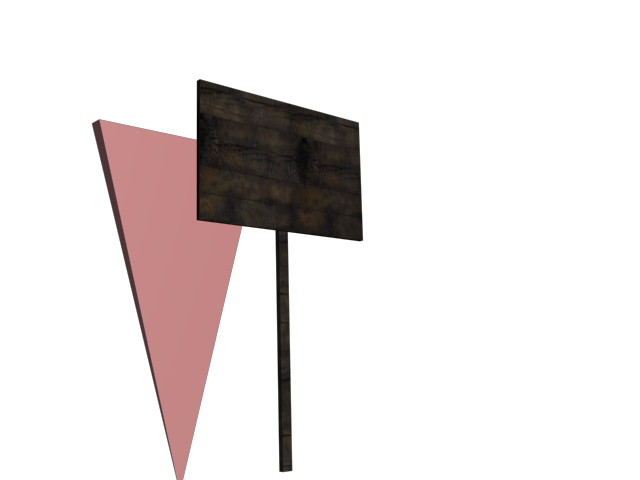
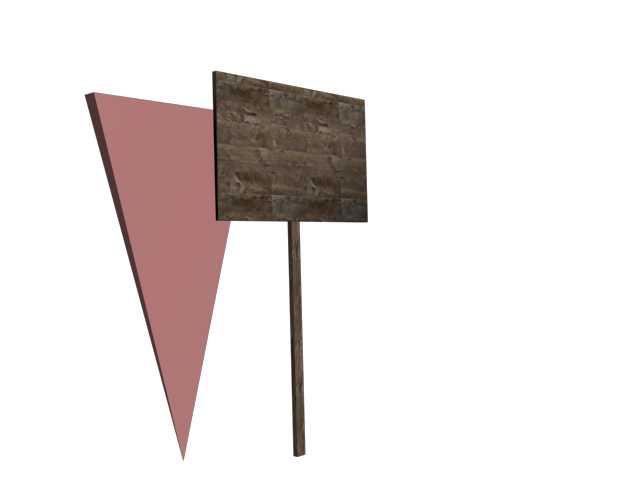
took your advice on both collision mesh and wooden textures.
Found these textures within bf2 statics, and used a "pyramid" for collision mesh.
Should I just use that pyramid thingy for both col0, col1 and col2? I dont really see any point in doing something else. Maybe for the soldier collision mesh? make it very small so you dont get stuck behind a invisible wall next to the sign?
EDIT: woops forgot the pics... d'oh
here they are.
I used a texture of a 'plank' for one of them - which I think looks cool, and some burned wood - dont know why exactly, it just has an appeal to me I guess
Posted: 2007-10-15 17:24
by Rhino
looks pretty good, thou I dont think the plank is quite right, maybe for the stem but for the main sign part maybe use something like ply wood?
Col looks good, col 1 and col 2 should be that triangle, but for col 0 just clone the object as it will look very odd bullets hitting stuff in mid air, which should go though and also bad for gameplay
Also need to find a way to get the wrighting on the sign, think the only way for that is to get a new colour texture in, but just use a wood detail thou better ask matt.b or someone else about that one
Posted: 2007-10-15 19:25
by Z-trooper
[R-DEV]Rhino wrote:looks pretty good, thou I dont think the plank is quite right, maybe for the stem but for the main sign part maybe use something like ply wood?
Col looks good, col 1 and col 2 should be that triangle, but for col 0 just clone the object as it will look very odd bullets hitting stuff in mid air, which should go though and also bad for gameplay
Also need to find a way to get the wrighting on the sign, think the only way for that is to get a new colour texture in, but just use a wood detail thou better ask matt.b or someone else about that one
ok. I'll try to look up some plywood if I can, or something that looks like it.. about putting the text on there I have no idea how to do that without having to create a new texture file. also if I have to use different textures from bf2 I cant have the model as just one piece? :S