Page 2 of 4
Re: Animating for Battlefield 2
Posted: 2009-06-17 04:57
by Tonnie
addaco wrote:Ok thanks, and one final thing, where are the PR weapon cons located?
ok i suggest you make a copy of the pr mod and call it "pr_edit".
then go to "objects" inside objects the should be two zip files "objects_client" and "server_client" select both right click and hit the "extract here" button. then go into the "weapons" folder that got extracted then to "handheld" and then you will have all the handheld weapons in there
let me know how you get along
Re: Animating for Battlefield 2
Posted: 2009-06-19 05:08
by Chuc
Re: Animating for Battlefield 2
Posted: 2009-06-22 20:02
by Tomato-Rifle
When i try to import the G3 iron i get this error
Re: Animating for Battlefield 2
Posted: 2009-06-22 21:41
by Chuc
Don't import the mesh via those extended tools, you see that I have an additional set of tools for importing meshes and animations.
Re: Animating for Battlefield 2
Posted: 2009-06-22 23:04
by Tomato-Rifle
Well, where would i get those :/
This?
http://www.fpsbanana.com/tools/1553
Re: Animating for Battlefield 2
Posted: 2009-06-22 23:27
by Chuc
To be honest I forgot where

Just browse around the BF2 Editor forums on 3DSmax export tools.
EDIT: YES THAT ONE
Re: Animating for Battlefield 2
Posted: 2009-06-22 23:43
by Tomato-Rifle
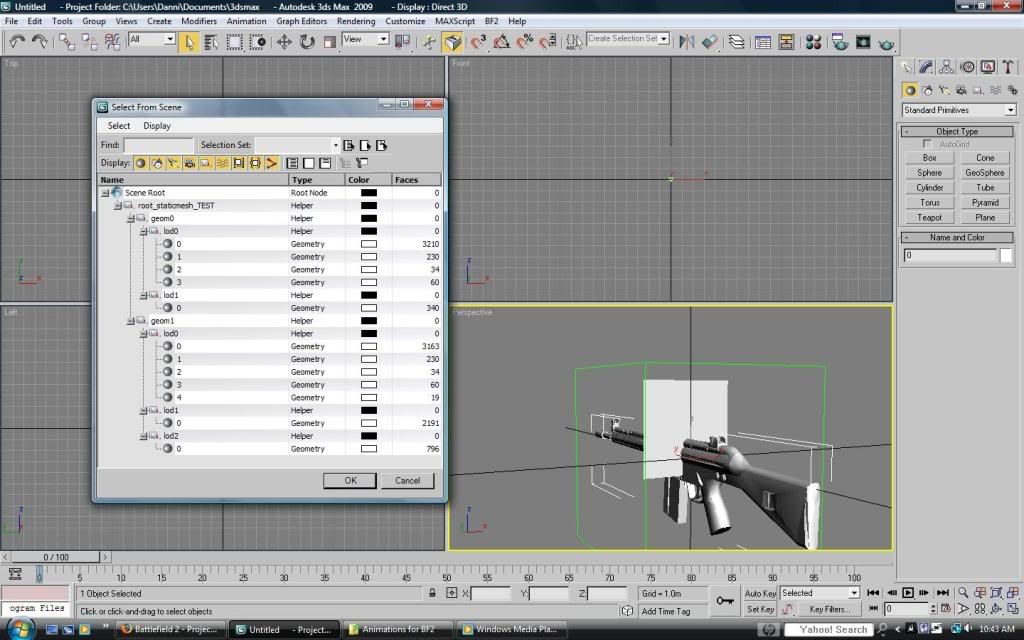
One more question, why are there a bunch of models in the one model?
Re: Animating for Battlefield 2
Posted: 2009-06-22 23:54
by Chuc
Following the tutorial, delete all the meshes aside from geom0 lod0 (that is your first person level of detail geometry).
Geom0 Lod1 is what you can load when you sight in, so things like scope reticles etc are in there. Because we use 3D sights in PR now, unless your weapon has a scope, there's no need for a lod1.
Geom1 lod0 is the highest detail third person geometry, and subsequent lods are lower detail meshes that get rendered the further away it is.
Thats why its called a
Bundlemesh, as it has a lot of meshes bundled into it
Re: Animating for Battlefield 2
Posted: 2009-06-25 14:42
by Tomato-Rifle
And another question, how do i make the selection box with the lods look like yours? mine looks like this
Re: Animating for Battlefield 2
Posted: 2009-06-25 14:45
by Chuc
I'm not sure how you got that window.. but to select objects from a table just press hotkey "H".
Re: [Animation Tutorial] Animating for Battlefield 2
Posted: 2009-10-07 10:21
by Chuc
Hey addaco, really sorry for the wait. Unfortunately I can't find any problems downloading or extracting, did you try downloading with a download manager or something with resume support?
Re: [Animation Tutorial] Animating for Battlefield 2
Posted: 2009-11-07 16:45
by Wilkinson
I'm having an issue making my IK Constraints.
For some reason I cannot get the Link Params
Re: [Animation Tutorial] Animating for Battlefield 2
Posted: 2009-11-07 22:25
by Chuc
You need to make a link constraint via the top drop down menu
Re: [Animation Tutorial] Animating for Battlefield 2
Posted: 2009-11-08 00:24
by Wilkinson
Got it thanks.
Re: [Animation Tutorial] Animating for Battlefield 2
Posted: 2010-03-22 15:54
by HitmanS2
I have a problem, I don't the necessary tools thing... why ?
