yea setting stuff at medium does help for some reason. Still crashes though. I just came from the first time i really got into the game. Was on a squad that was cool and understanding for bout a hour/15 minutes. Then Bam. DC'd Then crashed to desktop when i tried to rejoin.
Tuff time for newbies to join. Just starting to get the hang of it then you got to start over and look like a jerk for DCing on top of it.
That is on XP SP3 32bit, when I use Vista 64 of course my ram is 6gb and over all the computer runs much faster.
I'll be testing it on 64 bit vista tonight but i foresee no problems, if anything a performance boost in game.
I still keep XP though because vista and BF2 editor do NOT get along at all.
I get BSODs (Blue Screens - Page fault in non paged area) all the time but I think it has to do with my sound card because it doesnt seem to happen when I downgrade from XFI - ULTRA mode to HARDWARE sound but I lose my directional sound etc.
For the CTD when loading Dragon Fly, I can log in as admin and bypass whatever is causing it. For those of you who like me who do not normally use their admin account, and/or did not install it there you can find a little help here: (for XP users)
Deadfast wrote:
Following the previous troubleshooting guide focused on general game launching problems, I have written this one. It's focused on those who cannot join any multiplayer server thanks to the error you see above.
As many mistakenly think, this error is mostly not caused by illegal copy of the game. If you are so unlucky to end up with this error your Windows registry key containing your game CD-key is damaged.
The usual recommended fix for this problem is complete reinstall of the game. Even though it will fix the problem it's not necessary to go that far. All you have to do is edit a single value in your registry.
Instructions:
Press Windows key + R (or alternatively go to Start > Run)
Write the following into the opened window: regedit and hit ENTER
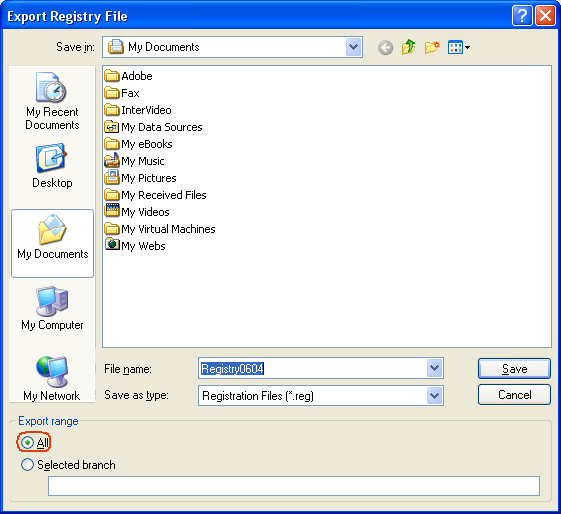
Create a registry backup in case something goes wrong (see Restore registry section for instructions on how to restore):
File > Export... > select All in Export Range (see below for image) > name it, select a location and Save
Browse through the keys (key is the "folder" you can see in tree to the left of the window) to: *HKEY_LOCAL_MACHINE\SOFTWARE\Electronic Arts\EA Games\Battlefield 2\ergc (you can always see where you are located on the bottom of the registry editor window)
If you have followed the path specified above you should be able to see a registry value called (Default) in the right part of the window
Double-click on the value to open its editor
Delete everything after x9392 (first 5 digits)
Now enter your CD-key (behind the x9392) without dashes or spaces
If your CD-key would be ABCD-0123-EFGH-4567-IJKL you would write it as ABCD0123EFGH4567IJKL
Then the complete line would look like: x9392ABCD0123EFGH4567IJKL
Once you're done entering the code simply click on OK, close the registry editor window and you should be all set to play the game again
* The path for 64bit versions of Windows (Vista x64 and XP x64 editions) is different: HKEY_LOCAL_MACHINE\SOFTWARE\Wow6432Node\Electronic Arts\EA Games\Battlefield 2\ergc
The rest of the guide is not affected.
Subsection: Restore registry aka something went wrong and now my Windows is messed up...
First of all, don't panic.
If you were following the instructions closely and you still have the registry backup then the fix can't be easier:
Locate the registry backup file (*.reg)
Double-click on the file
Confirm registry import and all overwrite prompts
You registry will be restored to their previous state (before changing the registry value, so you have to retry to make the game work)
Disclaimer:
I, nor anybody else, hold any responsibility for any possible hardware or software damage (how unlikely that might be) caused by following these instructions.
My mic, however, doesn't work while logged in as admin. I assume it is because BF2 was not installed into the admin account and BF2 has a VoIP server installation bundle that probably doesn't have admin rights. I can`t tell you if re-installing BF2 into the admin account will help at this time, but maybe someone else can.
1.) The new maps (e.g. Dragon Fly, Gaza etc.) require more graphical power. Make sure that you decrease your graphic setings (e.g. from high to medium / medium to low and disable Anti-Aliasing).
2.) Remember that you first have to remove earlier builds of Project Reality (completely) from your system. Otherwise Project Reality 0.9 would not run.
3.) If you reinstall Battlefield 2 remember the order of the installation of Battlefield 2:
KeksTerror wrote:
2.) Remember that you first have to remove earlier builds of Project Reality (completely) from your system. Otherwise Project Reality 0.9 would not run.
Please note that due to the size of the mod, we have split the download into two separate parts, "Part 1 of 2" and "Part 2 of 2". You will need to download and install both in order to play PR v0.9. The installer will remove any previous versions of Project Reality automatically.
It might... Although I had to manually uninstall a PR older version... But it might have been removed from the folder, ra ra ra, you know what I mean.
Kronka wrote:It might... Although I had to manually uninstall a PR older version... But it might have been removed from the folder, ra ra ra, you know what I mean.
Yep, I know. I always do it like that, cause then I am sure, that any previous files are removed ...
I'm having the same BSOD problems and the performance is like shit. I mean a fps rate of 30 with full settings at every new map with two GTX285 cards on SLI, 9400 CPU and 4 Gigs of internal memory is ridiculous.
Is there any status regarding a fix? No wonder those PR servers are empty.
I got this problem on my laptop (asus G50V GF 9700M GT driver: 197.16) after being away abroad for 5 weeks. (I only playe here where I got enough speed on the broadband)
I cant even get the game to start! Black screen for a sec. then back to desktop. Same for BF2 and so on. (only who cares for BF? :b )
Blackscreen-crash makes me suspect grafic-card issue, but latest driver and all set as last time I played.. I dunno what else?
Anyways, I have googled the issue but cant find any adwice that I could apply on this.
Plz advice me.
Ps. I did play 0.9 a lot before i went abroad...no crashes no probs. Ds
Kindly
Pappsen
Last edited by Pappsen on 2010-05-29 08:45, edited 1 time in total.
Reason:moore info




 B4TM4N