Page 2 of 3
Re: New Computer
Posted: 2010-11-17 11:06
by Darkcloak2
Quick Update:
I've decided to split my order in half, ordering the majority of it on Black Friday.
Then, after ATI releases the Radeon 69xx series on Dec. 13th, I'll order some video card (6970 or 580) with all the cables. I'm hoping the price war betewen Nvidia and ATI will bring down the price a bit.
Re: New Computer
Posted: 2010-11-17 14:45
by ma21212
Dont get that case, its evil. The only mistake I made was when building a PC was chosing that thing.
Re: New Computer
Posted: 2010-11-17 19:29
by Darkcloak2
yar, I changed it to a half as cheap, non-steel case.
Re: New Computer
Posted: 2010-11-19 11:29
by Darkcloak2
Regarding PSUs (specifically this one
Newegg.com - CORSAIR HX Series CMPSU-1000HX 1000W ATX12V 2.2 / EPS12V 2.91 SLI Ready CrossFire Ready 80 PLUS Certified Modular Active PFC Compatible with Core i7 Power Supply), what's the difference between 1 12v rail and 2 12v rails? Will I need to set things up differently or do something weird if I get 2 12V rails as in the PSU above?
EDIT: The above question is in the context that I plan on getting one gTX 580 now and SLIing another one in the future.
Re: New Computer
Posted: 2010-11-19 12:47
by RHYS4190
if you going with a WC system, There is a new GPU out called a Hydro copper ftw 470, Which comes with a factory installed water cooling block,
First impressions of this new GPU where quite positive people reported it did quite a good job keeping the GPU cool,
And also the added benefit that you do not have to worry about tapering with your graphic card and stuffing it up trying to install the water block.
i was looking at getting a hydro FTW my self for my new computer, but then the quy I was going to get to build the bloody thing broke his arm a few month ago and i can't get a hold of him and find out wtf is going on.
What a F$$$ year.
Re: New Computer
Posted: 2010-11-20 00:47
by FuzzySquirrel
2 12v rails is exactly what it says. Instead of having one beefy 12v rail with alot of amps you get 2 12v rails with 40amps each (which is plenty for anything) You wont have to do anything different with setup.
Re: New Computer
Posted: 2010-12-06 15:38
by Darkcloak2
Put the computer together this weekend, pressed the on button and it failed.
Right now, all the fans spin fine (i.e. Case fans, gpu fans and cpu fans) the motherboard lights up, the harddrive and optical drive work. However, the monitor offers no display on the screen and no startup beeping sound. Anyone know if this is a PSU or a motherboard problem?
Re: New Computer
Posted: 2010-12-06 17:04
by Mad-Mike
So is it just the monitor that isnt working?
Re: New Computer
Posted: 2010-12-06 18:14
by SnipingCoward
My newest case doesn't even have a speaker so I do not get any beeps at all xD.
Maybe you did not connect those wires properly?
As for no signal:
Double check that the card is seated properly into the slot.
try switching the video ports (i.e. to onboard), make sure the monitor is set to the right source.
Maybe the cmos jumper was set to clear the bios and some one forgot to put it back in to the right position? Check that.
Re: New Computer
Posted: 2010-12-06 22:55
by Darkcloak2
Sorry about that guys, I should've been more clear. I plugged in a couple of keyboards and speakers into the keyboard thing and audio jacks and still got no beeps and the keyboards had no lights. Took some measurements on the PSU and it seems to me that the PSU is distributing no power. Going to take a couple more voltage measurements on the Motherboard tonight.
PS PSU is Corshair 850HX Motherboard is something X58A-UD3r
Re: New Computer
Posted: 2010-12-07 01:56
by whatshisname55
Mad-Mike wrote:You would need 1000w if ur going to get 2 cards.
Nope, a decent 750w will power any 2 cards, you would only need the 1000w if you're going 3 way cards.
Re: New Computer
Posted: 2010-12-07 18:22
by ma21212
Darkcloak2 wrote:Sorry about that guys, I should've been more clear. I plugged in a couple of keyboards and speakers into the keyboard thing and audio jacks and still got no beeps and the keyboards had no lights. Took some measurements on the PSU and it seems to me that the PSU is distributing no power. Going to take a couple more voltage measurements on the Motherboard tonight.
PS PSU is Corshair 850HX Motherboard is something X58A-UD3r
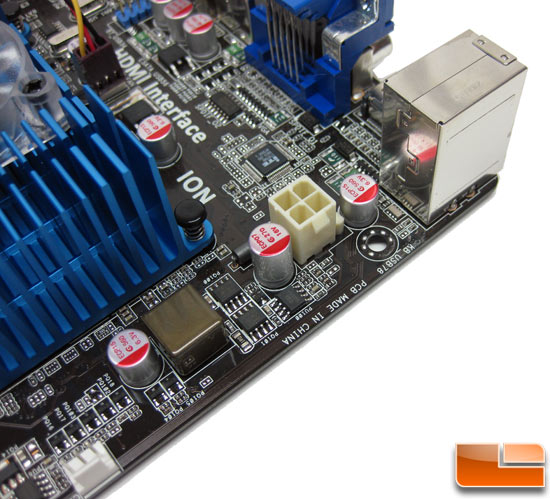
When I built my first comp in June, the first time I hit the power button samething happend, lights start, fans start, etc but nothing on the screen. The problem was I forgot to plug in the 2nd power connector for the CPU.
the white 4pin plug (some moboards might be 8pin)
also heres a
very helpful page
http://www.tomshardware.com/forum/26114 ... o-problems
BTW tell me how your monitor is, Im thinking of buying it.
Re: New Computer
Posted: 2010-12-07 19:37
by Darkcloak2
Thanks for the tip, I'll check it out when I get back later. On my monitor, I swtiched at the last minute to something that was on sale for a good price so sorry I can't help there.
Coinciding with your advice, I've unplugged everything except for the CPU and the MB and it still doesn't work as in it doesn't beep.
Re: New Computer
Posted: 2010-12-12 23:31
by Darkcloak2
Hm, swapped both CPU and MB. Still won't POST. Tried removing almost all components and still doesn't post. I'm at the edge of ripping my hair out and then sledgehammering the PC to little bits. Any tips?
Re: New Computer
Posted: 2010-12-13 06:26
by SnipingCoward
You do have the right input source selected on your monitor's OSD menu, right? (DVI (port 1 or 2) or HDMI)
Also I just recently stumbled upon a post where a psu of that manufacturer was causing errors. It actually lead to the conclusion that it was a common defect (although in relation with a different motherboard) and they had to replace it, I think, check it out:
[Solved] Windows 7 install hangs on "starting windows" screen - general-discussion - windows-7
Also: The initial bios beeps are transmitted via the system speakers only. (Check section "13) F_PANEL (Front Panel Header)" of your manual on where to connect it)
If you did not connect it (properly or at all) you simply will not hear any beeps as usual.
Re: New Computer
Posted: 2010-12-16 01:22
by Darkcloak2
Thanks for all the help guys. I found the problem in the end but I don't dare post it here for fear of getting banned for pure stupidity. Thanks again.
Re: New Computer
Posted: 2010-12-16 01:42
by BloodBane611
Yes folks, that is the test team - so dumb, we could ban them

Glad to hear you found it, honestly when putting together a comp it's always some dumb little thing that didn't even cross your mind. I forgot what it was with my mind, but I remember feeling dumb when I figured it out and got it working.
Re: New Computer
Posted: 2010-12-18 01:49
by turdinathor
what was it, my buddys comp turns on but i get no display changed the video card with no luck. the power button blinks on and off .the hd spins up , i have no idea.
Re: New Computer
Posted: 2010-12-18 01:52
by whatshisname55
Is his CPU seated correctly?
Re: New Computer
Posted: 2010-12-18 01:59
by turdinathor
not sure its a core 2 duo and im a amd guy kinda scared to mess with it but i might give it a try.