
Your Current System Graphics Setting
-
Gore
- Retired PR Developer
- Posts: 2491
- Joined: 2008-02-15 21:39
Re: Your Current System Graphics Setting
Max high.
-
Sabre_tooth_tigger
- Posts: 1922
- Joined: 2007-06-01 20:14
Re: Your Current System Graphics Setting
[R-COM]VoXiNaTiOn wrote:For a new comp I'm looking at Win XP, E7300, 2GB of RAM and an ATI HD 4850 512MB, anyone got a guess on the settings it will be able to handle?
Get more main memory and graphics card memory also if possible. 3 years after bf2 came out very few games will require as much memory to work
2gb is enough but it'll lag less with more space especially if you were to play ramiel after fools road for example
-
VoXiNaTiOn
- Posts: 1644
- Joined: 2008-07-26 15:15
Re: Your Current System Graphics Setting
Vista is too shiny to resist, so I'm going to stretch to the 4GB RAM and Vista, I might try and get a 1GB 4850.
Sorry for the minor hijack.
Sorry for the minor hijack.

-
Sabre_tooth_tigger
- Posts: 1922
- Joined: 2007-06-01 20:14
Re: Your Current System Graphics Setting
Sounds good, Im pretty sure pr will make good use of a 1gb card which strains the main memory less but I'd still want that because its cheap right now 
Check this out to see how much your system is using/needs
http://members.home.nl/jcr83/VidMemWatchV3.zip
Check this out to see how much your system is using/needs
http://members.home.nl/jcr83/VidMemWatchV3.zip
-
Oldirti
- Posts: 310
- Joined: 2007-08-06 14:37
Re: Your Current System Graphics Setting
Whats your system specs?AgentJadeD wrote:Everything maxed 8xAA 16xAF on 1680x1050

-
AgentJadeD
- Posts: 299
- Joined: 2006-03-26 18:07

-
Skodz
- Posts: 791
- Joined: 2007-05-26 06:31
Re: Your Current System Graphics Setting
Am I the only one experiencing very frequent random crash to desktop possibly due to my 2x2gb DDR3 1333 ??
Most of the time there is no error message but sometimes there is one about memory error.
Most frequent crash occur while loading a map or during Training mode.
Actually, it just look like my spec is too powerful for that game because I have absolutely NO problem on anyother game such as Company of Heroes, Medieval 2: Total War, Call of Duty 4, Crysis, Far cry 2, etc....
Hopefully bf2 patch 1.5 will make it more stable on modern spec...
Most of the time there is no error message but sometimes there is one about memory error.
Most frequent crash occur while loading a map or during Training mode.
Actually, it just look like my spec is too powerful for that game because I have absolutely NO problem on anyother game such as Company of Heroes, Medieval 2: Total War, Call of Duty 4, Crysis, Far cry 2, etc....
Hopefully bf2 patch 1.5 will make it more stable on modern spec...
-
AgentJadeD
- Posts: 299
- Joined: 2006-03-26 18:07
Re: Your Current System Graphics Setting
I rarely get a CTD. But when i do I just load up again. When i was using vista 2 weeks ago. I used to get CTD a few times an evening.


-
Hotrod525
- Posts: 2215
- Joined: 2006-12-10 13:28
Re: Your Current System Graphics Setting
im still able to run high whit my AMD6000+, 2 8800GTS640, 4Gig or ram @ 1ghz =D ( im kiddin, i known i would be able to run that game for Ever.)

-
Epim3theus
- Posts: 1110
- Joined: 2007-01-03 13:23
Re: Your Current System Graphics Setting
Put your terrain on medium, there is something stickied in the hardware section mentioning this. Has to do with vista and memory dump, something or other.Skodz wrote:Am I the only one experiencing very frequent random crash to desktop possibly due to my 2x2gb DDR3 1333 ??
Most of the time there is no error message but sometimes there is one about memory error.
Most frequent crash occur while loading a map or during Training mode.
Actually, it just look like my spec is too powerful for that game because I have absolutely NO problem on anyother game such as Company of Heroes, Medieval 2: Total War, Call of Duty 4, Crysis, Far cry 2, etc....
Hopefully bf2 patch 1.5 will make it more stable on modern spec...
I'm on all high, except terrain on medium to stop the crashing.
PS. how do you set the 16x AF?
If you can read this the ***** fell off.
-
Tomato-Rifle
- Posts: 2091
- Joined: 2007-12-31 22:24

-
TheOak82
- Posts: 108
- Joined: 2007-09-03 13:41
Re: Your Current System Graphics Setting
Got a new PC. Vista 32bit, [email protected], ATI HD 4870 512Mb, 4gb RAM. Everything high, 4 X AA. On some maps FPS goes down to 40 at times. Feels like performance was a bit better with old PC, XP SP3, [email protected], 8800 GT 512Mb.
Is it Vista screwing me over? Really thought with these specs I could use Vista and happily run games on high graphics.
Is it Vista screwing me over? Really thought with these specs I could use Vista and happily run games on high graphics.
-
Lt.Dan_991
- Posts: 47
- Joined: 2008-07-29 02:52
Re: Your Current System Graphics Setting
Run everything high except textures because of the memory error. 
Got a Q6600, 4 GB of ram, and an 8800 GT 512MB
Got a Q6600, 4 GB of ram, and an 8800 GT 512MB
-
Hawk_345
- Posts: 617
- Joined: 2006-06-12 22:27

-
DesmoLocke
- Posts: 1770
- Joined: 2008-11-28 19:47
Re: Your Current System Graphics Setting
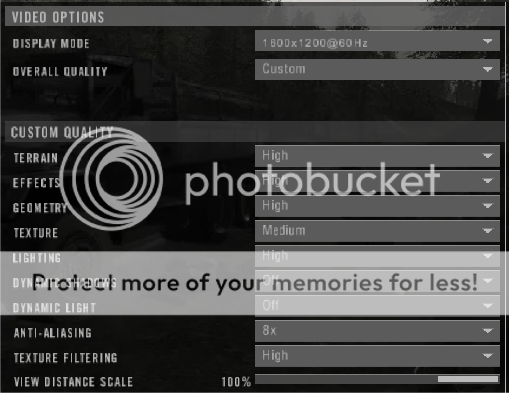
HIGH Get around 90-100 on all maps except Ramiel. It dips to 40-50 when walking through the city or looking down at it from a helo. Oh, since setting my texture to medium PR has run a lot more stable. 
Manufacturer: Dell Inc./ myself
Processor: AMD Athlon(tm) 64 X2 Dual Core Processor 6400+ (2 CPUs), 3.2GHz
Memory: 4 GB RAM 667 MHz DDR2
Hard Drive: 250 GB 7,200 RPM
Video Card: NVIDIA EVGA GeForce 8800 GT Superclocked 655 MHz core, 1000 MHz memory, 1630 MHz shader
Monitor: Dell 2407WFP 24" LCD
Sound Card: SB X-Fi Xtreme Audio
Speakers/Headphones: $20 POS Cyber Accoustics
Keyboard: Logitech G15 blue
Mouse: Razer Copperhead red
Mouse Surface: Rocketfish Control/Speed
Operating System: Windows Vista™ Home Premium
Motherboard: Generic Dell with Foxconn sticker?
Computer Case: Dell E521 BTX
Manufacturer: Dell Inc./ myself
Processor: AMD Athlon(tm) 64 X2 Dual Core Processor 6400+ (2 CPUs), 3.2GHz
Memory: 4 GB RAM 667 MHz DDR2
Hard Drive: 250 GB 7,200 RPM
Video Card: NVIDIA EVGA GeForce 8800 GT Superclocked 655 MHz core, 1000 MHz memory, 1630 MHz shader
Monitor: Dell 2407WFP 24" LCD
Sound Card: SB X-Fi Xtreme Audio
Speakers/Headphones: $20 POS Cyber Accoustics
Keyboard: Logitech G15 blue
Mouse: Razer Copperhead red
Mouse Surface: Rocketfish Control/Speed
Operating System: Windows Vista™ Home Premium
Motherboard: Generic Dell with Foxconn sticker?
Computer Case: Dell E521 BTX


-
[FIN] Mauno_Koivisto
- Posts: 12
- Joined: 2009-01-01 11:17
Re: Your Current System Graphics Setting
Ok, first post ever, yet i have been around since the beginning of PR. Just chilling and waiting for something to happen...etc downloading ...
Manufacturer: Me
Processor: E 8400 @ 4 Ghz
Memory: 4 GB RAM 1066 MHz DDR2
Hard Drive: 200 GB + 500 GB
Video Card: NVIDIA 260 GTX 216 SP @ 738/1522/1150
Monitor: LG 22" 1680x1050
Sound Card: SB X-Fi Fidelity pro
Speakers/Headphones: Fatality
Keyboard: Reclusa Gaming Keyboard
Mouse: Logitech G3
Mouse Surface: Exel sharp
Operating System: Windows Vista™ Ultimate 64 bit
Motherboard: Gigabyte EP35-DS3R rev 2.1
Computer Case: Antec 300
Everything on high, except textures (high=memory leak)
edit. 8xaa, 16xaf
Manufacturer: Me
Processor: E 8400 @ 4 Ghz
Memory: 4 GB RAM 1066 MHz DDR2
Hard Drive: 200 GB + 500 GB
Video Card: NVIDIA 260 GTX 216 SP @ 738/1522/1150
Monitor: LG 22" 1680x1050
Sound Card: SB X-Fi Fidelity pro
Speakers/Headphones: Fatality
Keyboard: Reclusa Gaming Keyboard
Mouse: Logitech G3
Mouse Surface: Exel sharp
Operating System: Windows Vista™ Ultimate 64 bit
Motherboard: Gigabyte EP35-DS3R rev 2.1
Computer Case: Antec 300
Everything on high, except textures (high=memory leak)
edit. 8xaa, 16xaf
-
Sabre_tooth_tigger
- Posts: 1922
- Joined: 2007-06-01 20:14
Re: Your Current System Graphics Setting
no high textures would be a vista problem right
-
[FIN] Mauno_Koivisto
- Posts: 12
- Joined: 2009-01-01 11:17
Re: Your Current System Graphics Setting
Not sure if it is only Vista related, but if textures are set to high, after a while lagging begins (with v-sync at least)..i got a 24 Mb internet connection and pretty good comp, so that is not the reason why the lagging starts. There is (google) proven fact that BF2 has a memory leak.
-
Stryker Machine
- Posts: 57
- Joined: 2008-07-28 11:51
Re: Your Current System Graphics Setting
Manufacturer: ?
Processor: AMD Athlon XP 2600 +
Memory: 1 GB Ram
Hard Drive: 200 GB
Video Card: NVIDIA Geforce 5200
Monitor: GNR 17 Inch
Sound Card: X treme Sound booster
Speakers/Headphones: Sony Bass headphones
Keyboard: Logitech cordless
Mouse: Logitech G9
Mouse Surface: mouse mat
Operating System: Windows XP SP 3
Motherboard: ?
Computer Case: ?
Processor: AMD Athlon XP 2600 +
Memory: 1 GB Ram
Hard Drive: 200 GB
Video Card: NVIDIA Geforce 5200
Monitor: GNR 17 Inch
Sound Card: X treme Sound booster
Speakers/Headphones: Sony Bass headphones
Keyboard: Logitech cordless
Mouse: Logitech G9
Mouse Surface: mouse mat
Operating System: Windows XP SP 3
Motherboard: ?
Computer Case: ?
[COLOR="Red"]|Automatic Rifleman|Supply Support and Transport Driver|[/COLOR]
Battlefield 2 In Game : MeanMachine002
Xfire : meanmachine02
Battlefield 2 In Game : MeanMachine002
Xfire : meanmachine02
-
Gunner4712
- Posts: 118
- Joined: 2008-12-03 19:38
Re: Your Current System Graphics Setting
Mine
Manufacturer:
TOSHIBA
Processor:
Intel(R) Core(TM)2 Duo CPU P7350 @ 2.00GHz (2 CPUs), ~2.0GHz
Memory:
4090MB RAM
Hard Drive:
189 GB
Video Card:
NVIDIA GeForce 9700M GTS
Monitor:
Generic PnP Monitor
Sound Card:
Speakers (Realtek High Definition Audio)
Speakers/Headphones:
Razer Piranah Headset
Keyboard:
USB Root Hub
Mouse:
Razer Diamondback
Mouse Surface:
VisionTek Red LED Mousepad with 6 USB Ports
Operating System:
Windows Vista™ Home Premium (
Manufacturer:
TOSHIBA
Processor:
Intel(R) Core(TM)2 Duo CPU P7350 @ 2.00GHz (2 CPUs), ~2.0GHz
Memory:
4090MB RAM
Hard Drive:
189 GB
Video Card:
NVIDIA GeForce 9700M GTS
Monitor:
Generic PnP Monitor
Sound Card:
Speakers (Realtek High Definition Audio)
Speakers/Headphones:
Razer Piranah Headset
Keyboard:
USB Root Hub
Mouse:
Razer Diamondback
Mouse Surface:
VisionTek Red LED Mousepad with 6 USB Ports
Operating System:
Windows Vista™ Home Premium (