Page 3 of 3

Re: Whino needs a new Storage Solution

Posted: 2012-01-29 01:34
by Rhino
Bumpy, still can't find any way to get BesySync to have a delay before it dose its real-time sync and as such, backing up 1/2 saved files and its starting to look like BesySync isn't the answer to my problems unless anyone can think of a way to add a delay in...

So ye, some more help here would be good, any other programs that can do this?

Cheers!
Re: Whino needs a new Storage Solution

Posted: 2012-01-29 02:00
by LITOralis.nMd
download dataram ramdisk and install, give it a 500mb ram drive. mount the ramdrive.
open 3dsmax and set the auto update to on. point it to save to your ram drive in a sub directory. set 3dsmac autobackup to only use 1 or 2 backups for now, as this is just a test.

set bestsync to copy that sub directory to your HDD.
set bestsync to only archive full files.
set bestsync to use unused cpu cycles maybe too.
set bestsync to timestamp files.

dataram ramdisk has a few options, make sure you automount ramdisk image on boot, and autosave on shutdown.

this is a test for you're comfort level. I know it will work cause I do something similar when shifting scanned image databases around to archives.

RAMDisk - Software - Server Memory Products & Services - Dataram

two things:
1. 3dsmax autobackup save time will be much faster.
2. bestsync will only be syncing full files.

Re: Whino needs a new Storage Solution

Posted: 2012-01-29 02:07
by Rhino
[R-COM]LITOralis.nMd wrote:2. bestsync will only be syncing full files.
How so? Just because it can save faster to the ram drive?

Re: Whino needs a new Storage Solution

Posted: 2012-01-29 02:33
by LITOralis.nMd
bestsync can do full or partial files, check the bestsync preferences, it's in there somewhere.
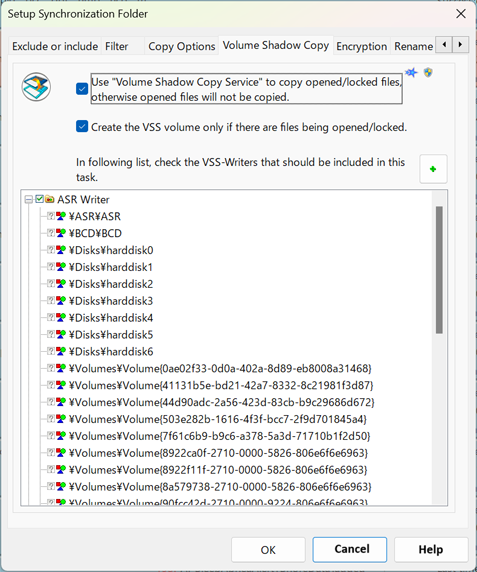
turn off VSS usage to prevent open files from being copied.
example screenshot:
Image

http://www.risefly.com/foldersyncsete.htm

Re: Whino needs a new Storage Solution

Posted: 2012-01-29 03:12
by Rhino
[R-COM]LITOralis.nMd wrote:bestsync can do full or partial files, check the bestsync preferences, it's in there somewhere.
turn off VSS usage to prevent open files from being copied.
Not seen that option but I'll look again. Any idea where it might be?

Also having VSS on or off doesn't seem to make any difference for Max?

Re: Whino needs a new Storage Solution

Posted: 2012-01-29 21:17
by Gaz
I find the best storage solution is found here

Re: Whino needs a new Storage Solution

Posted: 2012-01-30 05:46
by Rhino
Got my own one here :p

Kinda hard to store computer stuff on stuff you've modelled thou...

Re: Whino needs a new Storage Solution

Posted: 2012-02-10 11:39
by Rhino
Right small bump, thinking of getting this 2.5TB HDD here: WD 2.5TB 3.5" SATA-III Caviar Green Hard Drive.. | Ebuyer.com

Anything I should be concerned about on it? Seems pretty good value for money at 46 squid per TB with 64mb cache etc, can't seem to find out what its rpm is thou?

So ye, any cons with this drive?

Re: Whino needs a new Storage Solution

Posted: 2012-02-10 11:59
by Mad-Mike
Im hopeless with Hard drives and solid state drives as you might know But think I read somewhere its better to get like 2x 500GB HDD to make 1TB instead of getting 1x 1TB HDD alone. :? ??:

'[R-DEV wrote:Rhino;1726876']Got my own one here :p
Lmao brilliant, why have I never seen these pics :razz:

Re: Whino needs a new Storage Solution

Posted: 2012-02-10 12:08
by Rhino
Mad-Mike wrote:Im hopeless with Hard drives and solid state drives as you might know But think I read somewhere its better to get like 2x 500GB HDD to make 1TB instead of getting 1x 1TB HDD alone. :? ??:
Mainly getting these for storage space more than anything else with replacing this with one of my current 1.5TB drives, so I can put that in one of my network PCs which is now full of backups so I can still backup over LAN, + I'm slightly running out of space with my current 2x 1.5TB drives too. But looking at the best possible speed at the same time out of the drive :)
Mad-Mike wrote:Lmao brilliant, why have I never seen these pics :razz:
hehe, blogs are easy to miss :p

Re: Whino needs a new Storage Solution

Posted: 2012-02-10 12:26
by Psyrus
'[R-DEV wrote:Rhino;1731418']Right small bump, thinking of getting this 2.5TB HDD here: WD 2.5TB 3.5" SATA-III Caviar Green Hard Drive.. | Ebuyer.com

Anything I should be concerned about on it? Seems pretty good value for money at 46 squid per TB with 64mb cache etc, can't seem to find out what its rpm is thou?

So ye, any cons with this drive?
WD Green drives are either 5400rpm or 'adaptive' 7200rpm which basically means (afaik) they can spin up to 7200rpm, but generally don't... and are basically 5400rpm drives. Great for storage... not for operating systems :)