Page 3 of 6
Re: I found a fix for the "memory .dll error" for vista 32 & 64 bit user's.
Posted: 2009-04-23 02:23
by =BTB= LoftyB
This fix has also worked for me. Follow the instuctions correctly. you wanna end up with a book case, not a doorstop
Re: I found a fix for the "memory .dll error" for vista 32 & 64 bit user's.
Posted: 2009-04-24 23:55
by Killer2354
meh when i do everything u say (yes i ran under administrator) i get this line inside it
C:\Program Files\Microsoft Visual Studio 9.0\VC>
help anyone? i hope i don't have to reinstall the visual thing
Re: I found a fix for the "memory .dll error" for vista 32 & 64 bit user's.
Posted: 2009-04-26 08:40
by R.J.Travis
Brokenspin3 wrote:This "problem fixer" is a joke, i just followed his steps and it ended up that i had to uninstall everything (Bf2 Bf2 SF and PR). now that i have installed it again, it still doesn't work. I have 32vista and i did has he said you should.
But even now afterwards it dosn't work, so it seams no more BF for me until i Reinstall my computer. Gr8 work man. Should had said risks and possible errors, SUCH as your bf will not work again. I even uninstalled that Visual C++ edition thingy. It still doesn't connect to the bf or PR server. Cant even log into the game.
A Simple bull**** if u ask me
//Brokenspine
(You'll need to be an Administrator)
First, you'll need to grab and install Visual Studio C++ Express
from Microsoft.
It's free so don't worry.
Once installed, you'll need to update it, also make sure u have latest game
patch installed.
Backup the bf2.exe file, just in case.
I'm sorry it did not work and you had problem but your the first one that had to reinstall everything because it didn't work.
Re: I found a fix for the "memory .dll error" for vista 32 & 64 bit user's.
Posted: 2009-04-26 08:43
by R.J.Travis
HannesFury wrote:Hey guys. I managed to do all the steps successfully but unfortunately with no result.
The same dll error appears
Can you other people play via Hamachi? for me, hamachi bypasses this issue!
the hamachi network is called PRSP FUN and the password is: madmike
so welcome there fellow DLL-friends!
Sorry I'm not sure why you getting this maybe you need to allow even more memory for this map not sure I'd have to get the error my self and I don't play the PRSP.
Re: I found a fix for the "memory .dll error" for vista 32 & 64 bit user's.
Posted: 2009-04-26 08:47
by R.J.Travis
Killer2354 wrote:meh when i do everything u say (yes i ran under administrator) i get this line inside it
C:\Program Files\Microsoft Visual Studio 9.0\VC>
help anyone? i hope i don't have to reinstall the visual thing
I'm sorry I'm not understand your problem are you getting " C:\Program Files\Microsoft Visual Studio 9.0\VC> " as a error in the command window? a screen shot would help alot.
Re: I found a fix for the "memory .dll error" for vista 32 & 64 bit user's.
Posted: 2009-04-26 17:55
by Code2104
Well, I'm not sure if this is related but suddenly after getting this "patch" i get kicked by PB all the time, packet flow errors, authentication errors, please reinstall PB if problems occur, I did and still the same. I never had ANY PB related problems before...
Re: I found a fix for the "memory .dll error" for vista 32 & 64 bit user's.
Posted: 2009-04-26 23:18
by R.J.Travis
Code2104 wrote:Well, I'm not sure if this is related but suddenly after getting this "patch" i get kicked by PB all the time, packet flow errors, authentication errors, please reinstall PB if problems occur, I did and still the same. I never had ANY PB related problems before...
as stated before this patch does not mess with your PB sounds like your having admin right problem i would turn off your ACU if its on and send in a e-mail to PB.
Re: I found a fix for the "memory .dll error" for vista 32 & 64 bit user's.
Posted: 2009-04-27 18:15
by sharpless
you can olso just lower your grapichs. then i no more crashes.
i was on high before but now my texture are on mid so it crashes nomore
Re: I found a fix for the "memory .dll error" for vista 32 & 64 bit user's.
Posted: 2009-05-02 02:52
by WhiteTiger
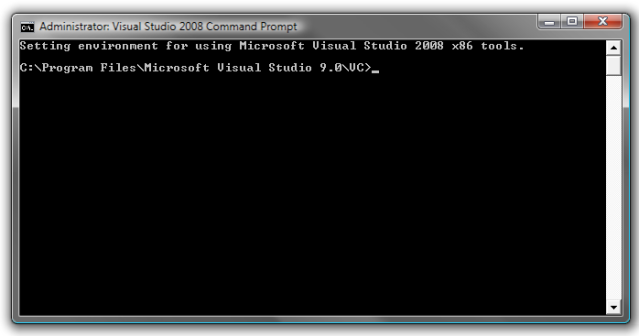
Very nice instructions. Thanks for helping us. I have stumped on a step though. When I right click "run as administrator" on Visual Studio 2008 command prompt, this is what it shows. Im not sure how to navigate to the appropriate folder.
Re: I found a fix for the "memory .dll error" for vista 32 & 64 bit user's.
Posted: 2009-05-03 13:27
by R.J.Travis
WhiteTiger wrote:Very nice instructions. Thanks for helping us. I have stumped on a step though. When I right click "run as administrator" on Visual Studio 2008 command prompt, this is what it shows. Im not sure how to navigate to the appropriate folder.
you would need to post where on your hard drive the files are.
I should be something like this
C:\windows\system32>cd C:\program files\ (hit enter)
It should read
cd C:\program files>
then type cd C:\program files> EA GAMES (hit enter)
should read
cd C:\program files\EA GAMES>
then type
cd C:\program files\EA GAMES\Battle Field 2 (hit enter)
should read
cd C:\program files\EA GAMES\Battle Field 2>
then type
cd C:\program files\EA GAMES\Battle Field 2\editbin.exe /LARGEADDRESSAWARE BF2.exe (hit enter)
should get the windows trade mark and then follow the last step i listed on the front page.
I have Photos of every step on the front page.
Re: I found a fix for the "memory .dll error" for vista 32 & 64 bit user's.
Posted: 2009-05-03 13:29
by R.J.Travis
sharpless wrote:you can olso just lower your grapichs. then i no more crashes.
i was on high before but now my texture are on mid so it crashes nomore
Yes you can but I like all high it seems to run allot smoother once you get this fix in then medium.
Oh and it looks allot better.

Re: I found a fix for the "memory .dll error" for vista 32 & 64 bit user's.
Posted: 2009-05-05 00:28
by FuR-ExX
What do I do if my BF2 directory is not on C: hdd? It seems that i can only navigate through the C: partition.

Re: I found a fix for the "memory .dll error" for vista 32 & 64 bit user's.
Posted: 2009-05-07 19:56
by R.J.Travis
FuR-ExX wrote:What do I do if my BF2 directory is not on C: hdd? It seems that i can only navigate through the C: partition.
try cd I:\programs files etc
Re: I found a fix for the "memory .dll error" for vista 32 & 64 bit user's.
Posted: 2009-05-09 09:45
by XXLpeanuts
hey, how do i type in the location, when i open (as administrator) i get this and i cant delete it or start a new line so i cant type anything new or locate the directory?????? And your picture on how to do so does not help
Setting environment for using Microsoft Visual Studio 2008 x86 tools.
C:\Program Files\Microsoft Visual Studio 9.0\VC>
DONT MATTER I HAVE DONE IT THANKS
Re: I found a fix for the "memory .dll error" for vista 32 & 64 bit user's.
Posted: 2009-05-10 04:02
by KooteniaRanger
I can't do this fix because my command prompt won't let me access my E drive, which is where my BF 2 files are installed.
Re: I found a fix for the "memory .dll error" for vista 32 & 64 bit user's.
Posted: 2009-05-14 19:35
by R.J.Travis
XXLpeanuts wrote:hey, how do i type in the location, when i open (as administrator) i get this and i cant delete it or start a new line so i cant type anything new or locate the directory?????? And your picture on how to do so does not help
Setting environment for using Microsoft Visual Studio 2008 x86 tools.
C:\Program Files\Microsoft Visual Studio 9.0\VC>
DONT MATTER I HAVE DONE IT THANKS
Screen shot would help
you have to type cd fyi.
cd c:\Program Files\
--------------------------------------
Sorry I don't have a E drive I can't help you there.
I would try cd e:\Program Files\
Re: I found a fix for the "memory .dll error" for vista 32 & 64 bit user's.
Posted: 2009-05-28 08:36
by Tiger1
how do i find out if i use 64 bit or 32 bit?
Re: I found a fix for the "memory .dll error" for vista 32 & 64 bit user's.
Posted: 2009-05-30 01:40
by Lt.Dan_991
Control panel -> System -> System type
Re: I found a fix for the "memory .dll error" for vista 32 & 64 bit user's.
Posted: 2009-05-31 11:34
by Cheditor
Did the fix last night and then tested it today. Getting a MD5mismatch PB kicked. I manually updated it but then that couldnt finish due to not being able to copy loads of stuff. Tried again and PB still kicking me. I then tried to revert the BF2.exe with the copy i had which for some reason just deleted its self. Travis you have any idea whats going on with this?