Page 24 of 102
Re: Show your models thread...( IMAGE HEAVY)
Posted: 2008-05-12 15:50
by Surround
Small animation by me again
YouTube - Dropship
All assets done by me.
Re: Show your models thread...( IMAGE HEAVY)
Posted: 2008-05-12 16:02
by Z-trooper
pretty neat

I would wish I had more time to mess around with animation

Re: Show your models thread...(IMAGE HEAVY)
Posted: 2008-05-19 13:47
by Glimmerman
I love the ships you have modelled, whats the poly count on the destroyer?
Re: Show your models thread...(IMAGE HEAVY)
Posted: 2008-05-20 12:04
by Maxfragg
almost, since UVing this moddel would take more than a month
Re: Show your models thread...(IMAGE HEAVY)
Posted: 2008-05-20 12:53
by Z-trooper
since these two threads have been merged, I cant seem to see any new posts and a whole bunch of old ones are gone :S
Re: Show your models thread...(IMAGE HEAVY)
Posted: 2008-05-22 07:45
by Rhino
note this is not PR related, I did it for the GA Speed modeling comp


Re: Show your models thread...(IMAGE HEAVY)
Posted: 2008-05-22 13:30
by Maxfragg
okay, i've already wondered
Re: Show your models thread...(IMAGE HEAVY)
Posted: 2008-05-24 15:48
by Tomato-Rifle
My first model, its a really plain mortar round

Can anybody tell me how to smooth the edges at the front?
Re: Show your models thread...(IMAGE HEAVY)
Posted: 2008-05-24 17:04
by Tomato-Rifle
I made a Panzerfaust not really good, but i just started modding
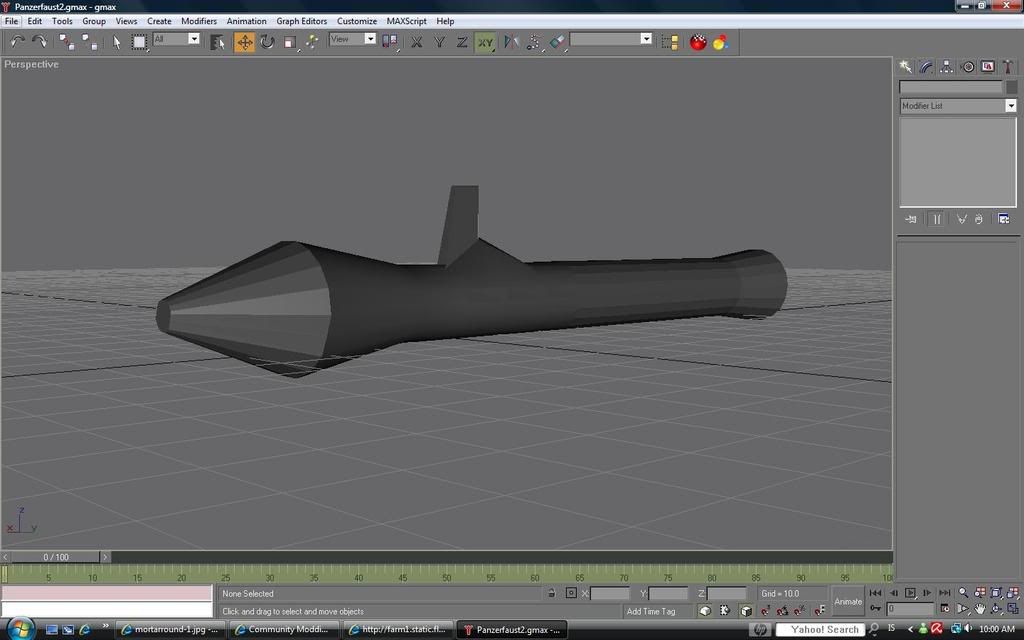
Im having trouble with the sights

Re: Show your models thread...(IMAGE HEAVY)
Posted: 2008-05-24 20:05
by Tomato-Rifle
I added some details. Still need help with the sights

Re: Show your models thread...(IMAGE HEAVY)
Posted: 2008-05-24 21:50
by KP
If you want to smooth the front end out, there should be a tool under polygon editing called "auto smooth". Select the polies you want to smooth out and hit "auto smooth". Should do the job. At least that's how it works in 3ds max. You're using Gmax, which should be pretty similar.
Re: Show your models thread...(IMAGE HEAVY)
Posted: 2008-05-25 00:09
by Tomato-Rifle
Cant find it, a Meshsmooth butten that didnt make it smooth that much
EDIT: i clicked that butten alot of times and it smoothed out but ir really laggy
And this is the wireframe

Re: Show your models thread...(IMAGE HEAVY)
Posted: 2008-05-25 07:51
by KP
That looks like it just created an awful lot of vertices. I suggest you don't do that.
Well, it might not be there, or it might be somewhere else. I haven't used Gmax in ages. Mesh Smooth is not it, there should be an Auto Smooth function somewhere, unless Gmax doesn't have that function.
Re: Show your models thread...(IMAGE HEAVY)
Posted: 2008-05-25 08:01
by PRC_Heavy_Z
Or have you tried smoothing groups? it's the number pad thing that goes to thirty something.
Re: Show your models thread...(IMAGE HEAVY)
Posted: 2008-05-25 13:41
by Tomato-Rifle
PRC_Heavy_Z wrote:Or have you tried smoothing groups? it's the number pad thing that goes to thirty something.
lol what?
Re: Show your models thread...(IMAGE HEAVY)
Posted: 2008-05-26 19:49
by KP
Polygons. Every face on a model is a polygon. Polygons are again made up of triangles. The number of triangles in a polygon depends on the number of vertices - that is, corners - the polygon has. Understandable?
Re: Show your models thread...(IMAGE HEAVY)
Posted: 2008-05-26 19:55
by LekyIRL
It's so much clearer now
Re: Show your models thread...(IMAGE HEAVY)
Posted: 2008-06-01 20:58
by Surround
Pic of my earlier dropship and my first scifi AR what I have created
Dropship by ~SuurFett on deviantART
and the AR


Re: Show your models thread...(IMAGE HEAVY)
Posted: 2008-06-01 21:07
by Chimpanzeeee
cool. looks like a space age mini 14!
