Posted: 2008-04-29 14:13
Changing the engine isn't that bad at all, but not finishing it is  .
.
. .up and down arrow keys are used by the chopper, for pitch and yaw.Jonny wrote:How about if you modify the boat coding and use the up/down arrows, they are available to do something when in a boat, but I have never seen anything happen when they are pressed.
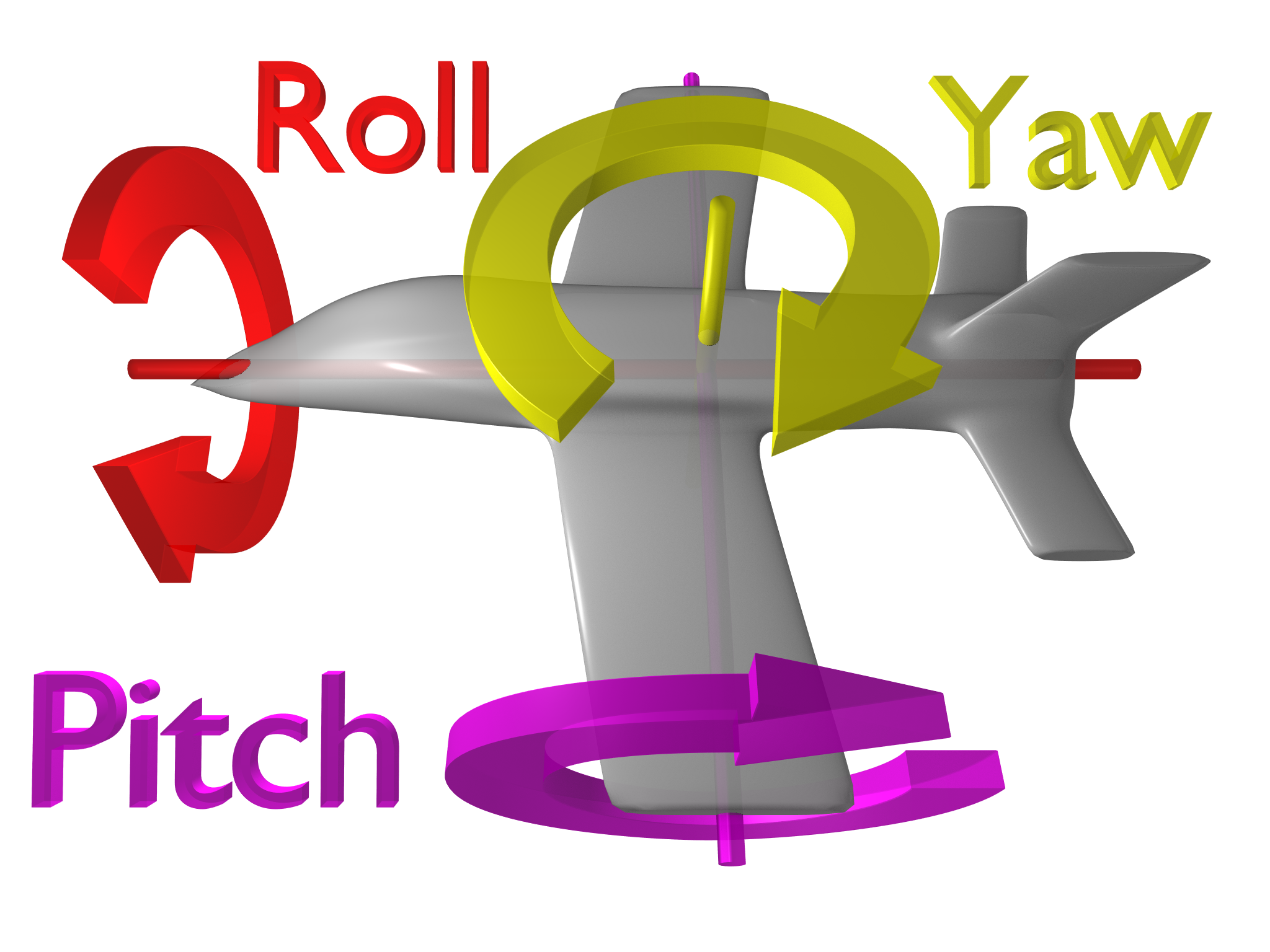
no, default keyboard keys are "A & D" for + & - throttle, "S & D" for left and right rudder (yaw), "left arrow & right arrow" for left & right roll, "up arrow & down arrow" for up and down pitch. Your mouse is a secondary bit.Jonny wrote:http://upload.wikimedia.org/wikipedia/c ... h_text.png
Isn't it with A & D keys and mouse?
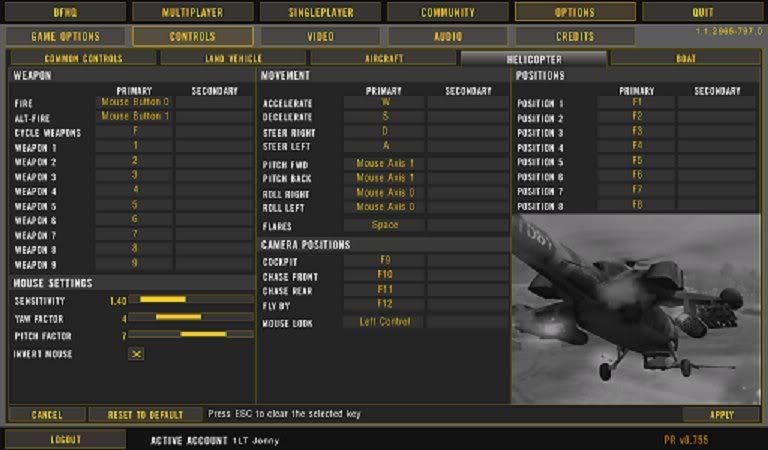
no your controls have been edited, this is the Default heli controls, Helicopter.con file which can be found in "C:\Program Files\EA GAMES\Battlefield 2\mods\bf2\Settings\Default\Controls\Helicopter.con"Jonny wrote:Ah, then my point still stands:
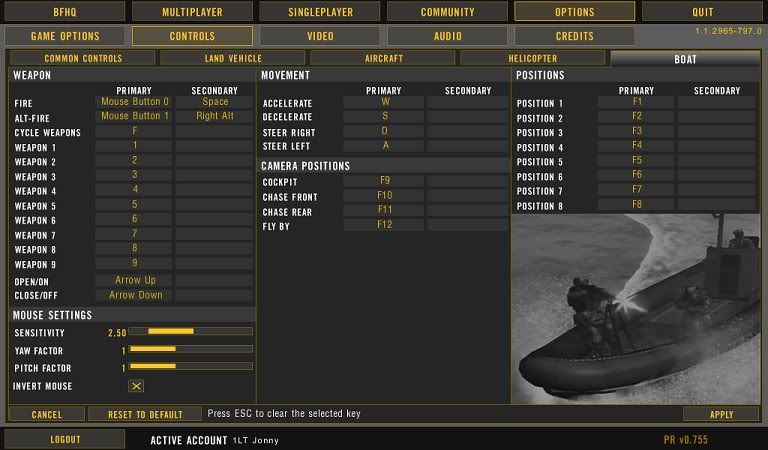
Look on the left side, at the bottom of the weapons section for both sets of keys:
http://i242.photobucket.com/albums/ff79 ... ntrols.jpg
http://i242.photobucket.com/albums/ff79 ... ntrols.jpg
Is it not possible to make use of the open/close bit if the helicopter was treated by the code as a boat, but the engine just like the helicopter engine?
I know cos I use more or less the default controls, and I fly choppers with the keyboard, unless im going for a long round of chopper flying, then I use my joystick.rem *** Controlmaps ***
rem *** Player Input ***
ControlMap.create HelicopterPlayerInputControlMap
ControlMap.addKeysToAxisMapping c_PIThrottle IDFKeyboard IDKey_W IDKey_S
ControlMap.addKeysToAxisMapping c_PIYaw IDFKeyboard IDKey_D IDKey_A
ControlMap.addButtonToTriggerMapping c_PIAltFire IDFMouse IDButton_1 c_CMPushAndHold
ControlMap.addKeyToTriggerMapping c_PIAltFire IDFKeyboard IDKey_Numpad0 c_CMPushAndHold 1
ControlMap.addButtonToTriggerMapping c_PIFire IDFMouse IDButton_0 c_CMPushAndHold
ControlMap.addKeyToTriggerMapping c_PIFire IDFKeyboard IDKey_Space c_CMPushAndHold 1
ControlMap.addAxisToTriggerMapping c_PINextItem c_PIPrevItem IDFMouse IDAxis_2
ControlMap.addAxisToAxisMapping c_PIMouseLookX IDFMouse IDAxis_0 0
ControlMap.addAxisToAxisMapping c_PIMouseLookY IDFMouse IDAxis_1 0
ControlMap.addKeysToAxisMapping c_PIMouseLookX IDFKeyboard IDKey_ArrowRight IDKey_ArrowLeft 1
ControlMap.addKeysToAxisMapping c_PIMouseLookY IDFKeyboard IDKey_ArrowUp IDKey_ArrowDown 1
ControlMap.addKeyToTriggerMapping c_PIMouseLook IDFKeyboard IDKey_LeftCtrl c_CMPushAndHold
rem *** TEST
rem *** END TEST
ControlMap.addKeyToTriggerMapping c_PICrouch IDFKeyboard IDKey_LeftCtrl c_CMPushAndHold
ControlMap.addKeyToTriggerMapping c_PIToggleFireRate IDFKeyboard IDKey_V c_CMNonRepetive
rem *** Additional variables***
rem game.setLandSeaKeyboardSensitivity 0.500000
rem game.setLandSeaMouseSensitivity 0.250000
rem game.setLandSeaMouseInvert 0
rem *** Common Player Input ***
ControlMap.addKeyToTriggerMapping c_PIFlareFire IDFKeyboard IDKey_X c_CMPushAndHold
ControlMap.addKeyToTriggerMapping c_PISayAll IDFKeyboard IDKey_K c_CMNonRepetive
ControlMap.addKeyToTriggerMapping c_PISayTeam IDFKeyboard IDKey_L c_CMNonRepetive
ControlMap.addKeyToTriggerMapping c_PIUse IDFKeyboard IDKey_E c_CMNonRepetive
ControlMap.addKeyToTriggerMapping c_PIShowScoreBoard IDFKeyboard IDKey_Tab c_CMPushAndHold
ControlMap.addKeyToTriggerMapping c_PICameraMode1 IDFKeyboard IDKey_F9 c_CMNonRepetive
ControlMap.addKeyToTriggerMapping c_PICameraMode2 IDFKeyboard IDKey_F10 c_CMNonRepetive
ControlMap.addKeyToTriggerMapping c_PICameraMode3 IDFKeyboard IDKey_F11 c_CMNonRepetive
ControlMap.addKeyToTriggerMapping c_PICameraMode4 IDFKeyboard IDKey_F12 c_CMNonRepetive
ControlMap.addKeyToTriggerMapping c_PIToggleCameraMode IDFKeyboard IDKey_C c_CMNonRepetive
ControlMap.addKeyToTriggerMapping c_PIPositionSelect1 IDFKeyboard IDKey_F1 c_CMNonRepetive
ControlMap.addKeyToTriggerMapping c_PIPositionSelect2 IDFKeyboard IDKey_F2 c_CMNonRepetive
ControlMap.addKeyToTriggerMapping c_PIPositionSelect3 IDFKeyboard IDKey_F3 c_CMNonRepetive
ControlMap.addKeyToTriggerMapping c_PIPositionSelect4 IDFKeyboard IDKey_F4 c_CMNonRepetive
ControlMap.addKeyToTriggerMapping c_PIPositionSelect5 IDFKeyboard IDKey_F5 c_CMNonRepetive
ControlMap.addKeyToTriggerMapping c_PIPositionSelect6 IDFKeyboard IDKey_F6 c_CMNonRepetive
ControlMap.addKeyToTriggerMapping c_PIPositionSelect7 IDFKeyboard IDKey_F7 c_CMNonRepetive
ControlMap.addKeyToTriggerMapping c_PIPositionSelect8 IDFKeyboard IDKey_F8 c_CMNonRepetive
ControlMap.addKeyToTriggerMapping c_PIScreenShot IDFKeyboard IDKey_PrintScreen c_CMNonRepetive
ControlMap.addKeyToTriggerMapping c_PIToolTip IDFKeyboard IDKey_T c_CMNonRepetive
ControlMap.addKeysToAxisMapping c_PICameraX IDFKeyboard IDKey_Numpad6 IDKey_Numpad4
ControlMap.addKeysToAxisMapping c_PICameraY IDFKeyboard IDKey_Numpad8 IDKey_Numpad2
ControlMap.addKeyToTriggerMapping c_PIToggleWeapon IDFKeyboard IDKey_F c_CMNonRepetive
ControlMap.addKeyToTriggerMapping c_PIWeaponSelect1 IDFKeyboard IDKey_1 c_CMNonRepetive
ControlMap.addKeyToTriggerMapping c_PIWeaponSelect2 IDFKeyboard IDKey_2 c_CMNonRepetive
ControlMap.addKeyToTriggerMapping c_PIWeaponSelect3 IDFKeyboard IDKey_3 c_CMNonRepetive
ControlMap.addKeyToTriggerMapping c_PIWeaponSelect4 IDFKeyboard IDKey_4 c_CMNonRepetive
ControlMap.addKeyToTriggerMapping c_PIWeaponSelect5 IDFKeyboard IDKey_5 c_CMNonRepetive
ControlMap.addKeyToTriggerMapping c_PIWeaponSelect6 IDFKeyboard IDKey_6 c_CMNonRepetive
ControlMap.addKeyToTriggerMapping c_PIWeaponSelect7 IDFKeyboard IDKey_7 c_CMNonRepetive
ControlMap.addKeyToTriggerMapping c_PIWeaponSelect8 IDFKeyboard IDKey_8 c_CMNonRepetive
ControlMap.addKeyToTriggerMapping c_PIWeaponSelect9 IDFKeyboard IDKey_9 c_CMNonRepetive
rem *** Not sure if reload works in vehicles? ***
ControlMap.addKeyToTriggerMapping c_PIReload IDFKeyboard IDKey_R c_CMNonRepetive
ControlMap.addKeyToTriggerMapping c_PISprint IDFKeyboard IDKey_LeftShift c_CMPushAndHold
no it would work, the problem you see is the buttons would conflict unless players changed the keys to something like the num pad keys or w/e, so we cant use it like that. If the weapon bit dont work out, we may look into forcing a code change to the control files on game load like FH2 did (I think, but it ballzed up the controls for bf2 and other mods if i can remember right) but will look into it if theres no other alternative, thou there is and thats the co pilotJonny wrote:But still teating the helicopter as a boat would leave the open/close keys free, would it not?
Or are those controls used by the type of engine you code into the vehicle, regardless of what the vehicle actually is. In which case how does the LAV25 work?
ehhh I have no clue, look at how the engine on the LAV and other ampib vehicles works, its probaly just the case that both engines are always engaged, just that only one is apparent when you are in water or on land but I could be wrong.Jonny wrote:The engine does not seem to be just one type, there are two I think, one for land and one for water.
It seems to work fine when the controls for both type of engine (land & water) are the same, but what if I changed them a little? Would it change controls in the water if thats the controls I edited or are the controls to be used defined in the files to be the same for both engines, ie just the land vehicle controls even though it is a boat engine type.


hold youre horses gonna post soon a UV of the chinook see is up to skinningSabre_tooth_tigger wrote:hrmm, do you mean the thread views. If you show something else when it clicks over to 29 or 30k I'll do a video showcasing the screenshots and link it back here if you like. You'd get even more views with some animation