Page 4 of 5

Re: [ATGM] 9K111 AT-4 Spigot

Posted: 2016-06-27 16:40
by Rhino
I've been inactive, and still am tbh, due to r/l stuff. And I say it, because it is far easier to give feedback on something small and simple, than something large. Once you've learned the basics of all the steps, then you can go back to your old models and apply what you've learnt to them, then any mistakes still remaining will be much easier to give feedback on.

As for something basic, a pistol isn't that basic, depends on the design of the weapon itself thou and the detail you go for. Something like a grenade or a mine, etc, are things much easier to learn on, or a small prop etc. Talk to the Community mods or Factions, find out if there is anything simple they need.

Also look around at other model projects done by the community, like these for example:
https://www.realitymod.com/forum/f388-p ... -pr-f.html
https://www.realitymod.com/forum/f388-p ... f-wip.html


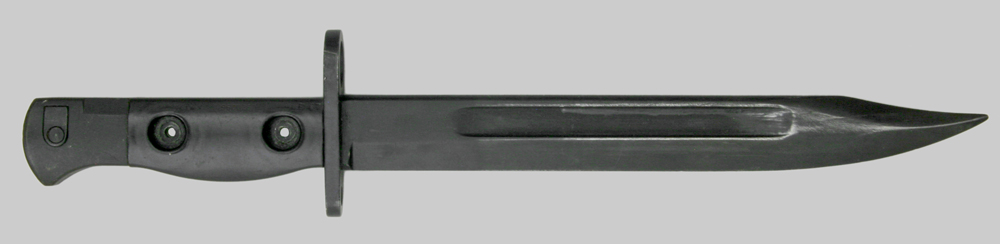
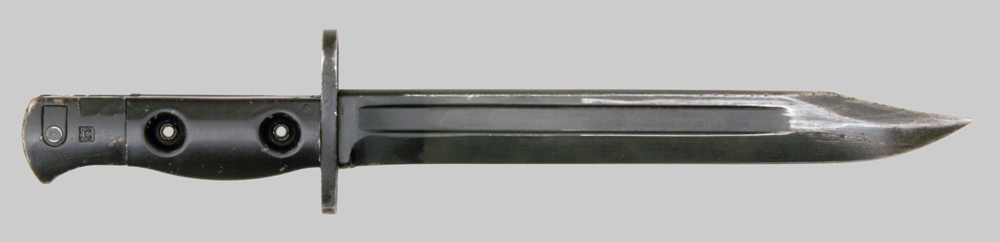
In fact if you want a simple task, the L1A3 Bayonet for the L1A1 SLR for PR:Falklands would be a really good task to learn on :)
'[R-DEV wrote:Bob_Marley;1821221']For the Brits theres a bit of variation too. We can have:

L1A3 early production, long fuller:
Image

L1A3 late production, short fuller:
Image

Or L1A4:
Image

Main difference is the attachment method of the pommel - L1A3 is brased where as L1A4 is riveted.

Blade:
Image

Re: [ATGM] 9K111 AT-4 Spigot

Posted: 2016-06-27 16:52
by Adriaan
Hey CaptMiller, check out this tutorial series (part 1 and 2), it covers the basics of UV mapping in 3ds max pretty well: Creating a Weapon For Source download - Mod DB

The green seams will show anywhere UV pieces aren't stitched together (creating seams in the UV). This is fine as long as you watch where the seams are on the 3d model. Generally you should try and make sure to have as few seams as possible, apart from where that causes warping/distortion in the UV map. It's important to make sure that there are as few obvious seams in the player's view as possible when using the weapon (first person view).

Feel free to PM me if you have more questions

Re: [ATGM] 9K111 AT-4 Spigot

Posted: 2016-06-28 00:10
by CaptMiller
thx for feedback

I decided to make a rocket for AT-4 Spigot , I hope it will come as a training project , I need to know how to remove these green seams, or if I can not delete them how can I make my seams where i want. In this case it is not matter i think , but how do it it future.

Is it ready for UV ?
Image
Image
Image
Image
Image
Image

Re: [ATGM] 9K111 AT-4 Spigot

Posted: 2016-06-28 07:23
by Rhino
Ye, the missile is a pretty good training task, although possibly a little too simple in this case since this one will only ever be seen in flight and as such, needs to be very low poly, lower poly than your current one. Would be worth putting up an Edged Framed picture of the missile since its hard to tell where the polys are and what shape they are in smooth mesh view, but there is no need for the lips between segments, they wont be seen at all, use up lots of extra tris and can be done though the normal/bump map.

For now you should really focus on getting the model 100% done then worry about UVs. But a quick tut, although you could probably find this out though full UVing tuts I'm sure.

basic missile I've made and auto UV on it, all the bits in little segments with only a few stitches:
Image

Now if you select an edge of a green seam, you will see the edge it can be welded onto in blue:
Image

Then go to Tools > Stitch Selected, a little window will pop up, default options are fine 95% of the time, press ok and you will find that blue bit is now part of that green bit you had before:
Image

And you can repeat this process:
Image
Image
Image
Image
Image

This isn't necessarily always the best way to go about this thou, and on the nose in this case you will get some stretched and compressed pixels etc.

For a basic cylinder the best approach is to select the faces then do a basic Cylinder UV in the Map Parameters section on the right when a UVW Unwrap modifier is attached. Then you get a single green seam, which is something you can't get rid of, and just rotate the basic cylinder round to a point where that single seam is best hidden, in this case, probably on the bottom of the missile:
Image
Image
Image

Anyways many approaches to UV etc, I suggest you go over that tut Adrian posted, and while not 100% about UVing, this tut might help for you to understand the bad bits of overlapping UVs and where you can overlap them etc:

Re: [ATGM] 9K111 AT-4 Spigot

Posted: 2016-06-28 08:09
by CaptMiller
I will look all the tutorials which thou and adrian send to me.

I tried to learn from the tutorials on YouTube . But I found that in 3ds MAX 9 missing or hidden , some functions of UV Editor Image

Re: [ATGM] 9K111 AT-4 Spigot

Posted: 2016-06-28 08:34
by Rhino
The tut Adrian linked is with ~Max9, although the basic principles and most of the features are the same with later versions, just in different places/icons etc.

Creating a Weapon For Source download - Mod DB

But as I said before, your getting way ahead of yourself. You, and anyone who is willing to help you, need to focus on just the model right now, then once that is done with feedback saying its all good, then you can get onto UVing.

Re: [ATGM] 9K111 AT-4 Spigot

Posted: 2016-06-28 09:16
by mries
Maybe this can help, lynda.com is a site with lots of professional trainings in various disciplines, also gaming/3d art.
Used it myself only for an excel training but it is interesting to take a look.
Lots of trainings can also be found on torrentsites (not supporting piracy ofcurz)

Posted: 2016-06-28 10:01
by Mineral
On my phone now, cant link you. But textools or something named similar has many of the functions you seek.

Re: [ATGM] 9K111 AT-4 Spigot

Posted: 2016-06-29 02:36
by CaptMiller
"In fact if you want a simple task, the L1A3 Bayonet for the L1A1 SLR for PR:Falklands would be a really good task to learn on :) [/QUOTE]"

__________________________________________________________

I decide do knife, is it ready for UV ?? I already deleted invisible polygons

https://skfb.ly/PWKt

Image
Image
Image
Image

handle did not make a more detailed , anyway will not see it in hand

Re: [ATGM] 9K111 AT-4 Spigot

Posted: 2016-07-03 02:41
by CaptMiller
The final version of the model at the moment. Removed some parts changed shape , reduced in accordance with the reference. also I added some smoothing groups in those places where I had them removed earlier
Image
Image
Image
Image
Image
Image
Image
I took as a basis the cover as in this picture , although the forms covers a lot of different types of missiles
Image

Re: [ATGM] 9K111 AT-4 Spigot

Posted: 2016-07-18 00:37
by CaptMiller
Pls help anybody, why modifiers Select Ring and Select Loop don't works when I unwraping ??

Image

Re: [ATGM] 9K111 AT-4 Spigot

Posted: 2016-07-18 01:50
by Ratface
Have to be in edge select to use ring/loop. In poly mode best you can do is turn off ignore back facing and then select the ones you need using a drag select. Just make sure you don't select anything you don't wanna UV on accident :)

Re: [ATGM] 9K111 AT-4 Spigot

Posted: 2016-07-18 08:57
by CaptMiller
ok thanx

Re: [ATGM] 9K111 AT-4 Spigot

Posted: 2016-07-18 11:29
by CaptMiller
_______________________________deleted__________________________________

Re: [ATGM] 9K111 AT-4 Spigot

Posted: 2016-07-24 16:39
by CaptMiller
UV map is ready
Image
Image

Re: [ATGM] 9K111 AT-4 Spigot

Posted: 2016-07-28 16:36
by CTRifle
Theres a few things Id look at changing, but good work so far!

There isnt any padding between the faces, it is packed reeeaaallyy tight and itll make it harder for the texturer and also it can cause pixel bleeding/edge issues with the texture.

Seems to be alot of space taken by box and the main barrel.. so what you could do is overlap some of the faces. Just make sure when doing this you pick some that are either opposite each other so ingame you wont notice the mirroring. This way you can make everythin a bit bigger cause at the moment all the little pieces are a bit small to get any detail into them like the ones in the top right.

Just make sure to not over use the overlaping as it can be a pain to texture and cause issues with the AO. Rhino does have a tut here for overlapping faces and AOs.

Thats all I can think of atm!

Re: [ATGM] 9K111 AT-4 Spigot

Posted: 2016-07-28 18:42
by CaptMiller
there was no screenshot , which I threw earlier, thanks CTrifle

Image

Re: [ATGM] 9K111 AT-4 Spigot

Posted: 2016-07-28 19:58
by Mineral
yeah too closely together. This will cause issues.

Re: [ATGM] 9K111 AT-4 Spigot

Posted: 2016-07-29 05:25
by Rhino
https://www.realitymod.com/forum/f189-m ... ost1482663

Your model is also far from being really ready to UV and Texture tbh.

Re: [ATGM] 9K111 AT-4 Spigot

Posted: 2016-07-29 09:36
by CaptMiller
'[R-DEV wrote:Rhino;2139683']https://www.realitymod.com/forum/f189-m ... ost1482663

Your model is also far from being really ready to UV and Texture tbh.
give details of what changes of model I need to make