Page 4 of 11
Posted: 2008-02-22 11:34
by Heskey
I'd love to see topo maps in PR instead of the over-head radar

Posted: 2008-02-25 05:38
by BloodBane611
Here's Mestia:

And the .dds for those who want to use it:
4shared.com - online file sharing and storage - download ingameMap.dds
Will almost certainly be recolored in the future, need to find a good color scheme that will work across all the commonly terrained maps.
Posted: 2008-02-25 12:30
by Clypp
Nice Bloodbane.
The tree color is really bugging me out. Perhaps you can grab the color from one of my maps, I kept it consistent throughout. Also the white in my maps is an off-white which makes it a little nicer to the eyes. If you come up with better colors that's fine though.
The edges of the map are strange. The top and bottom look weirdly stretched and the lake of trees around the perimeter, looks suspicious, I never notices that absence before.
I'll test it out in a bit.
Posted: 2008-02-25 14:48
by BloodBane611
Yeah, IronTaxi really minimized the amount of extra work he did. Heighmaps and trees under the combat zone are basically as easy as possible. Found it weird, but with the combat zone overlay you don't notice anything.The ingamemap.dds definitely isn't fully displayed for mestia though, don't know why. Just started fools road, and it was actually a full map.
Anyhow, revised files above, and I'm doing fools road now.
Posted: 2008-02-25 20:35
by Jagular
heh Im temporary out of this
to much RL work....
sorry
Posted: 2008-02-26 03:57
by Clypp
I'm working on a Jabal right now so nobody pick that up.
Done. Updated in initial post.
Posted: 2008-02-27 15:08
by Rico
Really great job. Get them all looking good like OGT and I'd definitely push for them to be included.
Posted: 2008-02-27 15:57
by Jagular
What about possibility to have both normal and topo maps ?
Posted: 2008-02-27 17:53
by Wasteland
If we can't have geographical feature names, can we at least number the involved hills?
Posted: 2008-02-28 00:32
by BloodBane611
It isn't possible to have both normal and topographical maps, because the map is defined by only one file: ingameMap.dds. I imagine some smart coder might be able to figure out a way around this, but as for us we've got nothing. Anyhow, the purpose of a topographical map is to give you all the information you would get on the normal map, plus a lot. You can tell what type of buildings there are, clearings are more obvious, and of course you can tell elevation (or at least change in elevation).
I think giving hills and other features some references would make a lot of sense. Also, many of the mappers who made the PR 0.7 maps are still around, so with a little input from them we could stay true to the original intent, while increasing realism and usefulness of the maps.
Now, for those who are posting here, I would say just please, DL the maps and play with them. You don't have to seek out the rough spots or anything, but you definitely will find a few if you go play for a while, especially when we start doing the larger maps. Then just report them here and we will fix them.
Posted: 2008-03-01 12:20
by Sadist_Cain
Good to see this getting back into full swing
Like I always say, I do like knowing what Kinda trees I'm being faced with


Will be downloading shortly to test out and give feedback on rough bits and places needing symbols/details etc (the Buddha statue on 7gates would be an awesome landmark)
This would be great to remove that whole "Birds eye" feel from land players in PR.
Just something about when you're out in the middle of nowhere and all you have is a map with symbols and points on it and you have to find out what they are... Makes things veeeery interesting
Edit:
Gem of an example of an English text map of Al Basrah, Same style the military would use (along with a dozen other forms aswell)

Check out the detail! it even states the terrain "s a n d a n d g r a v el" Can't wait to see these go through Beta and become more refined... 0.8 mebbe?
Posted: 2008-03-01 13:05
by Mongolian_dude
Jabal, OGT and Basrah look nice. Im not too sure on the Mestia one.
...mongol...
Posted: 2008-03-01 13:52
by BloodBane611
Mestia is getting a rerun at this moment, I wasn't happy with the quality. Part of the issue is that trees on mestia are not regular, on a real military map they most likely would simply label the entire area wooded and leave it at that (at least according to the latest US Army map reading manual).
@Sadist: That's a significantly less detailed map than the PR maps (meaning that there will be less labeling, as it obscures terrain), but some labeling is in the works.
Posted: 2008-03-08 14:58
by BloodBane611
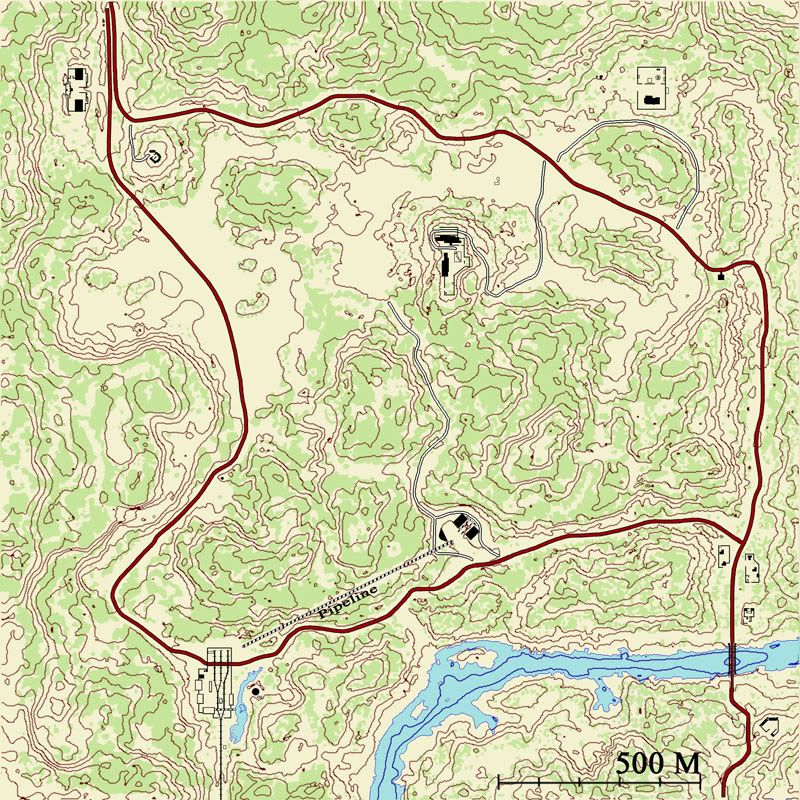
So the updated Mestia has been up for a bit, and I've got a WIP of fools road.
Posted: 2008-03-08 15:56
by Clypp
The contour lines are way too dense. This is making it difficult to see if the land is in general rising or falling. The map is only 2km x 2 km (?) and should not have such a high level of detail on height. 20m vertical separation, or maybe 10, is probably a better alternative. Same goes for Mestia.
Other than that, it is looking good! The roads should not be black, typically they are red or hashed black and white or red and white.
I'm starting Qwai now.
Posted: 2008-03-08 16:59
by Zimmer
For some reason I cant add the dss file in the minimap folder when its zipped what shall i do?
Posted: 2008-03-08 18:14
by BloodBane611
What program are you using? Try using Winzip.
I've been meaning to fix the road lines for a while, gotta do it for mestia too. I'll do that and the greater vertical separation this afternoon.
Posted: 2008-03-08 18:26
by diesel14lars
Zimmer wrote:For some reason I cant add the dss file in the minimap folder when its zipped what shall i do?
if youre trying to do it with windows explorer, the you need to unpack the folder, change the file, then repack the folder. MAKE SURE YOU BACK UP THE ORIGINAL!!!!!!
Posted: 2008-03-08 18:35
by Clypp
If you use winRAR you can just drag the new file onto the winrar window and it will copy over. You probably want to back up the ingamemap.dds first though.
Posted: 2008-03-08 20:34
by A-10Warthog
wow these are freaking great! i cant wait to see ingame. but will this then be the M (keybutton) map? or how will this work?s