[Help!] exporting from 3dsmax "saveMaterial" problem
Posted: 2013-02-04 02:41
I can't figure out why I can't get the exporter tool to work with my static object in 3dsmax9
I'm thinking I've made rookie mistake somewhere, but after several tryes I can't really figure out what it is.
Here is a part of the exporter message where it comes up with several warnings that it cannot create file, and the final red line is the one that makes it "stop"
 In this example I just added a "base" layer and not the rest and it makes the same error.


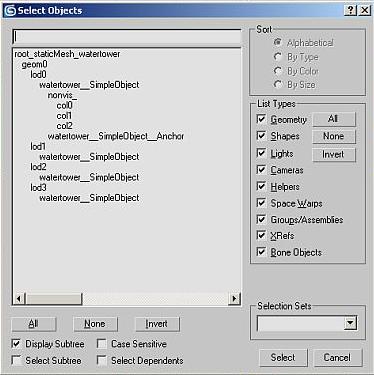
If anyone have some suggestions....maybe some simple tests I could make to see if there is something wrong with the Exporter tool or if its my model ....or my folder structure.... i'm running out of ideas myself but i'm pretty sure It's a stupid mistake somewhere
I'm thinking I've made rookie mistake somewhere, but after several tryes I can't really figure out what it is.
Here is a part of the exporter message where it comes up with several warnings that it cannot create file, and the final red line is the one that makes it "stop"
Code: Select all
		-- EXPORT MESH DATA
		writeLong f validMeshIDs.count


		local matFname = (getFilenamePath fname) + (getFilenameFile fname) + ".material"
		deleteFile matFname

		local fMat = fopen matFname "w"
		if fmat != undefined then
		(
			fclose fMat
		)
		else
		(
			format "WARNING! Unable to create file: %\n" matFname
		)


		for i=1 to validMeshIDs.count do
		(
			local meshObj = objs[validMeshIDs[i]]
			local matInfo = BF2MatInfo.getMulti meshObj.material type :o bjectTypeName

			local meshObj_OriginalTransform = meshObj.transform

			local isNonVis = false
			if isValidNode meshObj.parent then
			(
				if (lowercase meshObj.parent.name == "nonvis_") then
					isNonVis = true;
			)


			local crdSpace = matrix3 1
			if isStaticObject then
			(
				crdSpace = meshObj.transform * (inverse rootObjNode.transform)
			)
			else
			(

				local p = meshObj.parent
				if isValidNode p then
				(

					if lowercase p.name == "nonvis_" then
					(
						if isValidNode p.parent then
						(
							-- A collision mesh's pivot is the visible mesh that it is parented to
							crdSpace = meshObj.transform * (inverse p.parent.transform)
						)
					)

					-- scale the mesh
					crdSpace = crdSpace * scaleMatrix meshObj.scale

				)


			)


			local dontWarnSkinWeights = false

			local bnObjs = #()
			-- TODO: Get the skeleton bones in the correct order as they will be in the export
			if objectTypeName == "skinnedmesh" then
			(
				format "SkinnedMesh ... Getting skeleton bones for mesh: %\n" meshObj.name
				bnObjs = bf2GetSkinMeshBones meshObj objs jointNodeTypes
			)
			if objectTypeName == "bundledmesh" then
			(
				dontWarnSkinWeights = true
				for o in objs do
				(
					if findItem jointNodeTypes (classof o) > 0 then
						append bnObjs o
				)
			)
			local minUvSetCnt = 0
			if isStaticObject and not isNonVis then
			(
				minUvSetCnt = 4
			)


			rSceneDump.writeMesh f meshObj matInfo coordSpace:crdSpace s:s isNonVis:isNonVis bnObjs:bnObjs dontWarnSkinWeights :d ontWarnSkinWeights minUvSetCnt:minUvSetCnt

			meshObj.transform = meshObj_OriginalTransform

			local a = ""
			for i=1 to matInfo.count do
			(
				local fxMat = matInfo[i]

				if fxMat.fxFilename == undefined then
				(
				 	format "WARNING: % has undefined .fxFilename\n" meshObj.name
					--format "    % \n" fxMat
					--format "    % \n" meshObj.material
				)
				local b = fxMat.materialID as string
				b = b + ";" + (fxMat.materialName as string)
				b = b + ";" + (fxMat.fxFilename as string)
				b = b + ";" + (fxMat.technique as string) + ";"

				for j=1 to fxMat.textures.count do
				(
					local tmpTexture = fxMat.textures[j]
					if tmpTexture.count == 0 then tmpTexture = "default.dds"

					b = b + "|" + tmpTexture
				)

				a = a + "?" + b
			)

			local saveMatSuccess = bf2mdtOps.saveMaterial matFname ("mesh" + ((i-1) as string)) a
			if saveMatSuccess != 0 then
			(
[color=Red]				format "WARNING! Unable to save file: %\n" matFname
			)
		)[/color]
If anyone have some suggestions....maybe some simple tests I could make to see if there is something wrong with the Exporter tool or if its my model ....or my folder structure.... i'm running out of ideas myself but i'm pretty sure It's a stupid mistake somewhere
 ) so
) so  I guess it was stopped because I didn't have write permission by default in the 3dsmax9 folder.