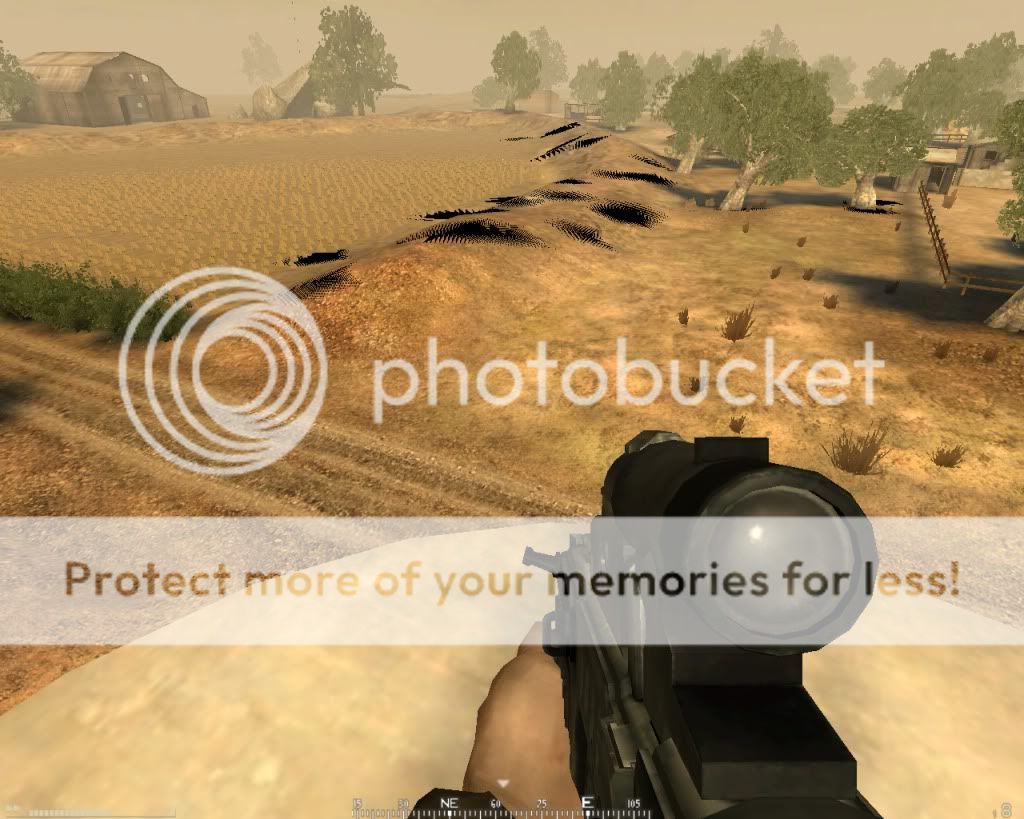
Graphical "cross stitch" effect.
Posted: 2013-03-12 15:12
I'm attaching a YouTube clip of a graphical problem I'm experiencing in both BF2 and PR. I run BF2 through Origin.
BF2 Black Cross Stitch Splotches - YouTube
My computer is a Dell Inspiron N5110 with a Intel Core i5-2450M cpu. 6 mb of memory. Direct X 11. Windows 7 Home Premium 64 bit. Graphics are Intel HD Graphics Family.
There is a patchwork of black cross-stitch-like splotches at a certain distance from me in every direction.
Has anyone seen this before?
My computer runs both BF2 and PR very well on high settings other than in this regard.
Thanks for any help you can offer,
cryptofcolumbus
BF2 Black Cross Stitch Splotches - YouTube
My computer is a Dell Inspiron N5110 with a Intel Core i5-2450M cpu. 6 mb of memory. Direct X 11. Windows 7 Home Premium 64 bit. Graphics are Intel HD Graphics Family.
There is a patchwork of black cross-stitch-like splotches at a certain distance from me in every direction.
Has anyone seen this before?
My computer runs both BF2 and PR very well on high settings other than in this regard.
Thanks for any help you can offer,
cryptofcolumbus