Page 1 of 2
PR 1.0 Open Beta Mumble start-up guide
Posted: 2013-06-29 10:28
by Mineral
PR 1.0 Open Beta - Mumble start-up guide
So with the PR 1.0 Open Beta the new PR mumble works differently then before. And quite a few people are having trouble trying to set it up correctly.
One very important note to start with:
PR 1.0 beta uses a different mumble then 0.98, so you don't need to launch that one for the open beta.
The new mumble auto-launches when you join a PR 1.0 beta game and was installed when you installed the beta.
1. Where is mumble? How can I change settings?
It will start minimized and have a icon in your tray. Now there is a bug that this icon can go invisible, but it's still there and clickable. This is fixed in a future release.

You can click on it and then you will see the full window. Now simply go to
Configure->Settings and you will be able to change the settings as before. You should definitely take a look at the
Input and Output devices(mic and speakers) to make sure those are correct.
If you want to change your buttons simply change them in the Shortcuts tab.
NOTE: You MUST minimize PRMumble to Tray before playing PR, or PRMumble will capture focus and alt-tab you out of PR continuously.
2. Can't I pick an overlay anymore?
There is no more need for an overlay in PR 1.0 Open Beta. This is now build in to the HUD of the game.
 3. How do I know if mumble is working fine? What if it crashes?
While in-game you will also have icons to the right bottom corner showing you a status of your current mumble.

From left to right:
- You are transmitting audio
- Your mic is muted
- Your sound is muted
- Your mumble is disconnected
Now at the moment mumble can experience some problems due to the heavy player load. It can crash. If this happens it will show you the disconnect icon shown above.
If you alt+tab out of the game you will see the Crash report. Simply send or don't send it and mumble will autorestart and will work again.
If you have any other issues post them on the forums so they can be used as feedback for a future PR update.
have fun in the beta

Re: PR 1.0 Open Beta Mumble start-up guide
Posted: 2013-06-29 10:39
by Prevtzer
Very helpful, thanks!
Re: PR 1.0 Open Beta Mumble start-up guide
Posted: 2013-06-29 17:44
by Butcher8923
Hi, are there any know issue with win8? Because for me mumble won't start with Pr 1.0.
Re: PR 1.0 Open Beta Mumble start-up guide
Posted: 2013-06-30 10:04
by Mineral
it will start when you join a server.
Re: PR 1.0 Open Beta Mumble start-up guide
Posted: 2013-06-30 20:57
by Kwalc297
My mumble does not show up on the taskbar(nor is there an invisble one). I've restarted my pc and re-installed, but its the same. I got on fine in the afternoon and now its not working.
Re: PR 1.0 Open Beta Mumble start-up guide
Posted: 2013-07-01 16:17
by Subscyed
Kwalc297 wrote:My mumble does not show up on the taskbar(nor is there an invisble one). I've restarted my pc and re-installed, but its the same. I got on fine in the afternoon and now its not working.
I'm having the same issue as this gentleman and I've yet to have found a fix.
Upon asking a clanmate to give me the IP address of the PR 1.0 mumble and trying to manually connect, mumble joins the server and within seconds it disconnects from it claiming session lost.
Mumble also does not launch along with PR1.0, not even when joining a server.
Re: PR 1.0 Open Beta Mumble start-up guide
Posted: 2013-07-01 20:50
by Tommygun
For me in XP it freezes every 5 mins or so...says Mumbles crashed and after being dropped to desktop and clicking the "dont send error report" I can tab back in again, lag radically a bit then Mumble works again. Sometimes when you flip to desktop there seem to be 3 or 4 instances of mumble in the tray area around the clock and then they go away.
The game does crash too after a while...probably some other issue.
Re: PR 1.0 Open Beta Mumble start-up guide
Posted: 2013-07-02 00:52
by 007.SirBond
MineralWouter wrote:If you alt+tab out of the game you will see the Crash report. Simply send or don't send it and mumble will autorestart and will work again.
Myself and others, after communicating with them in game suffer from mumble crashing causing the game to ALT TAB out and minimize. I do not get any crash reports, but mumble does restart itself. Hopefully in future updates you guys can fix the crashing. Strange, most PR players never had this crashing issue on 0.98.
Re: PR 1.0 Open Beta Mumble start-up guide
Posted: 2013-07-02 01:09
by LITOralis.nMd
The old PRmumble beta 1.0.0.4 was using Mumble 1.2.0.X as it's base, the new mumble is using 1.2.4Mumble as a base, there has been alot of changes, we're working on it.
One thing to note, if you do not minimize PRMumble to the tray, the program will continuously Alt-Tab you out of all other programs and back to PRMumble.
We are working on that issue now. Which seems to be the big issue besides the actual PRMurmur server continuously crashing.
Re: PR 1.0 Open Beta Mumble start-up guide
Posted: 2013-07-02 07:36
by Tommygun
Whats the deal with there being many instances of mumble in the tray when you are alt tab'ed out?
Its nothing to do with someone fixing the previous incarnation with the invisible icon and now making it appear too often and start itself again?
Whatever, Im sure it will be fixed soon and the game looks great! Thanks.
Re: PR 1.0 Open Beta Mumble start-up guide
Posted: 2013-07-02 07:54
by 40mmrain
mumble just disconnects all the time for me. IT will start up, try to connect, and "Server connection failed: The remote host closed the connection." comes over and over. Sometimes it will connect, but it has a total mind of it's own.
Is this server side, or can I do something about it myself, like open some ports or idk
Re: PR 1.0 Open Beta Mumble start-up guide
Posted: 2013-07-02 10:08
by hyraclyon
Mumble just doesn't seem to connect to the PR server for me at all! IE it always shows me the disconnected icon while ingame.
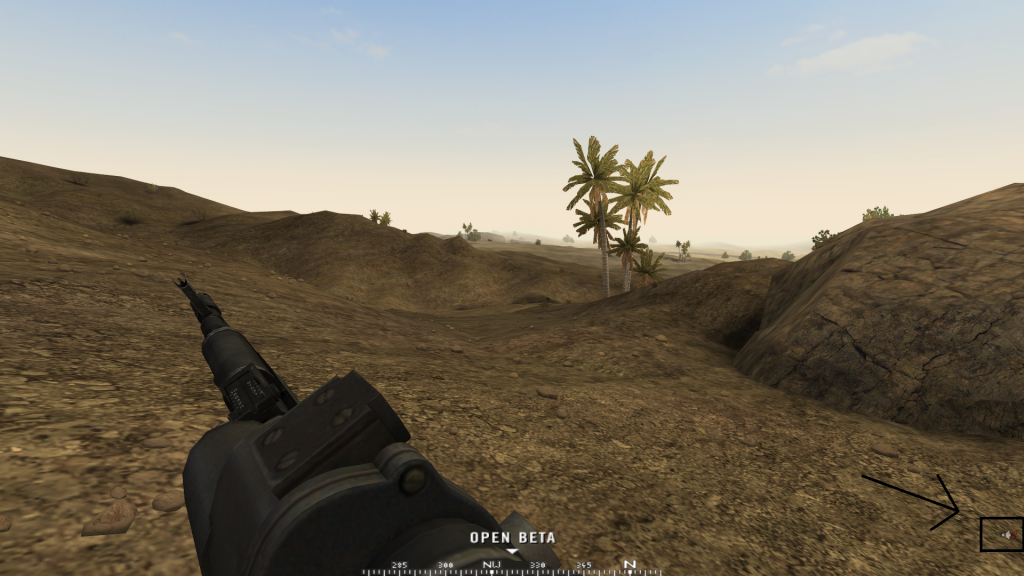
Anyone knows what might be causing this? I already tried configuring my sound devices in mumble and running as administrator. I'm on windows 8 btw.
Re: PR 1.0 Open Beta Mumble start-up guide
Posted: 2013-07-02 11:39
by 40mmrain
post the error log that you get.
Ive been dealing with some certificate issue I think. I went poking around in mumble's files and the .crt file, the ceritificate has some weird .manifest file extension. I opened it up in an editor to see if there was anything obvious, but I dont know shit about programming, so I couldnt fix it myself.
Re: PR 1.0 Open Beta Mumble start-up guide
Posted: 2013-07-02 12:07
by hyraclyon
40mmrain wrote:post the error log that you get.
Ive been dealing with some certificate issue I think. I went poking around in mumble's files and the .crt file, the ceritificate has some weird .manifest file extension. I opened it up in an editor to see if there was anything obvious, but I dont know shit about programming, so I couldnt fix it myself.
Where can I find this error log? Because I haven't gotten any error messages at all. When I alt-tab and open mumble it's just blank with no apparent problems.

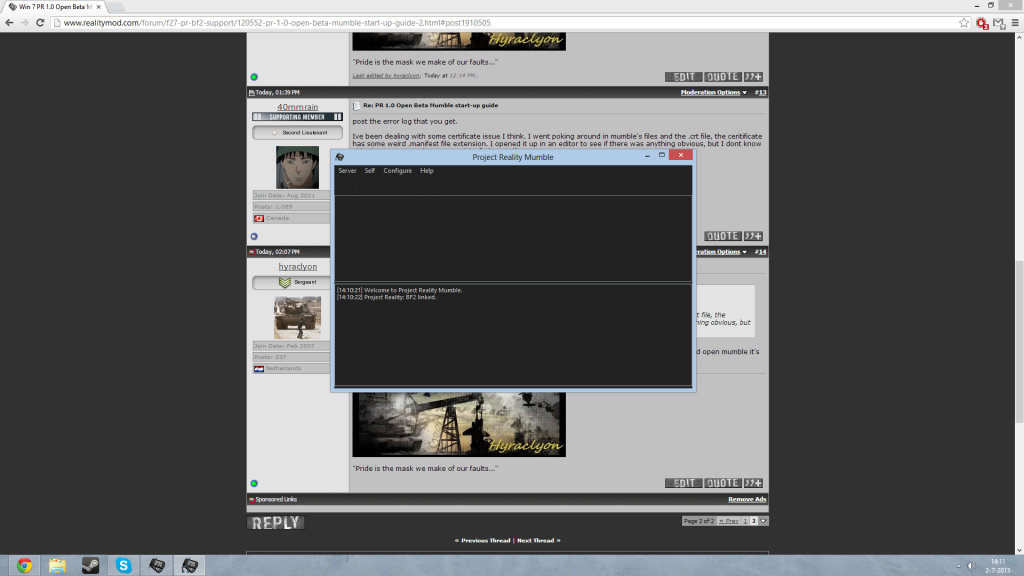
That's what it looks like while alt-tabbed out of the game for me.
Re: PR 1.0 Open Beta Mumble start-up guide
Posted: 2013-07-02 13:46
by MoshPanda
Hey anyone had problem connect to the server I kept getting server connection failed: Connection time out. info from mumble whereas i can hear my squad member talking ingame but i cant speak? any solutions its so annoying.

Re: PR 1.0 Open Beta Mumble start-up guide
Posted: 2013-07-02 17:13
by REinHARD
Possible workaround for Mumble crash dialog getting focus.
In windows registry add DWORD parameter DontShowUI with value 1 at path
HKEY_LOCAL_MACHINE\SOFTWARE\Microsoft\Windows\Windows Error Reporting
Now it will just silently close and automatically restart.
Tested in Windows 7.
P.S. Crashed a chopper today because of this, so...
Re: PR 1.0 Open Beta Mumble start-up guide
Posted: 2013-07-02 20:45
by 40mmrain
hyraclyon wrote:Where can I find this error log? Because I haven't gotten any error messages at all. When I alt-tab and open mumble it's just blank with no apparent problems.
That's what it looks like while alt-tabbed out of the game for me.
yes, thats the log in the bottom half of the GUI. Well, that's pretty bad, because it appears as though your mumble doesnt even attempt to connect to the server. I'll post the log of mine in a sec.

here's the exact issue I have
Re: PR 1.0 Open Beta Mumble start-up guide
Posted: 2013-07-02 21:44
by hyraclyon
40mmrain wrote:yes, thats the log in the bottom half of the GUI. Well, that's pretty bad, because it appears as though your mumble doesnt even attempt to connect to the server. I'll post the log of mine in a sec.
here's the exact issue I have
That's really weird though, I've tried reinstalling multiple times, even with administrator rights and everything, but it always ends up this way. It's like it doesn't even recognize that it has to connect to anything. Yours seems like a certificate issue indeed, must be something wrong in the code for the both of us. Sure hope the devs are aware of these issues..
Re: PR 1.0 Open Beta Mumble start-up guide
Posted: 2013-07-02 23:35
by hyraclyon
Turns out i am in fact able to connect to the PR server manually. It then tells me that my username is invalid. I change it, and it works perfectly fine.
I personally think that this message of an invalid username and mumble not auto-connecting are related. Maybe PR:Mumble doesn't know how to handle this and aborts the connection. I haven't found a way to change the username permanently though, so I can't test my theory.
Re: PR 1.0 Open Beta Mumble start-up guide
Posted: 2013-08-17 03:22
by sold67
Is it impossible to open PR Mumble twice now?