Page 1 of 1
Losing connection to server
Posted: 2013-07-19 03:33
by skooterkid23
Well recently I have been losing connection to any server I join on PR. Every time I join a server between 30 seconds and 5 mins it losing connection instanly. I have a great ping of around 30 and no lag. Iv'e been playing PR for about 2 years and it seems to start happening when I installed PR 1.0. 1.0 was fine but when it was over I went back to PR .981 and it started. And it ONLY losing connection to PR servers, not FH2 or stock BF2. Iv'e shut down my firewall, looked at the router, updated pb, and reinstalled PR. Looking at the forums, it seems some people are having the same problem.
I'm wondering if PR 1.0 had anything to do with it.
Re: Losing connection to server
Posted: 2013-07-19 04:14
by notmyingamename
same issue, same symptoms, same timing
Re: Losing connection to server
Posted: 2013-07-19 06:19
by Knallkopp_02
0.981 is the current Version i think, maybe this is the problem.
Re: Losing connection to server
Posted: 2013-07-19 06:53
by skooterkid23
Ah sorry, what I meant to say was .981, I was thinking of the previous version.
Re: Losing connection to server
Posted: 2013-07-29 12:56
by midget
same issues as above only connect for 30 seconds befor its loast
Re: Losing connection to server
Posted: 2013-07-29 15:23
by radegast1.cz
Maybe it is a nonsence, but should it be doe punkbuster?
Re: Losing connection to server
Posted: 2013-07-30 10:04
by skooterkid23
Alright I MAY have found my problem, punkbuter. It is all FUBAR.
I go to play PR trying to fix the losing connection issue and I decide to open my process when I'm playing. Come to find out Punkbuster A and B are not running while playing. So I decide to go into services and look at it there and I come across this.
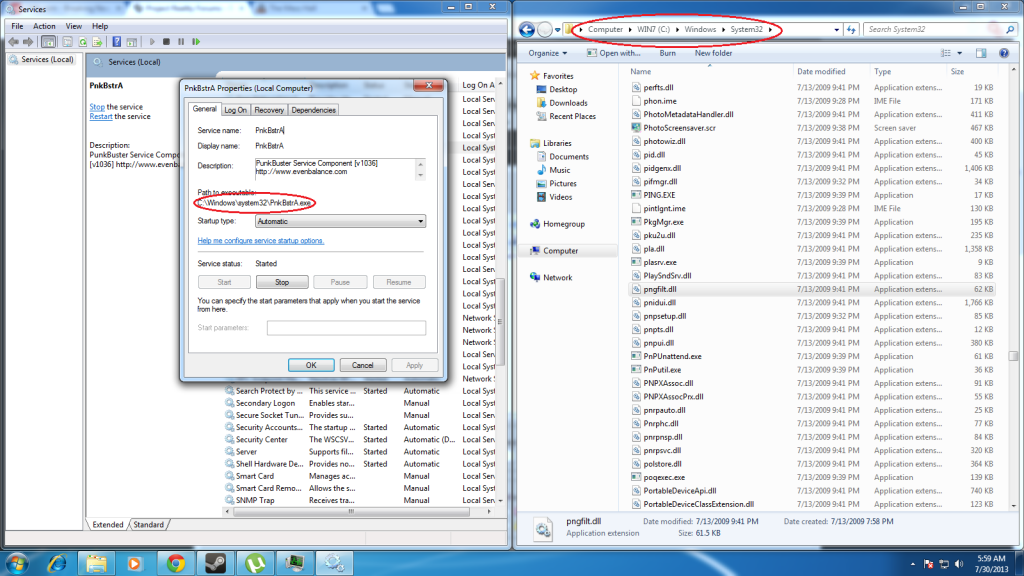
If you look there is no pnkbstrA.exe in my system32 folder. I'm trying to delete punkbuster fully and I'm not sure what files need to be deleted. Anyone have any suggestions why punkbuster A and B would not be running? and how to FULLY delete my pb?
Thanks
Re: Losing connection to server
Posted: 2013-07-30 11:20
by radegast1.cz
What about instal CCleaner and use him for uniinstall punkbuster - it should clear register and default it's setting. Then instal and update him again. ... Maybe silly idea, but it would be first thing I would do.
Re: Losing connection to server
Posted: 2013-07-30 19:16
by Cindarellaman
I got the same problem
Re: Losing connection to server
Posted: 2013-07-30 22:01
by LITOralis.nMd
Skooterkid, good detective work,
now how the f'ing heck did that happen?
In short, first find if it is installed somewhere else, uninstall it, download the installer from evenbalance, reinstall, then use Psyrus' fix.
In your Control Panel\All Control Panel Items\Programs and Features can you uninstall Punkbuster? Is punkbuster listed?
Also, you might want to do a full system search for pnkbstrA.exe to see where the heck it actually got installed.
If you can't uninstall through Control Panel\All Control Panel Items\Programs and Features then you'll need to open RegEdit and search for pnkbstrA and pnkbstrB and 1. find the location 2. delete all the registry entries.
Re: Losing connection to server
Posted: 2013-07-31 03:20
by skooterkid23
Well heres the deal.
It is giving me a bunch of errors when I uninstall it from programs and features. Went into the registry, did a search, and nothing was there. Found out pnkbstrA.exe and pnkbstrB.exe are in my C:\Windows\SysWOW64. And my pb folder is gone in my AppData folder. Weird. Really weird.