Page 1 of 1
Error 1324
Posted: 2013-08-29 20:29
by Cifyra
Hi,
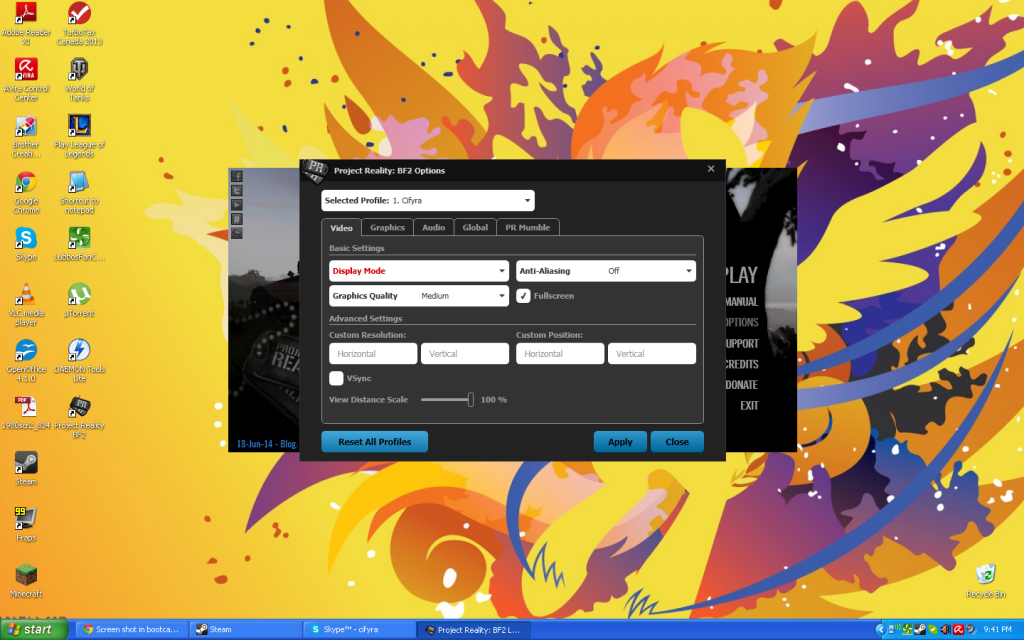
I'm on Windows XP 32bit on 1st Gen Macbook Pro bootcamp. I tried to run PR to see how far I can get with everything set on low graphics. However, I cannot boot up Project Reality. When I go to options in the launcher,
Display Mode is in red text and there are no options in the drop down menu. When I try to launch the game an error pops up,
Launch Error 1324: The Selected display mode is not supported.
I also got the following crash once, not sure if it's related. Do you guys have any idea what's going on? Thanks.
Code: Select all
Project Reality Log File
prlauncher.exe started at: 2013-08-29T16:03:11

Critical Error: An unhandled exception has occured. Details are as follows:

Value cannot be null.
Parameter name: v

Further details can be found in the following file:

[url]C:\Program Files\Steam\steamapps\common\Battlefield 2\mods\pr\bin\prlauncher.log[/url]

Please report this error to the Project Reality Team, and include the log file in your report.

[url=https://www.realitymod.com/forum/f27-pr-bf2-support]Visit Support Forum[/url]

 > System.ArgumentNullException: Value cannot be null.
Parameter name: v
   at System.Windows.PresentationSource.CriticalFromVisual(DependencyObject v, Boolean enable2DTo3DTransition)
   at Reality.UI.Data.Dpi...()
   at System.Windows.Threading.ExceptionWrapper.InternalRealCall(Delegate callback, Object args, Int32 numArgs)
   at MS.Internal.Threading.ExceptionFilterHelper.TryCatchWhen(Object source, Delegate method, Object args, Int32 numArgs, Delegate catchHandler)
Re: Error 1324
Posted: 2013-08-29 20:50
by MaSSive
Re: Error 1324
Posted: 2013-08-30 06:05
by Cifyra
Didn't work

Posted: 2013-08-30 06:27
by Walther[RUS]
to solve this problem we need to update the PR . encountered this problem with the users windows 7 and 8
Sent from my A701 using Tapatalk 4
Re: Error 1324
Posted: 2013-08-30 07:28
by zloyrash
This problem starts with new versions of PR1.0
First versions and Pr1.0beta was OK.
Re: Error 1324
Posted: 2013-08-30 17:01
by Walther[RUS]
Help! We need a new patch for the game. Looks more likely not solve the problem!
Re: Error 1324
Posted: 2013-08-30 20:37
by Devastation2.0
I have the same error :\
Re: Error 1324
Posted: 2013-08-30 20:44
by MaSSive
Start PR launcher go to Support menu, and post support info tab contents here.
Also post PRLauncher.log conent here.
Re: Error 1324
Posted: 2013-08-30 20:45
by Devastation2.0
Found a fix:
Open C:\Users\NAME\Documents\ProjectReality - Now right click on "Profiles" - Go to properties and un-tick read-only.
Now open up your 1.0 Launcher and go to your options, and select "reset profiles to default" or whatever it says.
Worked for me

Re: Error 1324
Posted: 2014-01-16 04:50
by The1astReaper
I FIXED IT! I was recently encountering the same issue described here. When ever i went to load up the game it would give me error 1324 need to reset display ect. so i went into the options and clicked reset profile and tried again, this seems to have worked, i am about to try and put my settings back in the options and see how it goes.
Re: Error 1324
Posted: 2014-01-16 04:52
by The1astReaper
and after reseting video and sound settings to normal the problem seems to have gone
Re: Error 1324
Posted: 2014-07-12 01:38
by Cifyra
Code: Select all
System Information
------------------
  Operating System: Microsoft Windows XP Home Edition (5.1.2600)
   Current Culture: English (United States)
       Motherboard: Apple Inc. Mac-F42C89C8
         Processor: Intel Pentium III Xeon processor (Physical: 2, Logical: 2)
            Memory: 2.00 GB
      DIMM Modules: DIMM0: 1024.00 MB @ 667 MHz
                    DIMM1: 1024.00 MB @ 667 MHz
         Page File: 19.52 MB
    .NET Framework: Unknown

Display Information
-------------------
 Display Device(s):
   Display Mode(s):
    Driver Version: 6.14.11.6763 (167.63)
    Display Memory: 512.00 MB
     Multisampling: 2, 4, 8
               DPI: 96 (100%)

Audio Information
-----------------
  Primary Playback: Realtek HD Audio output
 Primary Recording: Realtek HD Audio Input
  Open AL Renderer: Software
               EAX: True
           EAX 1.0: False
           EAX 2.0: True
           EAX 3.0: False
           EAX 4.0: False
           EAX 5.0: False
             X-RAM: False

Disk Information
----------------
      Install Path: C:\Program Files\Steam\steamapps\common\Battlefield 2
                    Free: 3.90 GB, Total: 126.11 GB, FS: NTFS, SSD: False
          Mod Path: C:\Program Files\Steam\steamapps\common\Battlefield 2\mods\pr
                    Free: 3.90 GB, Total: 126.11 GB, FS: NTFS, SSD: False
     Profiles Path: C:\Documents and Settings\Ryan\My Documents\ProjectReality\Profiles
                    Free: 3.90 GB, Total: 126.11 GB, FS: NTFS, SSD: False
    Update DL Path: C:\Documents and Settings\Ryan\Local Settings\Application Data\Project Reality\Project Reality BF2\Downloads
                    Free: 3.90 GB, Total: 126.11 GB, FS: NTFS, SSD: False
   Update Log Path: C:\Documents and Settings\Ryan\Local Settings\Application Data\Project Reality\Project Reality BF2\UpdateLogs
                    Free: 3.90 GB, Total: 126.11 GB, FS: NTFS, SSD: False

Game Information
----------------
    Installed Mods: bf2, pr, xpack
       Current Mod: pr
       BF2 Version: BF2 1.5
        PR Version: 1.2.0.0
          Language: english
   Debug Available: False
     Large Address: False
Supported Hardware: None

Profile Information
-------------------
      Profile 0001: Cifyra
              Type: Online
        View Intro: True
        Fullscreen: True
      Display Mode: 800x600@60Hz
Display Mode Valid: False
   Graphics Scheme: Medium
     Multisampling: Off
             VSync: False
   Terrain Quality: Low
   Effects Quality: Medium
  Geometry Quality: Low
   Texture Quality: Medium
  Lighting Quality: Low
   Dynamic Shadows: Medium
    Dynamic Lights: Medium
 Texture Filtering: Medium
    Audio Provider: Software
    Provider Valid: True
     Audio Quality: Medium
               EAX: True
Code: Select all
Project Reality Log File
PRLauncher.exe started at: 2014-07-11T21:01:43

Critical Error: An unhandled exception has occured. Details are as follows:

Object reference not set to an instance of an object.

Further details can be found in the following file:

[url]C:\Program Files\Steam\SteamApps\common\Battlefield 2\mods\pr\bin\PRLauncher.log[/url]

Please report this error to the Project Reality Team, and include the log file in your report.

[url=https://www.realitymod.com/forum/f27-pr-bf2-support]Visit Support Forum[/url]

 > System.NullReferenceException: Object reference not set to an instance of an object.
   at PRLauncher.WPF.ViewModel.OptionsWindowViewModel.set_SelectedProfile(KeyValuePair`2 value)
   at PRLauncher.WPF.ViewModel.OptionsWindowViewModel..()
   at System.Threading.ThreadHelper.ThreadStart_Context(Object state)
   at System.Threading.ExecutionContext.Run(ExecutionContext executionContext, ContextCallback callback, Object state, Boolean ignoreSyncCtx)
   at System.Threading.ExecutionContext.Run(ExecutionContext executionContext, ContextCallback callback, Object state)
   at System.Threading.ThreadHelper.ThreadStart()
Unticked "Read Only" but still didn't work after clicking "reset all profiles"