Page 1 of 1
missing dll file
Posted: 2013-09-11 12:24
by Easy_driver1980
i need help im missing a dll file called msvcr100_clr0400.dll please some help me i reinstald like 20 times
Also downloaded this dll file installed nothing,...
updated frame 4.0 nothing.
Somebody ?
Re: missing dll file
Posted: 2013-09-11 15:00
by Easy_driver1980
UPDATE:
I installed the dll file but now when I click on the launcher nothing happens,....????
BF2 vanilla does start though
EDIT :
Game starts,....but i get a message to change the icon on the desktop to c:\program files\ea games\battlefield 2\mods\pr\pr.exe.
I cannot do that because i'll get a error message that the path isn't correct.
Second,.....in \mods\pr is no pr.exe located
So please help
Re: missing dll file
Posted: 2013-09-11 18:56
by MaSSive
PR.exe? There's no such thing. There is
PRBF2.exe in root of Battlefield 2, and the rest related to launcher and PRMumble is in
mods\pr\bin
Missing "MSVCR100_CLR0400.dll" Can someone help me out PLEASE!
PROBLEM WITH MSVCR100_CLR0400.dll
Google is your friend.
Re: missing dll file
Posted: 2013-09-11 19:28
by Easy_driver1980
Yeah thought so to.
Well I got it exact the same as your screenshot.

[/IMG]
When i start pr it says it cannot connect to pr.exe????
No clue anymore here.
So to be clear,.....pr starts up,...I see the intro and then I get the message that i need to use the pr.exe????
With the launcher nothing happens at all.
Re: missing dll file
Posted: 2013-09-11 19:35
by MaSSive
Hmm, are you sure you have the right version installed? Have you removed previous 0.98 or whatever 0.XX prior to installing new one?
PR.exe is no more it should not ask for it. When you launch gme from PRBF2.exe it says that you must interact with PRLauncher.exe not PR.exe.
Something is seriously wrong with your setup, so try to reinstall PR 1.0 completely and update to latest. Make sure you have Net 4 and Visual C++ 2010/2012 for your system.
Remove all traces of PR from the system, reboot, try and see if vanilla BF2 works fine, and then reinstall PR 1.0 and update. Don't skip any of the steps.
Follow the guide >
https://www.realitymod.com/forum/f27-pr ... guide.html
OR TRY THIS FIRST:
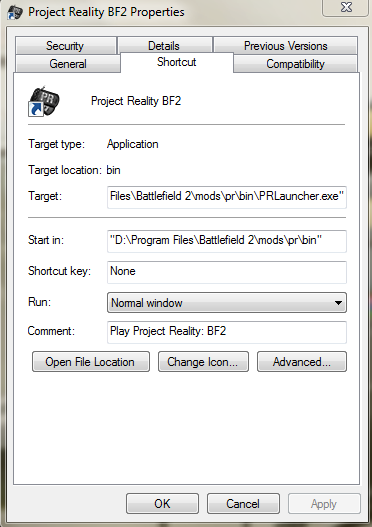
Got to wherever Batlefiled 2 is installed, open folder mods, then open pr, and after that locate bin folder and open it.
Find PRLauncher.exe, right click on it and Send To > Desktop ( create shortcut )
Remove all other shortcuts but this new one. Then try to start over newly created shortcut.
Re: missing dll file
Posted: 2013-09-11 19:52
by Easy_driver1980
MaSSive wrote:Hmm, are you sure you have the right version installed? Have you removed previous 0.98 or whatever 0.XX prior to installing new one?
PR.exe is no more it should not ask for it. When you launch gme from PRBF2.exe it says that you must interact with PRLauncher.exe not PR.exe.
Something is seriously wrong with your setup, so try to reinstall PR 1.0 completely and update to latest. Make sure you have Net 4 and Visual C++ 2010/2012 for your system.
Remove all traces of PR from the system, reboot, try and see if vanilla BF2 works fine, and then reinstall PR 1.0 and update. Don't skip any of the steps.
Follow the guide >
https://www.realitymod.com/forum/f27-pr ... guide.html
OR TRY THIS FIRST:
Got to wherever Batlefiled 2 is installed, open folder mods, then open pr, and after that locate bin folder and open it.
Find PRLauncher.exe, right click on it and Send To > Desktop ( create shortcut )
Remove all other shortcuts but this new one. Then try to start over newly created shortcut.
Tried all of those options already,....

nothing changed,.....
Most stupid is that the launcher you mention doesn't do anything,....
I click on it,....that's it nothing happens.
Re-installed everything several times,....downloaded 1.0 from several sites,...no change at all.
Going little crazy here

see screens:

[/IMG]

[/IMG]
Re: missing dll file
Posted: 2013-09-11 20:07
by Easy_driver1980
UPDATE:
Fixed it,.....
I copied the PRBF2.exe into the bin folder and it worked,....