Page 1 of 2
Recommended Joystick ?
Posted: 2014-01-21 14:42
by Mac-Rec0n
Hello all, i was wondering what Joystick people use to fly helicopters in Project Reality BF2.
im used to using mouse and keyboard but to be honest i want a joystick.
i was wondering if any of you could recommend me one ?
i was thinking about the logitech extreme 3d pro (had one before but it was broken when i bought it so never got to use properly)
i DO have a price limit of ?15, so i am restricted to Ebay etc.
Re: Recommended Joystick ?
Posted: 2014-01-21 14:56
by ElshanF
Hey Ryan
I see your limit isn't really helping however I did manage to buy this for ?25 once.
This joystick has lasted me 2-3 years and no issues whatsoever works fine however the price has gone up quite a bit I don't know why. Hopefully you can find enough money to purchase this, it's really good.
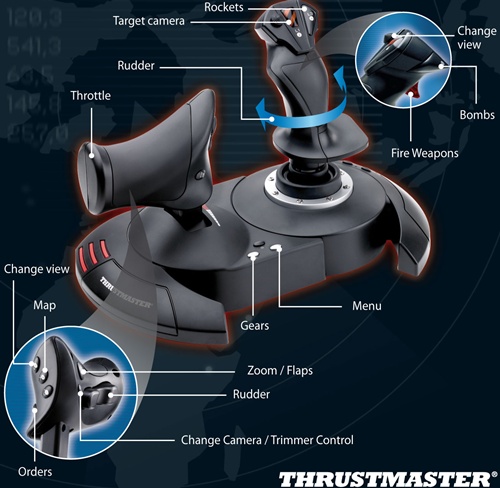
I found it for ?30 if you're up for it
 Thrustmaster T-Flight Hotas X PC (2960703) - BT Shop
Also you can try bid for this one
http://www.ebay.co.uk/itm/Thrustmaster- ... 4d17a7018e
Hope I could help
Re: Recommended Joystick ?
Posted: 2014-01-21 15:11
by Glimmerman
Im using a Thrustmaster HOTAS Cougar, its made out of metal for the most past so you will get a excellent build quality that lasts, unfortunaltly they dont make it anymore but the Thrustmaster HOTAS Warthog is still in production, downside of it it costs a small fortune.
Re: Recommended Joystick ?
Posted: 2014-01-21 15:13
by ElshanF
For the money you have honestly the T-Flight Hotas X is perfect. Price and features. Glimmerman that joystick looks amazing.
Re: Recommended Joystick ?
Posted: 2014-01-21 15:24
by weixman
Have been using logitech extreme 3d pro for about 5 years now. Never had any problems. Best bang for the buck.
Re: Recommended Joystick ?
Posted: 2014-01-21 16:35
by Mac-Rec0n
ElshanF wrote:Hey Ryan
I see your limit isn't really helping however I did manage to buy this for ?25 once.
This joystick has lasted me 2-3 years and no issues whatsoever works fine however the price has gone up quite a bit I don't know why. Hopefully you can find enough money to purchase this, it's really good.
Whos Ryan ?
You gotta be kidding me, i was literally holding this joystick a few hours ago in the store and thought it looked alright, never picked it up thought thought i could get it cheaper online but infacts its more expensive online haha.
my price limit is a little higher then i originally stated, reason being when ever i see a forum poster with a budget people ALWAYS go over his/her budget by a few quid so i thought id lower mine and then people would recommend me stuff for my actual budget haha it worked !!!
but yeah thanks for the suggestion, still pondering over that one.
Re: Recommended Joystick ?
Posted: 2014-01-21 16:44
by ElshanF
How much did you find it for at which store? I was surprised to see BT selling it haha
Re: Recommended Joystick ?
Posted: 2014-01-21 17:02
by Mac-Rec0n
Its in Maplin, says 40 on there website but was 29.99 instore, thought i could get it on there website cheaper as thats the case most of the time but cheaper to get into the store..
Re: Recommended Joystick ?
Posted: 2014-01-21 17:04
by ElshanF
Get it ASAP before it's gone

You can even separate the stick and throttle !
Not seen anything as more value for money
Re: Recommended Joystick ?
Posted: 2014-01-21 18:38
by saXoni
Logitech Extreme 3D Pro.
Re: Recommended Joystick ?
Posted: 2014-01-21 18:59
by AncientMan
Saitek X52 Pro is the only joystick with built in support by PRLauncher. You'll get some additional features with auto loading profiles, grid coordinates and target marker distance on the MFD, and when I get around to fixing it, flashing buttons when you're locked on target/own vehicle is locked on
Other joysticks should work fine though, just doesn't have the extra features.
Then again, you're limited in price, so there goes that option

Re: Recommended Joystick ?
Posted: 2014-01-21 19:21
by Mikemonster
[R-DEV]AncientMan wrote:Saitek X52 Pro is the only joystick with built in support by PRLauncher. You'll get some additional features with auto loading profiles, grid coordinates and target marker distance on the MFD, and when I get around to fixing it, flashing buttons when you're locked on target/own vehicle is locked on
Other joysticks should work fine though, just doesn't have the extra features.
Then again, you're limited in price, so there goes that option
I tried to use my X-52 Pro for PR, and I found it impossible to use the throttle due to it not being self centering (PR has 'up' or 'down' rather than a proper representation of the collective AFAIK).
Do you just use the joystick?
I was quite excited about using a HOTAS but just spent my time oscillating up and down!
OP might want to bear this in mind if he expects a HOTAS to be of use.
Re: Recommended Joystick ?
Posted: 2014-01-22 00:52
by matty1053
Can joysticks control the throttle in jets?
(Like keep it at a steady 50%?, while landing?)
I might get the Logitech 3d one. Pretty cheap.
What is the pro's and cons of the joysticks?
Re: Recommended Joystick ?
Posted: 2014-01-22 00:57
by saXoni
matty1053 wrote:Can joysticks control the throttle in jets?
(Like keep it at a steady 50%?, while landing?)
Yes it can.
Posted: 2014-01-22 11:11
by ElshanF
By looking at it it saves space but if you want that feel factor of having a "proper" thrust then go for the flight hotas
Posted: 2014-01-22 12:14
by Steeps
I have the Thrustmaster T.Flight also and I really like it. Of course it I had the money I would go for a metal joystick but that isn't happening any time soon.
The HOTAS X is great for the price it's at. You get a full throttle control and plenty of buttons to go with it. It's very manageable to play DCS games with it. In PR flying you won't even be able to map all of the buttons because there are more than enough.
Posted: 2014-01-22 12:59
by Mineral
Same here. Tflight is really nice for its price. Although the wire between both parts could be a bit longer IMO.
Posted: 2014-01-22 14:44
by ElshanF
I always keep mine together ! To be fair keeping the throttle seperate to adjust speeds for a tank is handy