Page 1 of 1
Rubberbanding
Posted: 2014-01-30 16:29
by Fnixer
So, lately I have started to recieve some weird rubberbanding when playing. Even while playing with only bots this happends. Looked over it a bit and saw others had the same problem for other battlefield games and a few here on this forum aswell, I was wondering if anyone had found a solution yet? Thanks in advance!
Re: Rubberbanding
Posted: 2014-01-30 16:34
by LITOralis.nMd
post system specs please, we can't help without some info
Re: Rubberbanding
Posted: 2014-01-30 16:55
by Fnixer
Operating System
Windows 7 Home Premium 64-bit SP1
CPU
Intel Core i7 3630QM @ 2.40GHz
Ivy Bridge 22nm Technology
RAM
6,00GB Dual-Channel DDR3 @ 798MHz (11-11-11-28 )
Motherboard
Alienware M17xR4 (U3E1)
Graphics
Standard PnP-sk?rm (1920x1080@60Hz)
Intel HD Graphics 4000 (Dell)
2047MB NVIDIA GeForce GTX 675M (Dell)
Storage
465GB Seagate ST9500423AS (SATA)
Optical Drives
HL-DT-ST DVD+-RW GA31N
Audio
Sound Blaster Recon3Di
Re: Rubberbanding
Posted: 2014-01-30 18:11
by LITOralis.nMd
It's a decent notebook,
make sure you're on Performance or Gaming Power Plan, so the GeForce GTX 675M is being used and not the HD4000,
Download Razer Gamebooster,
Download Bistum ProcessLasso Free
THe below quotes are for a guy wiht a notebook similar to yours, follow these steps:
'[R-COM wrote:LITOralis.nMd;1978003']Open ProcessLasso window.
Go to OPtions in Menu bar,
select Configure CPU Core Parking
Click Yes on UAC window.
you will see this window:
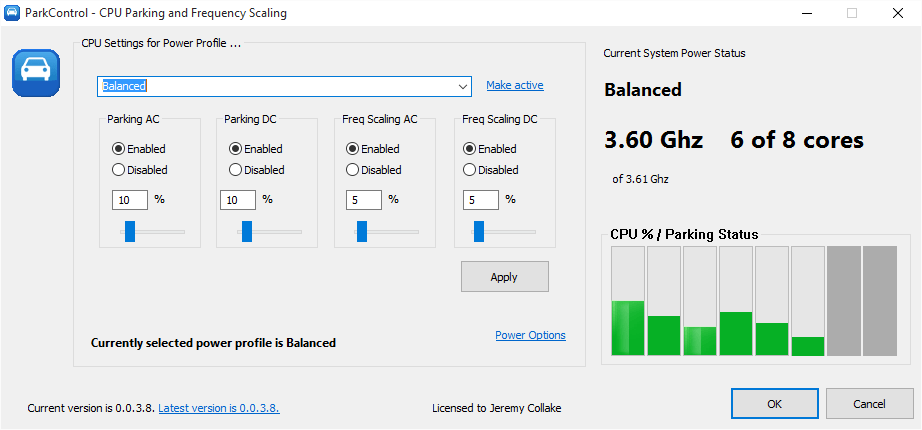
On left, select the Gaming Mode Power Plan.
Then select "Enabled" in the AC power mode.
Then select 100% in the slider.
OPtionally, you can do the same in the Battery power mode too. This will drain your battery quickly.
Click Apply.
If you use Razer GameBooster, you need to do the same thing again, but choose the Razer Gamebooster Power Plan on the left side when you reopen the Configure CPU Core Parking window.
'[R-COM wrote:LITOralis.nMd;1977963']Intel HD Graphics 3000,
You can try to unpark your cores,
Going further than that is very granular and system specific, you can shift the main PRBF2.exe thread onto a dedicated core, make sure PRMumble is on another core, and give PRBF2.exe High priority using the program I'll list below:
You can download BitSum's ProcessLasso utility,
Quote:
3. Download Bitsum ProcessLasso Free. Make sure you download the correct version, Free 32 bit or Free 64 bit,
Process Lasso - Automate and optimize process priorities, CPU affinities, power profiles, and more!
-- Start PR, alt tab to desktop, open ProcessLAsso window, right click on PRBF2.exe, BF2.exe, PRMumble.exe and pnkbstra.exe and pnkbstrB.exe and give them default priority status of High, set the PRBF2.exe and BF2.exe to gaming mode, and give them high or higher access to RAM.
Then you can also assign a core to each, but I've been told by the developer of ProcessLasso that it won't particularly help. The "Gaming Mode" option inside ProcessLasso will do that in a automated and more refined way.
You'll need to
unpark your cores,
https://bitsum.com/forum/index.php?topic=1702.0
ParkControl is FREEWARE to tweak and disable Windows CPU core parking!
What is that NUMBER that is shown on the GUI? That is the % of cores that must remain *unparked*. So, if it's 25%, then 75% of the CPU's cores can be parked at once (3 of 4).
For use with PR, set the GUI to 100% on Gaming Mode, so none of the cores are parked.
The Intel HD Graphics 3000, is a weak spot, it's going to be hard to get this to run, you might try setting the graphics level to medium, you could use something like Razer Gamebooster to shutdown background processes, turn off the Aero UI, (basically by making WIndws 7 look like windows XP, you can save 40MB of video RAM, which is the critical bottleneck in your system.
Re: Rubberbanding
Posted: 2014-01-30 18:39
by Fnixer
Alright, I will try and see if it works and get back to you. Thanks in advance for the response.
Re: Rubberbanding
Posted: 2014-01-30 20:08
by Fnixer
Been having a little playthrough of it now, solution seems to have fixed partly of the problem, less rubberbanding however still pressent.