Page 1 of 1
How to make textures for custom objects?
Posted: 2014-06-19 08:13
by szabopeter2011
Hi, I followed a tutorial and made a house with 3ds max 7. And I used this texture for everything (_c; _de; and _deb):
http://i58.tinypic.com/2wcr3eu.png
Then I got this:
http://i62.tinypic.com/2wrkbic.jpg
http://i60.tinypic.com/2a9zds7.jpg
(ingame too)
I tried changing the _deb to to this:
http://i61.tinypic.com/5ze9z7.png
but I got the same result.
After this I tried it with this combination (I picked the textures from an original bf2 object):
http://i61.tinypic.com/30hvq6u.jpg
and I got it working:
http://i62.tinypic.com/2jes4lh.jpg
I hope you can see the pictures.
How can I make my own textures (same like the original object's textures) for my object?
I searched a lot, but I got nothing. I also tried the nvidia atlas texture tool(?), but I couldn't use it.
Thank you, and sorry for my bad english.
Re: How to make textures for custom objects?
Posted: 2014-06-19 14:26
by Insanitypays
You should probably go back and fix your image links.
right click your picture and click "copy image url", then put the link between these:

You'll end up with this. It's a lot easier for us to help when you post the image directly

Anyway, from what I can see, it looks like your textures and UV map aren't aligned. You need to open the model's UV map in photoshop and either paint your own textures or stretch/distort photos to fit them.
A UV map takes the 3d geometry and flattens it into a 2 dimensional plane. This allows the artist to conveniently paint over the geometry in photoshop and add color/details.
EX:

The Nvidia tools are able to help you save to dds. Save your file as a dxt 1 or dxt 5* in the dropdown menu after you save the file as a DDS.
*dxt1 is a better sized file while dxt5 allows for transparency
hopefully I didn't tell you anything you already knew.
Re: How to make textures for custom objects?
Posted: 2014-06-19 14:38
by Rhino
You shouldn't be making custom textures for individual statics, instead you should be using existing texture pallets within bf2/pr unless there is really nothing you can use that works but that is unlikely.
Really basic tut on working with texture pallets although a pretty crappy one and most of the pics don't work now
 https://www.realitymod.com/forum/f189-m ... ettes.html
Re: How to make textures for custom objects?
Posted: 2014-06-19 18:32
by szabopeter2011
Thank you for the answers!
I didn't know anything you said.


The 1st one is now OK. But what is the 2nd one? And how do I make the 3rd, blue one?
Re: How to make textures for custom objects?
Posted: 2014-06-21 00:26
by CTRifle
I cant tell from your picture it looks like a diffuse texture (colored texture) but if its black and white it can also be a specular map (brightness and reflection) The 3rd is a normal map or bump map, you can do it a few ways, the easiest for you would be photoshop. You can download the Nvidia plugin for PSand use that for example
szabopeter2011 wrote:Thank you for the answers!
I didn't know anything you said.
Aha, what hes saying is to use the textures that are already in PR for size and optimization so we dont rack up gigs of textures. That tut he linked will show you how to edit your object UVs to be able to use PR textures. Also you can see how the different layers are used, deffuse, spec, normal ect in there too!
Re: How to make textures for custom objects?
Posted: 2014-06-21 08:04
by szabopeter2011
Thanks, I picked these textures from an original bf2 object to test my house.
The textures are:
1st: mods/bf2/objects_client.zip/staticobjects/_asia/village/textures/chvillage_01_c.dds
2nd: mods/bf2/objects_client.zip/staticobjects/_asia/village/textures/chvillage_01_de.dds
3rd: mods/bf2/objects_client.zip/staticobjects/_asia/village/textures/chvillage_01_deb.dds
The nvidia plugin is "NVIDIA Texture Tools for Adobe Photoshop" ?
Is it possible to make my own textures? And how do I make it? (The 1st one is now ok.)
Posted: 2014-06-21 12:57
by CTRifle
You make your own by first UVing your object, then you can render the UV layout and put that in Photoshop, then you just go ahead and "paint" whatever you want where it needs to go (ie brick, metal, dirt, scratches ect) then when your done apply said texture onto your object.
And you wanna find Nvidia .dds plugin for PS as .dds is what BF uses for textures
Re: How to make textures for custom objects?
Posted: 2014-06-21 13:26
by szabopeter2011
Ok, thank you. And how to make the _de and the _deb? (Do I need them?)
The 3rd is a normal map or bump map, you can do it a few ways, the easiest for you would be photoshop.
But how?

??:
Re: How to make textures for custom objects?
Posted: 2014-06-21 14:33
by CTRifle
to do both, .dds and normals just download this
https://developer.nvidia.com/nvidia-tex ... -photoshop
use the filter in that download to make them
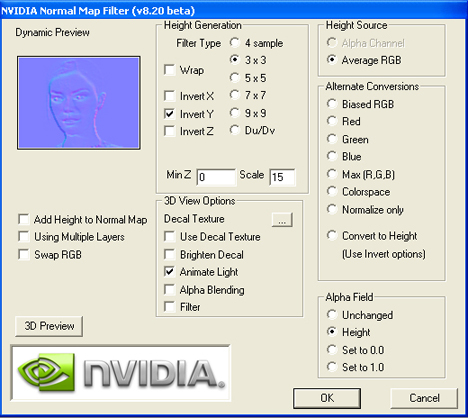
using that will get you a normal map like the one below, I quickly made this for an example

and do you need it? no but it adds depth to your objects and detail. So add them

Re: How to make textures for custom objects?
Posted: 2014-06-23 08:22
by szabopeter2011


