Page 1 of 1

Invaild CD key bug (happend right after updating to 1.2.1)

Posted: 2014-08-01 18:30
by RayPer
Title says everything ; I updated to 1.2.1 and tried to join a server, but it kicked me for "invaild CD key". I have tried to join with both of my profiles, but the result was the same .

Code: Select all

System Information
------------------
  Operating System: Microsoft Windows 7 Home Premium  (6.1.7600)
      Architecture: 64-bit
   Current Culture: Hebrew (Israel)
       Motherboard: MSI G41TM-P33 (MS-7592)
         Processor: Pentium(R) Dual-Core  CPU      E5500  @ 2.80GHz (Physical: 2, Logical: 2)
            Memory: 2.00 GB
         Page File: 2.12 GB
    .NET Framework: Unknown

Display Information
-------------------
 Display Device(s): Generic PnP Monitor on NVIDIA GeForce 8400 GS    
   Display Mode(s): 1440 x 900 (32 bit) @ 60 Hz
    Driver Version: 9.18.13.3182 (331.82)
    Display Memory: 512.00 MB
     Multisampling: 2, 4, 8
               DPI: 96 (100%)

Audio Information
-----------------
  Primary Playback: ??????? (VIA High Definition Au
 Primary Recording: ???????? (VIA High Definition A
  Open AL Renderer: Software
               EAX: True
           EAX 1.0: False
           EAX 2.0: True
           EAX 3.0: False
           EAX 4.0: False
           EAX 5.0: False
             X-RAM: False

Disk Information
----------------
      Install Path: D:\Sergei\Steam\steamapps\common\Battlefield 2
                    Free: 31.81 GB, Total: 365.66 GB, FS: NTFS, SSD: False
          Mod Path: D:\Sergei\Steam\steamapps\common\Battlefield 2\mods\pr
                    Free: 31.81 GB, Total: 365.66 GB, FS: NTFS, SSD: False
     Profiles Path: C:\Users\Family\Documents\ProjectReality\Profiles
                    Free: 1.62 GB, Total: 100.00 GB, FS: NTFS, SSD: False
    Update DL Path: C:\Users\Family\AppData\Local\Project Reality\Project Reality BF2\Downloads
                    Free: 1.62 GB, Total: 100.00 GB, FS: NTFS, SSD: False
   Update Log Path: C:\Users\Family\AppData\Local\Project Reality\Project Reality BF2\UpdateLogs
                    Free: 1.62 GB, Total: 100.00 GB, FS: NTFS, SSD: False

Game Information
----------------
    Installed Mods: bf2, pr, xpack
       Current Mod: pr
       BF2 Version: BF2 1.5
        PR Version: 1.2.1.0
          Language: english
   Debug Available: False
     Large Address: True
Supported Hardware: None

Profile Information
-------------------
      Profile 0001: RayPer
              Type: Online
        View Intro: True
        Fullscreen: True
      Display Mode: 1440x900@60Hz
Display Mode Valid: True
   Graphics Scheme: Medium
     Multisampling: Off
             VSync: False
   Terrain Quality: Low
   Effects Quality: Medium
  Geometry Quality: Low
   Texture Quality: Medium
  Lighting Quality: Low
   Dynamic Shadows: Medium
    Dynamic Lights: Medium
 Texture Filtering: Medium
    Audio Provider: Software
    Provider Valid: True
     Audio Quality: Medium
               EAX: True
      Profile 0002: JamboRambo
              Type: Online
 Last Used Profile: True
        View Intro: True
        Fullscreen: True
      Display Mode: 1440x900@60Hz
Display Mode Valid: True
   Graphics Scheme: Medium
     Multisampling: Off
             VSync: False
   Terrain Quality: Low
   Effects Quality: Medium
  Geometry Quality: Low
   Texture Quality: Medium
  Lighting Quality: Low
   Dynamic Shadows: Medium
    Dynamic Lights: Medium
 Texture Filtering: Medium
    Audio Provider: Software
    Provider Valid: True
     Audio Quality: Medium
               EAX: True

Re: Invaild CD key bug (happend right after updating to 1.2.1)

Posted: 2014-08-04 15:36
by MaSSive
Same here. I used to know the whereabouts of registry entries for BF2 but I forgot. Its been a while I worked with this. Ive tried changing it via "some tools" but no dice.

Ill try finding those and attempt to fix it and will report back.

Note: I have original disc version of BF2 Complete including Special Forces.

Edit:

Fixed it.

Run regedit by hitting Win + R > type > regedit > Enter

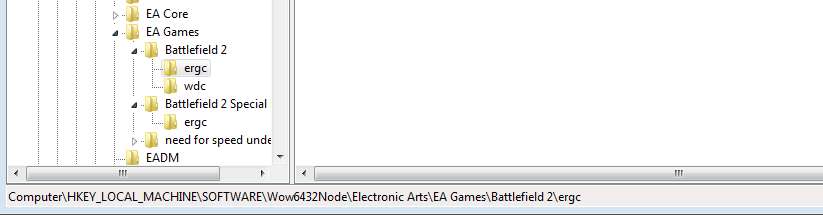
Locate this

Image


Modify entry under ergc and type x9392TYPE-YOUR-CDKEY-INCLUDING-SLASHES

As soon as you do this run PR and it should work.

IMPORTANT NOTE: This fix is for 64 bit systems. For 32bit system omit Wow6432Node entry. For Steam copies this may differ also.

Re: Invaild CD key bug (happend right after updating to 1.2.1)

Posted: 2014-08-13 18:25
by Vobbit
did this work?

Re: Invaild CD key bug (happend right after updating to 1.2.1)

Posted: 2014-08-13 23:04
by RayPer
MaSSive wrote:Same here. I used to know the whereabouts of registry entries for BF2 but I forgot. Its been a while I worked with this. Ive tried changing it via "some tools" but no dice.

Ill try finding those and attempt to fix it and will report back.

Note: I have original disc version of BF2 Complete including Special Forces.

Edit:

Fixed it.

Run regedit by hitting Win + R > type > regedit > Enter

Locate this

Image


Modify entry under ergc and type x9392TYPE-YOUR-CDKEY-INCLUDING-SLASHES

As soon as you do this run PR and it should work.

IMPORTANT NOTE: This fix is for 64 bit systems. For 32bit system omit Wow6432Node entry. For Steam copies this may differ also.
This is what I did and it works perfectly !

Re: Invaild CD key bug (happend right after updating to 1.2.1)

Posted: 2014-11-07 15:06
by killyjoy
What if i have the steam version of this game? I have tried searching for the same way as above but its not there. Sorry im not really intelligent on this stuff :/

Re: Invaild CD key bug (happend right after updating to 1.2.1)

Posted: 2014-11-07 19:54
by LITOralis.nMd
What OS do you have killyjoy? WIndows XP, Vista, 7, 8,? Is it 32 or 64 bit?
Right click the "My computer" icon on your desktop, click Properties, it will tell you if you have 32 or 64 bit version of windows.

Re: Invaild CD key bug (happend right after updating to 1.2.1)

Posted: 2014-11-07 20:31
by killyjoy
i have a windows 7 64bit

Re: Invaild CD key bug (happend right after updating to 1.2.1)

Posted: 2014-11-07 20:33
by killyjoy
[R-COM]LITOralis.nMd wrote:What OS do you have killyjoy? WIndows XP, Vista, 7, 8,? Is it 32 or 64 bit?
Right click the "My computer" icon on your desktop, click Properties, it will tell you if you have 32 or 64 bit version of windows.
i have a windows 7 64bit OS

Re: Invaild CD key bug (happend right after updating to 1.2.1)

Posted: 2014-11-07 21:20
by LITOralis.nMd
killyjoy wrote:i have a windows 7 64bit OS
Do you own a legal CDKey that has not been permabanned?
IF you are using a pirated CDKey, almost every pirated key has been permanently banned.

IF you do own a legit CDKey,
THe easiest way to go about this is to follow this tutorial:
Steam Community :: Guide :: [FIX] Your CDKey is not valid

Re: Invaild CD key bug (happend right after updating to 1.2.1)

Posted: 2014-11-07 23:36
by MaSSive
If this isn't working for you, your key is probably banned or you are trying to use invalid cd key. If you have a Steam version I suppose that you know where to get your key? In case you dont have it, then Steam handles it automatically on each start of the game, so you will need to run BF2 as administrator. Make sure that is checked in bf2.exe properties.

Re: Invaild CD key bug (happend right after updating to 1.2.1)

Posted: 2014-11-08 03:31
by killyjoy
'[R-COM wrote:LITOralis.nMd;2042386']Do you own a legal CDKey that has not been permabanned?
IF you are using a pirated CDKey, almost every pirated key has been permanently banned.

IF you do own a legit CDKey,
THe easiest way to go about this is to follow this tutorial:
Steam Community :: Guide :: [FIX] Your CDKey is not valid
Thank you very much it worked and got me on the game. THANKS!!

Re: Invaild CD key bug (happend right after updating to 1.2.1)

Posted: 2015-04-12 11:50
by Polishboss
MaSSive wrote:Same here. I used to know the whereabouts of registry entries for BF2 but I forgot. Its been a while I worked with this. Ive tried changing it via "some tools" but no dice.

Ill try finding those and attempt to fix it and will report back.

Note: I have original disc version of BF2 Complete including Special Forces.

Edit:

Fixed it.

Run regedit by hitting Win + R > type > regedit > Enter

Locate this

Image


Modify entry under ergc and type x9392TYPE-YOUR-CDKEY-INCLUDING-SLASHES

As soon as you do this run PR and it should work.

IMPORTANT NOTE: This fix is for 64 bit systems. For 32bit system omit Wow6432Node entry. For Steam copies this may differ also.
Thanks a lot, it works. Really, great job with finding that in regedit. Again, thanks a lot.