Page 1 of 2
kit skinnedmesh editing
Posted: 2015-01-06 20:43
by marius1986
hi all.
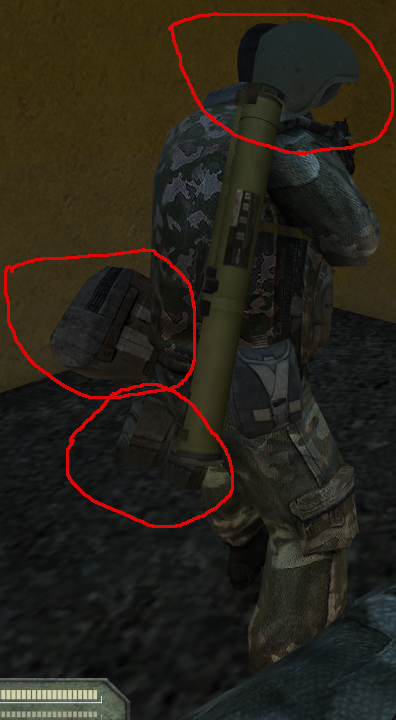
i make my battlefield 2 mod,and was necessary to change skinnedmesh of AT kit, instead of one part to add other, and during this work ran into the problem of "swimming" kit on the soldier body.I work in 3dsmax 9 with poe tool for battlefield 2.
did nobody meet nothing of the kind?
sorry for my bad english))


Re: kit skinnedmesh editing
Posted: 2015-01-06 20:48
by Mineral
Re: kit skinnedmesh editing
Posted: 2015-01-06 21:57
by marius1986
I looked a few tutorials on this theme,and as though did everything normal.
this is "skin"?

about "weight" nothing was written in the tutorials.
is it possible on more detailed?
or if there are references to this theme.
and my english is realy bad

.i learn it just 2 years.1 lesson in the week.
for conversation i use this translator
??????-?????????? ??????-?????????? 
thank you for attention.
Re: kit skinnedmesh editing
Posted: 2015-01-06 22:29
by Mineral
Can't see your pictures for some reason. Try a different image online host like
imgur: the simple image sharer. It's free and always online
I'm not an expert, but weight is simply put adding 'weight' to the skin vertexes. If for example the kit-geometry needs to move with both the bottom-body and top-body (for example a backpack) and threw the skin you added bottom-body and top-body you'll need to add weight to say how much the skin will follow the bottom body and top-body respectively. Then again, I'm not an expert so could be wrong.
http://knowledge.autodesk.com/support/3 ... 1-htm.html
is your set of kits brand new(hand made and exported by you), or is it imported threw poe-tools?
Re: kit skinnedmesh editing
Posted: 2015-01-07 10:01
by marius1986
'[R-DEV wrote:Mineral;2049713']Can't see your pictures for some reason. Try a different image online host like
imgur: the simple image sharer. It's free and always online
I'm not an expert, but weight is simply put adding 'weight' to the skin vertexes. If for example the kit-geometry needs to move with both the bottom-body and top-body (for example a backpack) and threw the skin you added bottom-body and top-body you'll need to add weight to say how much the skin will follow the bottom body and top-body respectively. Then again, I'm not an expert so could be wrong.
Weight Tool Dialog (Skin Modifier) | 3ds Max | Autodesk Knowledge Network
is your set of kits brand new(hand made and exported by you), or is it imported threw poe-tools?
thank you for the idea with "weight".it is needed to try.
this is not my kit brand.only the idea is my.
i want replace at-weapon erix with rpg-26 aglen for the russian spetznaz at-soldier.i know how to do this in kit.but i need to modify and at-soldier skinnedmesh.
rpg-26 mesh is from Project Reality,other mesh-parts of at-kit is from Battlefield 2 Special Forces.
and the picture with skin

Re: kit skinnedmesh editing
Posted: 2015-01-07 13:15
by marius1986
i trying weight the skin and turned out already vice versa - already rpg swiming ,and rest of kit parts staying normaly on the soldier body.

 https://www.youtube.com/watch?v=pQMXhLw ... y-L71wmbhw
Re: kit skinnedmesh editing
Posted: 2015-01-07 13:27
by Mineral
Seems like the pivot for the AT object is wrongly placed. Make sure it's 0,0,0
Re: kit skinnedmesh editing
Posted: 2015-01-07 13:59
by marius1986
[R-DEV]Mineral wrote:Seems like the pivot for the AT object is wrongly placed. Make sure it's 0,0,0
this is this pivot point?

all pivot points for all meshes is at 0.0.0.
Re: kit skinnedmesh editing
Posted: 2015-01-07 14:18
by Mineral
yes that's the pivot point.
mmm then I'm not really sure to be honest.
either it's a skinning issue (but then it should look way more deformed I think), or I'd say a pivot point wrongly placed. Does it happen on all the lod's?
Re: kit skinnedmesh editing
Posted: 2015-01-07 18:33
by marius1986
[R-DEV]Mineral wrote:yes that's the pivot point.
mmm then I'm not really sure to be honest.
either it's a skinning issue (but then it should look way more deformed I think), or I'd say a pivot point wrongly placed. Does it happen on all the lod's?
in sense "pivot point wrongly placed" ?
it happens just for the at-kit,where is the rpg mesh.
Re: kit skinnedmesh editing
Posted: 2015-01-07 19:35
by marius1986
there is progress, but....
i find in the Material Editor - BF2Object window ,interesting thing.one of materials was named "01 - Default"

(while other materials have the names as "drop_tangent" - for the kit bags on the floor when the soldier die,"Pilot_tangent" - for chopper and aircraft pilots and "SpetzKits_tangent" for the kit clases - medic,support,assault and others.)
And this material is for rpg mesh for at.I change it name in "SpetzKits_tangent"

and it gave a result
https://www.youtube.com/watch?v=aXZnRSO ... e=youtu.be
...but ...sometimes rpg swiming again,not so strongly but -
https://www.youtube.com/watch?v=S2pYY9i ... e=youtu.be
and on the other soldier ,without body armour like te medic(i kill the medic,take his kit and revive him) looks like that
https://www.youtube.com/watch?v=BW7w-Dz ... e=youtu.be
Re: kit skinnedmesh editing
Posted: 2015-01-07 19:51
by Mineral
Those floating problems are definitely related to the skinning and weight of vertexes. I have no knowledge on how to do it better then you, and I don't know anybody within the PR team that does

Try to find a skilled animator and exporter within the BF2 community is your best option I think. Maybe try the bfeditor.com forums?
As for the materials, looks to be in order? Although [R-DEV]Rhino is better at the multi-sub materials. I rarely use them and have little knowledge on materials and their shaders overall.
Re: kit skinnedmesh editing
Posted: 2015-01-07 20:02
by marius1986
'[R-DEV wrote:Mineral;2049867']Those floating problems are definitely related to the skinning and weight of vertexes. I have no knowledge on how to do it better then you, and I don't know anybody within the PR team that does
Try to find a skilled animator and exporter within the BF2 community is your best option I think. Maybe try the bfeditor.com forums?
As for the materials, looks to be in order? Although [R-DEV]Rhino is better at the multi-sub materials. I rarely use them and have little knowledge on materials and their shaders overall.
how I can contact [R-DEV]Rhino ? he enter here often?
Re: kit skinnedmesh editing
Posted: 2015-01-08 15:55
by marius1986
'[R-DEV wrote:Mineral;2049867']Those floating problems are definitely related to the skinning and weight of vertexes. I have no knowledge on how to do it better then you, and I don't know anybody within the PR team that does
Try to find a skilled animator and exporter within the BF2 community is your best option I think. Maybe try the bfeditor.com forums?
As for the materials, looks to be in order? Although [R-DEV]Rhino is better at the multi-sub materials. I rarely use them and have little knowledge on materials and their shaders overall.
i find the mistake of kit floating.i think...
but needed for testing more.
the PR kits geoms have 3 lods(lod0/lod1/lod2).when standart - 2 lods(lod0/lod1).my at kit had too 3 lods after importing rpg meshes.turned out that in my skinnedmesh file 1 kit had 3 lods and other - 2,after i delete the third lod(lod2) and the kit floating problem disappeared.
as I read on one forum - lod0 is used in game for player. lod1 used for bots but for what is used this third lod(lod2) ?
we will look that will be farther...
Posted: 2015-01-08 15:59
by Mineral
Lod (not load

) LevelOfDetail. Yeah I suggest to make the amount of lods equal for every kit. Not sure if that is what caused the issue but could be.
Re: kit skinnedmesh editing
Posted: 2015-01-08 18:26
by marius1986
[R-DEV]Mineral wrote:Lod (not load
) LevelOfDetail. Yeah I suggest to make the amount of lods equal for every kit. Not sure if that is what caused the issue but could be.
my spelling error

Re: kit skinnedmesh editing
Posted: 2015-01-11 16:43
by marius1986
exists the tutorial for "how to weight the kit-meshes to the bones correctly?"
for bf2)
Re: kit skinnedmesh editing
Posted: 2015-01-11 16:51
by Rhino
Re: kit skinnedmesh editing
Posted: 2015-01-11 18:27
by marius1986
merci
I find special for bf2.may be for bf2 is different?
Re: kit skinnedmesh editing
Posted: 2015-01-15 08:38
by Insanitypays
^ a timeless contraption of unparalleled sass