Page 1 of 2

CTD

Posted: 2015-11-01 19:05
by IlluminatorConfirmed
Crashed twice on Operation Soul Rebel today. After first crash turned all the settings down... and crashed again. Was flying CAS both times(sic amount of butthurt included).

Code: Select all

Project Reality Log File
PRLauncher.exe started at: 2015-11-01T21:44:13

Warning: Unable to set video setting: System.UnauthorizedAccessException: Отказано в доступе по пути "D:\Windows\Users\User\Documents\ProjectReality\Profiles\0001\Video.con.tmp".
   в System.IO.__Error.WinIOError(Int32 errorCode, String maybeFullPath)
   в System.IO.File.InternalDelete(String path, Boolean checkHost)
   в Reality.BF2.Settings.Video.SetSetting(UInt16 a, VideoSetting b, VideoLimitedQualityDescription c)
Warning: Error updating video settings: GeometryQuality: Failure
Warning: 1352: Error while game running.
System Information
------------------
Operating System: Microsoft Windows 7 Домашняя базовая (6.1.7601)
Architecture: 64-bit
Current Culture: Russian (Russia)
Motherboard: Gigabyte Technology Co., Ltd. GA-MA770-DS3
Processor: AMD Athlon(tm) II X4 640 Processor (Physical: 4, Logical: 4)
Memory: 8,00 GB
DIMM Modules: A0: 2,00 GB @ 800 MHz
A1: 2,00 GB @ 800 MHz
A2: 2,00 GB @ 800 MHz
A3: 2,00 GB @ 800 MHz
Page File: 8,00 GB
.NET Framework: 4.5.1, Runtime: 4.0.30319.18444

Display Information
-------------------
Display Device(s): Универсальный монитор PnP on NVIDIA GeForce GTX 550 Ti
Display Mode(s): 1440 x 900 (32 bit) @ 60 Hz
Driver Version: 10.18.13.5598 (355.9 8)
Display Memory: 1024,00 MB
Multisampling: 2, 4, 8
DPI: 96 (100%)

Audio Information
-----------------
Primary Playback: Динамики (Realtek High Definiti
Primary Recording: Mic in at rear panel (Pink) (Re
Open AL Renderer: Software
EAX: True
EAX 1.0: False
EAX 2.0: True
EAX 3.0: True
EAX 4.0: False
EAX 5.0: False
X-RAM: False

Disk Information
----------------
Install Path: G:\PRM\bin
Free: 417,34 GB, Total: 465,75 GB, FS: NTFS, SSD: False
Mod Path: G:\PRM\bin\mods\pr
Free: 417,34 GB, Total: 465,75 GB, FS: NTFS, SSD: False
Profiles Path: D:\Windows\Users\User\Documents\ProjectReality\Profiles
Free: 52,09 GB, Total: 172,79 GB, FS: NTFS, SSD: False
Update DL Path: D:\Windows\Users\User\AppData\Local\Project Reality\Project Reality BF2\Downloads
Free: 52,09 GB, Total: 172,79 GB, FS: NTFS, SSD: False
Update Log Path: D:\Windows\Users\User\AppData\Local\Project Reality\Project Reality BF2\UpdateLogs
Free: 52,09 GB, Total: 172,79 GB, FS: NTFS, SSD: False

Game Information
----------------
Installed Mods: bf2, bf2142, bfheroes, main, pr, xpack
Current Mod: pr
Version: Standalone - 1.0
PR Version: 1.3.5.0
Language: english
Debug Available: False
Large Address: True
Supported Hardware: None

Profile Information
-------------------
Profile 0001: LGPRMaverickGoose
Type: Online
Last Used Profile: True
View Intro: False
Fullscreen: True
Display Mode: 1440x900@70Hz
Display Mode Valid: True
Graphics Scheme: Custom
Multisampling: 2x
VSync: False
Terrain Quality: Low
Effects Quality: High
Geometry Quality: Low
Texture Quality: Medium
Lighting Quality: Low
Dynamic Shadows: Low
Dynamic Lights: Off
Texture Filtering: Low
Audio Provider: Hardware
Provider Valid: True
Audio Quality: High
EAX: True

Re: CTD

Posted: 2015-11-01 19:08
by IlluminatorConfirmed
Never happened before.

Re: CTD

Posted: 2015-11-01 22:14
by Olicarnage
I have the same problem. It looks like PRLauncher is trying to create a Video.con.tmp file to update Video.con but it fails because it doesn't have the right to do it. It's strange because I run it as the Administrator...

Code: Select all

Project Reality Log File
PRLauncher.exe started at: 2015-11-01T22:29:12

Warning: Unable to set video setting: System.UnauthorizedAccessException: L'acc?s au chemin d'acc?s 'D:\Users\Oli\Documents\ProjectReality\Profiles\0001\Video.con.tmp' est refus?.
   ? System.IO.__Error.WinIOError(Int32 errorCode, String maybeFullPath)
   ? System.IO.File.InternalDelete(String path, Boolean checkHost)
   ? Reality.BF2.Settings.Video.SetSetting(UInt16 a, VideoSetting b, VideoLimitedQualityDescription c)
Warning: Error updating video settings: GeometryQuality: Failure
Warning: 1352: Error while game running.

Re: CTD

Posted: 2015-11-02 07:36
by Olicarnage
I see one thing we have in common: we both changed our Documents folder location, wich is no longer in C:\ but in D:\ . Maybe it's related to the problem.

Re: CTD

Posted: 2015-11-02 18:09
by IlluminatorConfirmed
Olicarnage wrote:I see one thing we have in common: we both changed our Documents folder location, wich is no longer in C:\ but in D:\ . Maybe it's related to the problem.
I don't think so, since there're some people complaining about same issue aswell.

Btw. Once again crashed.

Code: Select all

Project Reality Log File
PRLauncher.exe started at: 2015-11-02T18:48:33

Warning: Unable to set video setting: System.UnauthorizedAccessException: Отказано в доступе по пути "D:\Windows\Users\User\Documents\ProjectReality\Profiles\0001\Video.con.tmp".
   в System.IO.__Error.WinIOError(Int32 errorCode, String maybeFullPath)
   в System.IO.File.InternalDelete(String path, Boolean checkHost)
   в Reality.BF2.Settings.Video.SetSetting(UInt16 a, VideoSetting b, VideoLimitedQualityDescription c)
Warning: Error updating video settings: TerrainQuality: Failure
Warning: 1352: Error while game running.

Re: CTD

Posted: 2015-11-03 13:48
by IlluminatorConfirmed
And again. Grozny now. Profile folders attributes are ok, those folders are not Read Only.

Code: Select all

Project Reality Log File
PRLauncher.exe started at: 2015-11-03T16:34:36

Warning: Unable to set video setting: System.UnauthorizedAccessException: Отказано в доступе по пути "D:\Windows\Users\User\Documents\ProjectReality\Profiles\0001\Video.con.tmp".
   в System.IO.__Error.WinIOError(Int32 errorCode, String maybeFullPath)
   в System.IO.File.InternalDelete(String path, Boolean checkHost)
   в Reality.BF2.Settings.Video.SetSetting(UInt16 a, VideoSetting b, VideoLimitedQualityDescription c)
Warning: Error updating video settings: GeometryQuality: Failure
Warning: 1352: Error while game running.

Re: CTD

Posted: 2015-11-03 20:09
by Tenken
yea this is getting ridiculous i cant even make it into a server sometimes before my game decides to ctd without warning.

Re: CTD

Posted: 2015-11-03 20:22
by Waddaz
Having the same issue

Re: CTD

Posted: 2015-11-03 20:24
by Mineral
This lickely to get fixed in the next hotfix. (I say likely as it's impossible for us to replicate each one of you's computer situation) Sorry for the inconvenience. Won't be long now.

Re: CTD

Posted: 2015-11-03 21:52
by Tenken
would you happen to know how long it might take for the hotfix to be released? i would love to try out the new maps and everything else :-?

Re: CTD

Posted: 2015-11-04 05:31
by IlluminatorConfirmed
Ok. Turning off AV software and an firewall fixed the problem for me, but I am not okay with this way of "fixing" issues, it seems to me that those crashes has something to do with unathorized access to profile directory.

Re: CTD

Posted: 2015-11-04 16:54
by Mineral
Had likely nothing to do with that. We just fixed it in the hotfix :)

Re: CTD

Posted: 2015-11-04 19:34
by IlluminatorConfirmed
[R-DEV]Mineral wrote:Had likely nothing to do with that. We just fixed it in the hotfix :)
It was before the hotfix.

Re: CTD

Posted: 2015-11-06 12:15
by dietcrack

Code: Select all

Project Reality Log File
PRLauncher.exe started at: 2015-06-06T19:14:29

Critical Error: An unhandled exception has occured. Details are as follows:

The process cannot access the file 'C:\Users\Ben\Documents\ProjectReality\Profiles\0001\Video.con' because it is being used by another process.

Further details can be found in the following file:

[url]V:\Project Reality BF2\mods\pr\bin\PRLauncher.log[/url]

Please report this error to the Project Reality Team, and include the log file in your report.

[url=https://www.realitymod.com/forum/f27-pr-bf2-support]Visit Support Forum[/url]

 > System.IO.IOException: The process cannot access the file 'C:\Users\Ben\Documents\ProjectReality\Profiles\0001\Video.con' because it is being used by another process.
   at System.IO.__Error.WinIOError(Int32 errorCode, String maybeFullPath)
   at System.IO.FileStream.Init(String path, FileMode mode, FileAccess access, Int32 rights, Boolean useRights, FileShare share, Int32 bufferSize, FileOptions options, SECURITY_ATTRIBUTES secAttrs, String msgPath, Boolean bFromProxy, Boolean useLongPath, Boolean checkHost)
   at System.IO.FileStream..ctor(String path, FileMode mode, FileAccess access, FileShare share, Int32 bufferSize, FileOptions options, String msgPath, Boolean bFromProxy, Boolean useLongPath, Boolean checkHost)
   at System.IO.StreamReader..ctor(String path, Encoding encoding, Boolean detectEncodingFromByteOrderMarks, Int32 bufferSize, Boolean checkHost)
   at System.IO.StreamReader..ctor(String path, Encoding encoding, Boolean detectEncodingFromByteOrderMarks, Int32 bufferSize)
   at System.IO.StreamReader..ctor(String path, Encoding encoding)
   at Reality.BF2.Console.ConUtils.GetValue(String a, String b, String& c, Encoding d, Boolean stripQuotes, Boolean allowEmpty)
   at Reality.BF2.Settings.Video.GetResolution(UInt16 a)
   at Reality.BF2.Settings.Video.GetAspectRatio(UInt16 a)
   at Ca.a(UInt16 a)
   at Ca.a(Object a, FileSystemEventArgs b)
   at System.IO.FileSystemWatcher.CompletionStatusChanged(UInt32 errorCode, UInt32 numBytes, NativeOverlapped* overlappedPointer)
   at System.Threading._IOCompletionCallback.PerformIOCompletionCallback(UInt32 errorCode, UInt32 numBytes, NativeOverlapped* pOVERLAP)

Re: CTD

Posted: 2015-11-06 12:34
by Mineral
That's a log from June?

Code: Select all

PRLauncher.exe started at: 2015-06-06T19:14:29

Re: CTD

Posted: 2015-11-06 13:37
by dietcrack
Oh I totally didn't notice. The log within my PR install folder is the same date, so I don't think it's logging the crash? Either way I'm getting CTD on map load when the 'Squad Assignment' button appears.

Yep, just deleted the profile folder in my documents, re ran the program by logging in and all, still CTD's at same point - no log file dropped in mydocs/projectreality/bf2 anywhere

Re: CTD

Posted: 2015-11-06 13:39
by Mineral
run the game in windowed mode if you can. Make sure you have no firewall, AV working against PR (read/write access, internet access). And if nothing helps perhaps try reinstalling.

Re: CTD

Posted: 2015-11-06 14:02
by dietcrack
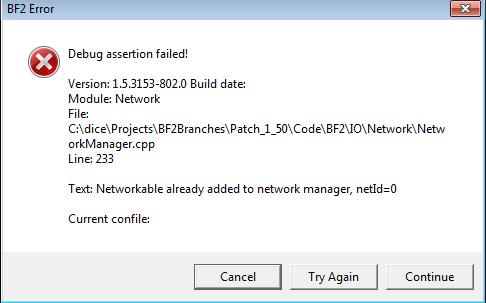
This is the error I receive when windowed: https://i.gyazo.com/94ef5739697ccd916b3 ... 0f9093.png

Re: CTD

Posted: 2015-11-06 14:12
by Mineral
That errors means that what you are running doesn't match the server. Are you running v1.3.6.1? I would really recommend reinstalling and make sure your original download isn't corrupted. Did you install v1.3.5 fresh or did you update from v1.3?

Re: CTD

Posted: 2015-11-06 14:13
by dietcrack
Updated from 1.3, will try a fresh install