Page 1 of 2
MIG 29 Skin
Posted: 2007-02-05 06:32
by GeZe
Well, I made a new skin for the MIG 29 (giving the MEC some love). Currently, the MIG 29 has a desert camo on it which is not very realistic. Just do an image search, and you will see the the majority are using a grey colour scheme.
The brown sticks out like a sore thumb in the sky, and the concrete runway. An unfair disadvantage. Well, no more!
Note: my graphic settings are low, with textures on medium.
Current MIG 29:
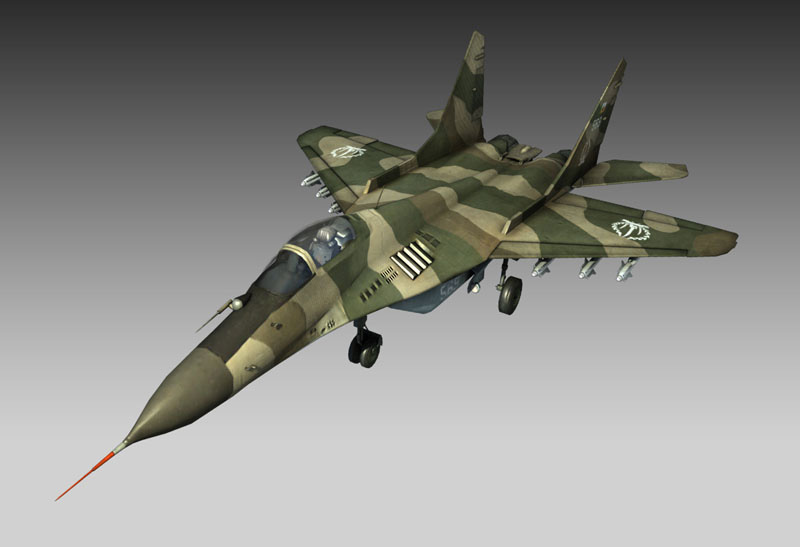

Real MIG 29:


My MIG 29 skin:


(Yes, that spike is supposed to be there. I've never noticed it before, but that's how it is.)
Posted: 2007-02-05 06:41
by Dylan
WOW! Much better man!
I always hated that tacky paint scheme on the MiG, as it just didn't feel authentic.
Good work!
Posted: 2007-02-05 06:55
by Maistros
Want me to dirty it up a bit? *grin*
Good job so far, though.
Posted: 2007-02-05 08:03
by RikiRude
I think if you tinted it more blue it would be like spot on. nicw job!
Posted: 2007-02-05 08:42
by -=ToD=-KNIFE
Very Nice, Ya known Devs i think EA dont give a damn about peaple modifying thier stuff because... if they did they would have Cracked down on the NAW Mod team for thier Many Modifyed Veichales maybe its time you go true on all the BF2 stuff? or atleast reskin a few things to More Real Standerds, oh and so you know ive figured that thats a Mig-29S so its a Kinda Multirole that does best at Ground Attack so you might wanna check up on Mig-29S skins
Posted: 2007-02-05 13:12
by G.Drew
looking good man, gj
Posted: 2007-02-05 16:03
by ryan d ale
Awesome job. Wish I could do stuff like that.
Posted: 2007-02-05 16:12
by bosco_
Good job!
But do the Migs who do their duty in the middle East have the same camo like the european ones?
I doubt that

??:
Posted: 2007-02-05 17:43
by Rhino
-=ToD=-KNIFE wrote:Very Nice, Ya known Devs i think EA dont give a damn about peaple modifying thier stuff because... if they did they would have Cracked down on the NAW Mod team for thier Many Modifyed Veichales maybe its time you go true on all the BF2 stuff?
you are allowed to put anouther skin on models.....

Posted: 2007-02-05 18:06
by Duke
looking good geze.
im currently experimenting on the harrier(no dont get exited, the thing itself is a long way from release, v buggy)
Giving it more of an actual battered camo than the standard bf2 grey that seems to go on everything
Posted: 2007-02-05 18:23
by GeZe
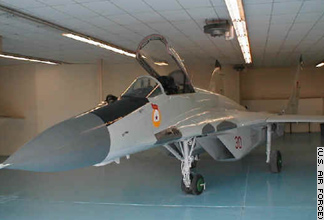
Iraq MIG 29:
Iran MIG 29:
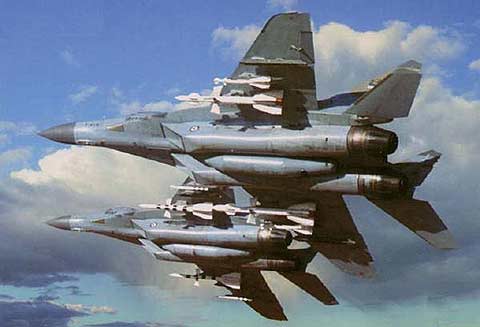
As you see, they are grey, having them desert camo makes no sense, considering they are trying to hide in the sky and concrete of the runway.
I am going to add more of a blue tint, and post a screeny soon.
Posted: 2007-02-05 18:30
by mavit
Whats so buggy about the harrier.....its just another jet isn't it?
Posted: 2007-02-05 18:34
by Rhino
mavit wrote:Whats so buggy about the harrier.....its just another jet isn't it?
thats random???
the harrier is bugged at the mo, needs a re-import + some more skinning work.
Posted: 2007-02-05 18:56
by GeZe
I gave it a more blueish tint:

hmmm, maybe not blueish enough. thoughts?
Posted: 2007-02-05 19:52
by Thunder
good job, its looking well nice, its missing soviet markings though *wink*
Posted: 2007-02-05 20:27
by Maistros
Not to upstage or attempt to outdue or take the spot away from you GeZe, hehe.. but I gave my go at skinning the MIG... Here's some screenies:
EDIT by Rhino: use other screens, they are from 504f and that is leaking....
EDIT by Maistros: I don't understand what it's leaking.. it's just a MIG shot.. the only thing sensitive in the shot would be the minimap of Gulf which was already posted elsewhere, correct? So what are you trying to protect?
Posted: 2007-02-05 20:29
by GeZe
wow, thats much better the mine
how did you get that metallic tinge?
and what do you use to make it dirty?
and what program do you use?
and how do you get it to look detailed. no matter what detail I put in the orignal file, it always blurs out in game. or is that just the graphics settings?
Posted: 2007-02-05 20:32
by Maistros
by tinge do you mean hue?
dirty i used photoshop.. various ways of doing it.. best way is duplicate desaturated layer set to pinlight with adjusted levels
program is photoshop.. been using it for almost 11 years now.
Posted: 2007-02-05 20:35
by Maistros
I am shocked Rhino took the screens down.
Posted: 2007-02-05 20:35
by GeZe
okay, thanks, hopefully my second attempt at skinning will look better