Error 1324 when launching game
Posted: 2019-02-26 00:15
Hi,
The problem
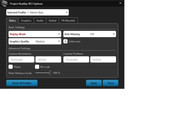
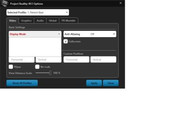
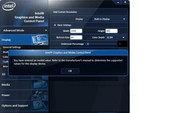
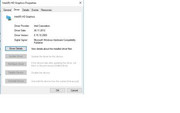
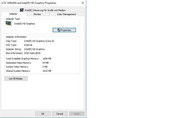
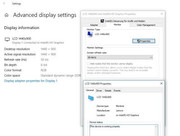
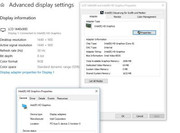
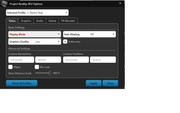
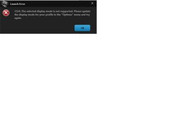
it seems that I am a bit out of luck when trying to launch the game on my mashine: After launching the game with the PRLauncher the screen goes black. However, the game does not start but exits with the error message 1324 (see screenshot). In fact, I can not even set the display mode (see screenshots).
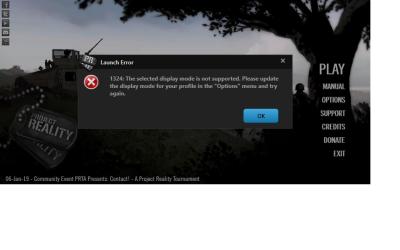
What I tried so far:
-- run the game with all kinds of compatiblity modes (Win8,WinXP, etc cetera)
-- update my drivers (they are the latest).
-- change the screen resolutions via Windows
-- try to run the game with fullscreen switched off.
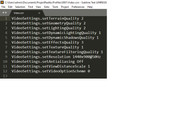
-- change the screen resolutions for default and registered profiles in the PR folder. I did this by editing the configuration files manually.
-- reset the profiles.
-- delete the ProjectReality folder with the profiles.
I also tried other resolutions e.g.
1400x900@60Hz
1400x900@50Hz
800x600@50Hz
1440x900@60Hz
1440x900@50Hz
(...)
Having done all that, I have no idea what I can do next, and would appreciate any help.
Some additional notes:
-- PR version 1.5.4.0, OS: Windows 10
-- Display and Graphic Adapter are working properly (no errors).
-- With Windows 10, my computer does not accept anything other than 50Hz.
-- The funny thing is that I can run 1400x900/60Hz (not 1440x900!) under Linux. There is no option for these resolutions configurations under Win10.
Hardware specs:
System Information: Display
Support Info Listing from the PRLauncher:
Not sure where the problem is here. It is either the drivers (thank you, Lenovo, for messing with the graphic drivers to run at 50Hz), or it is the hardware - my old X61 could even run PR, so this would be strange - or (...)?
Many thanks!
Cheers!
PS: Images can be found here, or clicked below:
The problem
it seems that I am a bit out of luck when trying to launch the game on my mashine: After launching the game with the PRLauncher the screen goes black. However, the game does not start but exits with the error message 1324 (see screenshot). In fact, I can not even set the display mode (see screenshots).
What I tried so far:
-- run the game with all kinds of compatiblity modes (Win8,WinXP, etc cetera)
-- update my drivers (they are the latest).
-- change the screen resolutions via Windows
-- try to run the game with fullscreen switched off.
-- change the screen resolutions for default and registered profiles in the PR folder. I did this by editing the configuration files manually.
-- reset the profiles.
-- delete the ProjectReality folder with the profiles.
I also tried other resolutions e.g.
1400x900@60Hz
1400x900@50Hz
800x600@50Hz
1440x900@60Hz
1440x900@50Hz
(...)
Having done all that, I have no idea what I can do next, and would appreciate any help.
Some additional notes:
-- PR version 1.5.4.0, OS: Windows 10
-- Display and Graphic Adapter are working properly (no errors).
-- With Windows 10, my computer does not accept anything other than 50Hz.
-- The funny thing is that I can run 1400x900/60Hz (not 1440x900!) under Linux. There is no option for these resolutions configurations under Win10.
Hardware specs:
Code: Select all
Hardware Specs: ThinkPad X201- 3626-W8S - Intel Core I5-560M - 8 GB Ram - 320 GB HDD - 12,1 " 16:10 1440x900 Display (LTD121EQ3B)
Further Display Specs: 1440x900 42T0480 140,3 250 LED 300:1 TMD-Toshiba LTD121EQ3B X201sCode: Select all
Name    Intel(R) HD Graphics
PNP Device ID    PCI\VEN_8086&DEV_0046&SUBSYS_215A17AA&REV_02\3&B1BFB68&0&10
Adapter Type    Intel(R) HD Graphics (Core i5), Intel Corporation compatible
Adapter Description    Intel(R) HD Graphics
Adapter RAM    (342.011.904) bytes
Installed Drivers    igdumd64.dll,igd10umd64.dll
Driver Version    8.15.10.2900
INF File    oem23.inf (iILKM0 section)
Color Planes    Not Available
Color Table Entries    4294967296
Resolution    1440 x 900 x 50 hertz
Bits/Pixel    32
Memory Address    0xF2000000-0xF23FFFFF
Memory Address    0xD0000000-0xDFFFFFFF
I/O Port    0x00001800-0x00001807
IRQ Channel    IRQ 4294967291
I/O Port    0x000003B0-0x000003BB
I/O Port    0x000003C0-0x000003DF
Memory Address    0xA0000-0xBFFFF
Driver c:\windows\system32\drivers\igdkmd64.sys (8.15.10.2900, 11,74 MB (12.311.776 bytes), 26.11.2012 23:26)Code: Select all
System Information
------------------
  Operating System: Microsoft Windows 10 Pro N (10.0.17134)
      Architecture: 64-bit
   Current Culture: German (Germany)
       Motherboard: LENOVO 3626W8S
         Processor: Intel(R) Core(TM) i5 CPU       M 560  @ 2.67GHz (Physical: 2, Logical: 4)
            Memory: 8,00 GB
      DIMM Modules: DIMM 1: 4,00 GB @ 1334 MHz
                    DIMM 2: 4,00 GB @ 1334 MHz
         Page File: 1,25 GB
    .NET Framework: 4.6+ Release Build: 461808, Runtime: 4.0.30319.42000
Display Information
-------------------
 Display Device(s): LCD 1440x900 on Intel(R) HD Graphics
   Display Mode(s): 1440 x 900 (32 bit) @ 50 Hz
    Driver Version: 8.15.10.2900
    Display Memory: 3,68 GB
     Multisampling:
               DPI: 96 (100%)

Audio Information
-----------------
  Primary Playback: Speakers (Conexant 20585 SmartA
 Primary Recording: Internal Microphone (Conexant 2
  Open AL Renderer: Software
               EAX: True
           EAX 1.0: False
           EAX 2.0: True
           EAX 3.0: False
           EAX 4.0: False
           EAX 5.0: False
             X-RAM: False

Disk Information
----------------
      Install Path: D:\project\PR
                    Free: 125,30 GB, Total: 146,48 GB, FS: NTFS, SSD: True
          Mod Path: D:\project\PR\mods\pr
                    Free: 125,30 GB, Total: 146,48 GB, FS: NTFS, SSD: True
     Profiles Path: C:\Users\admin\Documents\ProjectReality\Profiles
                    Free: 52,43 GB, Total: 96,33 GB, FS: NTFS, SSD: True
    Update DL Path: C:\Users\admin\AppData\Local\Project Reality\Project Reality BF2\Downloads
                    Free: 52,43 GB, Total: 96,33 GB, FS: NTFS, SSD: True
   Update Log Path: C:\Users\admin\AppData\Local\Project Reality\Project Reality BF2\UpdateLogs
                    Free: 52,43 GB, Total: 96,33 GB, FS: NTFS, SSD: True

Game Information
----------------
    Installed Mods: pr
       Current Mod: pr
           Version: Standalone - 1.0
        PR Version: 1.5.5.2
          Language: english
   Debug Available: False
     Large Address: True
Supported Hardware: None

Profile Information
-------------------
      Profile 0001: Patient-Bear
              Type: Online
        View Intro: True
        Fullscreen: True
      Display Mode: 1440x900@60Hz
Display Mode Valid: False
   Graphics Scheme: Low
     Multisampling: Off
             VSync: False
            NoLods: False
Terrain QMany thanks!
Cheers!
PS: Images can be found here, or clicked below: