Page 1 of 1
C5 GB Poster
Posted: 2007-04-03 11:01
by SnipA
hi guys
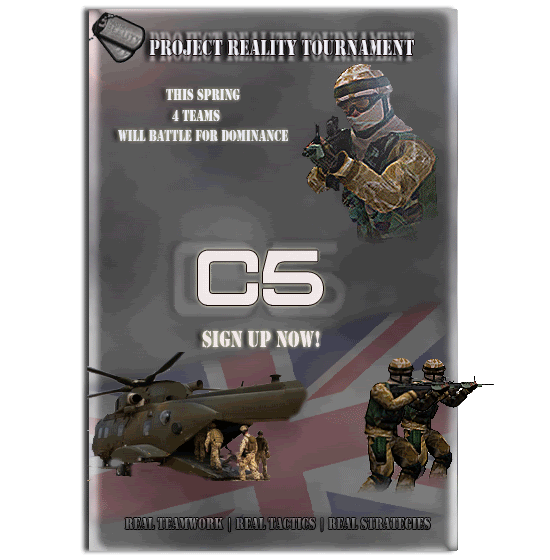
ive been pulling my hair out whilst making this, i took some quotes from the original one off the homepage. What do you guys think?

Posted: 2007-04-03 11:02
by Gaz
ya spelt 'Tournament' wrong

Is Dominance spelt correctly? Not sure lol.
Love the chinook and rifles pretruding from the poster

Posted: 2007-04-03 11:03
by KP
Love it, but you should remove the Harrier and the Chinook, as they are not in the game
Replace them with a Merlin and a Landy, perhaps? Also, maybe have a look at the edges of the two soldiers at the bottom there?
And you misspelt "tournament".
EDIT: Gaz beat me to it.
Posted: 2007-04-03 11:06
by SnipA
Fixed
Posted: 2007-04-03 11:19
by SnipA
How about this:
Posted: 2007-04-03 11:36
by KP
Yeah, that's more like it!

Posted: 2007-04-03 11:37
by Chubben
I like it but just one thing that needs to be done
you have to cut out the men/chopper with the path tool otherwise you get the horrible white edge around your things
Posted: 2007-04-03 11:41
by SnipA
Gaz i sent an email to the eamil provided on the page about join PR but i havent got anything back?
Posted: 2007-04-03 12:03
by SnipA
I like it but just one thing that needs to be done you have to cut out the men/chopper with the path tool otherwise you get the horrible white edge around your things
where abouts is that lol, sorry ive never used that

Posted: 2007-04-03 20:23
by Cherni
Thats really good!
Posted: 2007-04-04 04:29
by hoc_xfirestormx
woah! i actually didnt see this thread. i made one too


yeah i was really bored.
woah! very optimized. crazy image ready. whatev though, you get the idea.
Posted: 2007-04-04 08:08
by SnipA
where do you get your images from and do you know what the path tool is??
Posted: 2007-04-04 08:34
by M4nicMin3r
SnipA wrote:where do you get your images from and do you know what the path tool is??
The path options (assuming your using photoshop) are in their own separate pallet. You draw paths with the pen tool on your main tool pallet.
The pen tool takes some getting used to ..,i'd check a few tutorials first, these might help.
Paths & Pen Tool
How to use Photoshop's Pen Tool
Photoshop Pen Tool, page 1
Posted: 2007-04-04 09:07
by SnipA
thanks mate
the pen tool is sooo much more accurate!!
Posted: 2007-04-04 11:29
by M4nicMin3r
nps ...,
Just for shizz n gigglz you could try a photoshop tute i made for the ABR award contest (now dead

)
Its how to create your own ribbon in photoshop You can download the PS file at the bottom of the tutorial.
Posted: 2007-04-04 11:35
by SnipA
wicked, good job m8
Posted: 2007-04-04 11:38
by M4nicMin3r
Chrs .. shame none of my submissions got used
i did some pretty decent ones too....., shameless hint to the devs
Posted: 2007-04-04 15:04
by hoc_xfirestormx
****. my clanmate altec just told me i apparently have a noticeable red stroke around the text. that is an accident (i am colorblind, so it looks less noticeable to me). revised version coming soon