Page 1 of 1
[Help!] Map package issue...
Posted: 2007-05-16 23:31
by MichSt-Spartan
Well, I've been working on a map for 3 days, and I was planning on showing you guys some screens, but I ran into a problem yesterday. When I go to package my map, about 20% in I get this error message:
EditorMemory.dll: all alloc attempts failed for size 41609628
Any ideas what my problem may be? TIA.
Edit: I probably should have done this first, but I just checked the bf2editor forums, and I apparently need to free up some disc space (which I AM running out of). Defrag time.

Posted: 2007-05-17 02:37
by PARAMEDIC.CA
good question.
you can hand pack the files by using another map as a guide
or
be sure that your tpaint files are out of your level folder before packing
or
you can use a 3rd party batch file
here is a link from the editor website:
http://bfeditor.org/forums/index.php?sh ... ap+packing
Posted: 2007-05-17 23:06
by MichSt-Spartan
DVB-PARAMEDIC.CA wrote:good question.
you can hand pack the files by using another map as a guide
or
be sure that your tpaint files are out of your level folder before packing
or
you can use a 3rd party batch file
here is a link from the editor website:
http://bfeditor.org/forums/index.php?sh ... ap+packing
Yeah I'm still having problems... haven't removed the tpaint files, I'll try that. I think you guys are going to like what you see.
Posted: 2007-05-18 00:48
by MichSt-Spartan
Ok, I now no longer get errors, but I can't get the map to load. I placed the folder in the pr levels folder, deleted everything but client.zip, server.zip, and the Info folder, but the map doesn't show up in the list ingame. I don't get it, I've never had any of these problems before.
Posted: 2007-05-18 01:50
by danthemanbuddy
Sorry mate, Screenies or your whole map thing is bollocks.

Posted: 2007-05-18 03:35
by Rhino
MichSt-Spartan wrote:Ok, I now no longer get errors, but I can't get the map to load. I placed the folder in the pr levels folder, deleted everything but client.zip, server.zip, and the Info folder, but the map doesn't show up in the list ingame. I don't get it, I've never had any of these problems before.
dop you still have the .desc file?
Posted: 2007-05-18 18:29
by MichSt-Spartan
'[R-DEV wrote:Rhino']dop you still have the .desc file?
Yes, I do.
This is it: (the site's code removes the > and < symbols, so I replaced them with their respective brackets)
Code: Select all
{map}
	{name} Banghazi {/name}
	{briefing locid="LOADINGSCREEN_MAPDESCRIPTION_Banghazi"}map description for modders maps not localized (english only){/briefing}
	{music} common/sound/menu/music/load_MEC_music.ogg {/music}
	{modes}
	{/modes}
{/map}
I'm going to go out on a limb and say that I need a gamemode? And how would I add it?
Posted: 2007-05-18 18:56
by Rhino
[PHP]<map>
<name> Banghazi </name>
<briefing locid="LOADINGSCREEN_MAPDESCRIPTION_Banghazi">map description for modders maps not localized (english only)</briefing>
<music> common/sound/menu/music/load_MEC_music.ogg </music>
<modes>
<mode type="gpm_cq">
<maptype ai="0" players="16" type="doubleassault" locid="GAMEMODE_DESCRIPTION_doubleassault">Unlocalized test for this mode on this map</maptype>
<maptype players="32" type="headon" locid="GAMEMODE_DESCRIPTION_headon">Unlocalized test for this mode on this map</maptype>
<maptype players="64" type="headon" locid="GAMEMODE_DESCRIPTION_headon">Unlocalized test for this mode on this map</maptype>
</mode>
</modes>
</map>[/PHP]
that should work.
Posted: 2007-05-18 19:41
by MichSt-Spartan
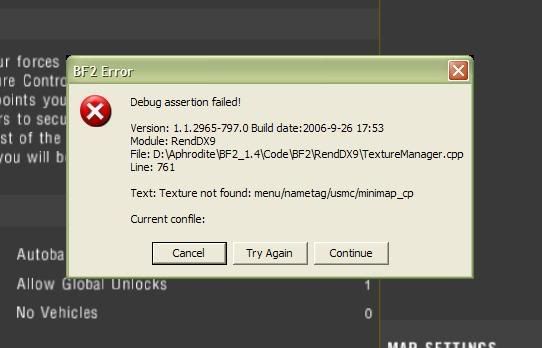
Yep. New issue. Right before 'Join' appears I get this:
Posted: 2007-05-18 19:43
by Rhino
Posted: 2007-05-18 19:46
by Outlawz7
Why would you pack it?
I got my map still unpacked..and can play it fine..
Posted: 2007-05-18 19:47
by Rhino
Outlawz wrote:Why would you pack it?
I got my map still unpacked..and can play it fine..
they wont online

Posted: 2007-05-18 19:48
by Outlawz7
'[R-DEV wrote:Rhino']they wont online
yea, but on your own rig, and just to take screenshots..well, you could take them in the editor...Print Screen and Ctrl+V it into Paint or Photoshop...
Posted: 2007-05-18 20:00
by MichSt-Spartan
Outlawz wrote:yea, but on your own rig, and just to take screenshots..well, you could take them in the editor...Print Screen and Ctrl+V it into Paint or Photoshop...
Well duh... but I also want to see how the map looks in-game.
Posted: 2007-05-18 21:42
by marcoelnk
3 days...aint that much he ^^
Posted: 2007-05-19 08:27
by Rhino
marcoelnk wrote:3 days...aint that much he ^^
I dont see you doing much in 3days. I think hes getting on quite well to be honest and very well if only 3days.