[Map] Black Hawk Down / Ramiel [Released]
Posted: 2007-08-23 23:36
Thursday Morning, September 6th Update:
New map uploaded, get the Black_Hawk_Down.zip off my filefront page (link in my sig) and also, be sure to get the server.zip fix for the map. Just drop it in after unzipping the map, and have it overwrite the old server.zip. Kits will work now.
biggest issue now is AAS nor conquest are working... theres something really wrong with the CP's... they are not updating... and this is causing major issues...
in the meantime, watch this vid of my map
http://files.filefront.com/Mogadishuwmv ... einfo.html
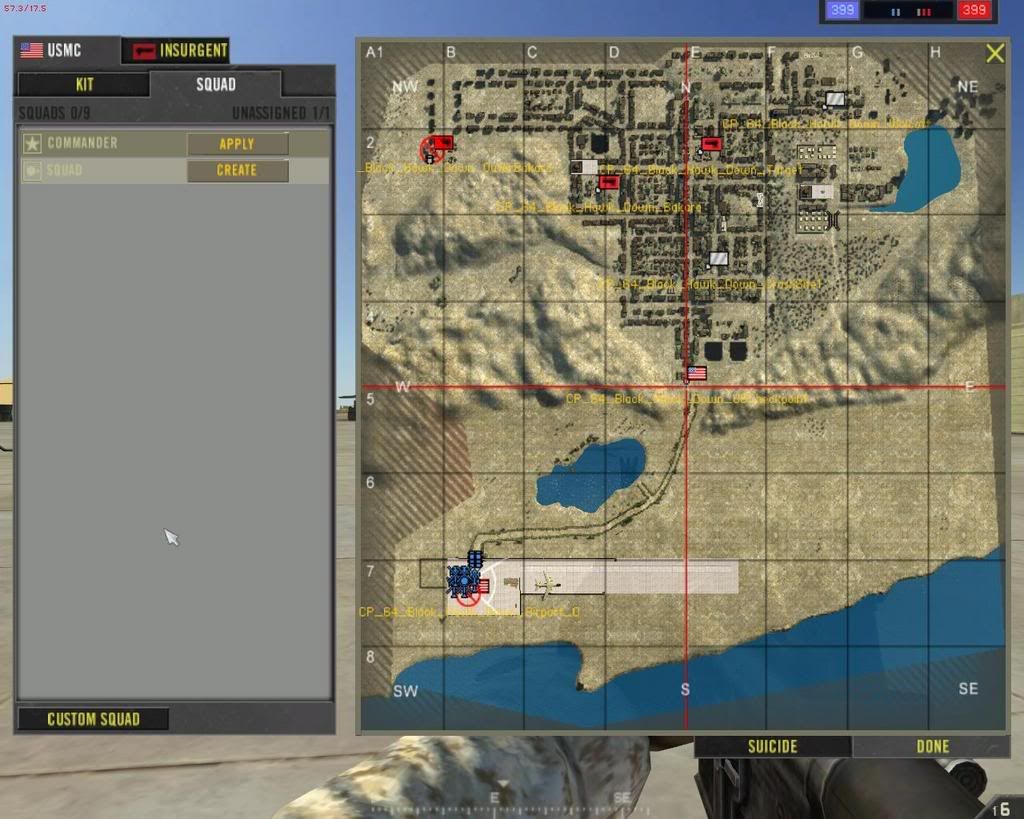
My first map ever made, and the result of my summer long project is finally here for Project reality .6!!!
It is in its alpha stage and I know there are some things that need work, but anyone interested, PLEASE download and give it a try on a local server, or better yet, host it on your server!!!
I hope you all enjoy.
Known problems:
1. overgrowth folder was corrupt and was deleted. Therefore, all trees placed by the overgrowth tool are missing. However, all trees in the city itself were placed manually, so they are still there. only trees on the outskirts are missing.
2. bakara market (INS main base) needs A TON OF work. It is still very basic, but as it is uncappable, its not too big a problem until the INS start to lose...
3. Please let me know if the number of RPG's are enough. And technicals.
4. Draw distance on the bushes **edit(and all smaller objects for that matter, is this an in-editor setting??)** is MUCH lower than i want, but I dont know if I can change that...
5. I get a full 60fps while flying over the center of the city. I hope it runs well on everyone elses computer.
6. No SP support as of yet, but that might be on its way. As of right now, there is only one mode to be used which is the 64 player conquest. All other sizes are identical and were not altered as far as I know. So start up in 64 size map.
***NEW***
7. The rotors and junk around BOTH black hawks in the city are either floating or are lower than wanted. Dont know how this happened, I checked them religiously Will fix though. (TY2D2)
8. The inside walls of the Target building, while ok, are made up of two destructible pieces. When the top explodes, a half circle is made in it. When the bottom piece explodes, a half circle is created in it. However, the two half circles dont form a circle, because they are both facing the same way... not a big big deal, but ill flip the top one to make it look a bit better. (TY2D2)
9. Some barricades are able to be driven over, and while they hurt you and the vehicle some with the flames, it is not sufficient to be a good barricade. I will add more statics inside to lodge/stop cars and hopefully catch you in them to burn ever so slowly. (TY2D2)
thats all I can think of right now... aside from the city needing to be a bit dirtier and more static cars/boxes/trash, etc.


New map uploaded, get the Black_Hawk_Down.zip off my filefront page (link in my sig) and also, be sure to get the server.zip fix for the map. Just drop it in after unzipping the map, and have it overwrite the old server.zip. Kits will work now.
biggest issue now is AAS nor conquest are working... theres something really wrong with the CP's... they are not updating... and this is causing major issues...
in the meantime, watch this vid of my map
http://files.filefront.com/Mogadishuwmv ... einfo.html
My first map ever made, and the result of my summer long project is finally here for Project reality .6!!!
It is in its alpha stage and I know there are some things that need work, but anyone interested, PLEASE download and give it a try on a local server, or better yet, host it on your server!!!
I hope you all enjoy.
Known problems:
1. overgrowth folder was corrupt and was deleted. Therefore, all trees placed by the overgrowth tool are missing. However, all trees in the city itself were placed manually, so they are still there. only trees on the outskirts are missing.
2. bakara market (INS main base) needs A TON OF work. It is still very basic, but as it is uncappable, its not too big a problem until the INS start to lose...
3. Please let me know if the number of RPG's are enough. And technicals.
4. Draw distance on the bushes **edit(and all smaller objects for that matter, is this an in-editor setting??)** is MUCH lower than i want, but I dont know if I can change that...
5. I get a full 60fps while flying over the center of the city. I hope it runs well on everyone elses computer.
6. No SP support as of yet, but that might be on its way. As of right now, there is only one mode to be used which is the 64 player conquest. All other sizes are identical and were not altered as far as I know. So start up in 64 size map.
***NEW***
7. The rotors and junk around BOTH black hawks in the city are either floating or are lower than wanted. Dont know how this happened, I checked them religiously
Will fix though. (TY2D2)8. The inside walls of the Target building, while ok, are made up of two destructible pieces. When the top explodes, a half circle is made in it. When the bottom piece explodes, a half circle is created in it. However, the two half circles dont form a circle, because they are both facing the same way... not a big big deal, but ill flip the top one to make it look a bit better. (TY2D2)
9. Some barricades are able to be driven over, and while they hurt you and the vehicle some with the flames, it is not sufficient to be a good barricade. I will add more statics inside to lodge/stop cars and hopefully catch you in them to burn ever so slowly. (TY2D2)
thats all I can think of right now... aside from the city needing to be a bit dirtier and more static cars/boxes/trash, etc.