Page 1 of 1
[Help!] Lightmap and Roads problem
Posted: 2007-09-17 09:03
by Outlawz7
I generated my lightmaps and this is how the grass looks

I basically have no idea, wth I messed up in the Lightmap options, so if anyone can enlighten me, which options to use to render proper lightmaps, I'd be grateful
Also, roads never render further than like 20-30m, anyone know the solution to this?

Posted: 2007-09-17 14:10
by Surround
Wow, I think bf2 mapping is not for me

I hope you find help tho
Posted: 2007-09-17 17:46
by Rhino
ehhh what texture are u using for your grass?
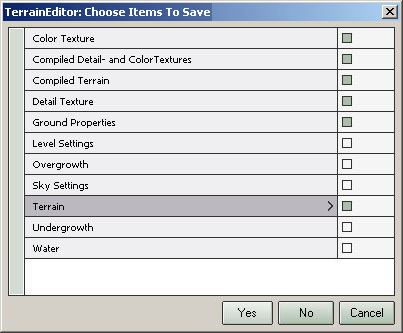
and to fix your roads, go into the terrain editor and save the following:
Posted: 2007-09-17 18:01
by Outlawz7
karkand_grass
Ironic, eh

And save only the Terrain option or all of them ticked off (in your pic)?
Posted: 2007-09-17 18:02
by Rhino
try a diffrent textuer and also try relightmapping your terrain under diffrent settings, it dont look lightmapped...
Posted: 2007-09-17 18:09
by Outlawz7
But it is lightmapped..sort of?

Also
And save only the Terrain option or all of them ticked off (in your pic)
Posted: 2007-09-17 18:32
by Rhino
you save the ones that are checked in that pic...
Posted: 2007-09-17 22:23
by Outlawz7
both grass and roads are now fixed, thanks for helping

Posted: 2007-09-18 07:33
by Desertfox
That map looks nice, can I see more screenshots
Posted: 2007-09-18 08:08
by =tGA=Harry
Ohh, the famous psychedelic hippie grass!

I have had this several times.
It happens when the colormaps gets distorted (like when you change groundsettings etc) and somehow information about the color is lost towards the undergrowth.
But dont worry, it is an easy fix.
Choose terrain and the texture palette. In this pallete there is a button which says colormap. Press this , and resave your map. The colormap is now fixed again and the undergrowth gets the right info. Then resave undergrowth to be sure.

Posted: 2007-09-18 08:10
by Desertfox
=tGA=Harry wrote:Ohh, the famous psychedelic hippie grass!
I have had this several times.
It happens when the colormaps gets distorted (like when you change groundsettings etc) and somehow information about the color is lost towards the undergrowth.
But dont worry, it is an easy fix.
Choose terrain and the texture palette. In this pallete there is a button which says colormap. Press this , and resave your map. The colormap is now fixed again and the undergrowth gets the right info. Then resave undergrowth to be sure.
lol its already been solved
Posted: 2007-09-18 08:11
by =tGA=Harry
Yeah, but now you know why it happened...
Posted: 2007-09-18 08:58
by Rhino
=tGA=Harry wrote:Yeah, but now you know why it happened...
I've never had the hippy grass
Posted: 2007-09-18 09:33
by Outlawz7
[R-CON]Desertfox wrote:That map looks nice, can I see more screenshots
When it's done
