Page 1 of 2
[Question] How can i recolor weapons
Posted: 2007-10-28 15:44
by Dan UK
Can somebody please tell me how to recolor weapons using photo shop please

Posted: 2007-10-28 15:50
by Z-trooper
Alrighty.
You should install a .dds plugin so you can play around with the texture files.
http://developer.download.nvidia.com/to ... 7.1915.exe
then you need to unpack the objects_client.zip in the \EA GAMES\Battlefield 2\mods\pr\objects folder.
If you browse around a bit you will find some texture folders/files in the weapon folders. they have the .dds extension. open that with photoshop, recolor it, put it into the zipped folder, run PR, see the changes..
that should be enough to get you started, if you want further info on stuff, let me know and I'll try to help out.
Posted: 2007-10-28 15:52
by Dan UK

cheers youve helped alot
Posted: 2007-10-28 16:07
by Z-trooper
For some more info you could try watching this video tutorial on how to create a weapon. only the 2nd part about texturing, he has a lot of good tips on how to make textures look realistic.
the first two videos are on unwrapping. It might not be that exciting if you only want to do the textures, but I recommend that you at least browse through it to see how the 2d texture file relates to the 3d model / why it looks like it does...
here is the file you need...
http://files.moddb.com/7833/download-cr ... or-source/
Posted: 2007-10-28 16:36
by Rambo Hunter
Hmm, i think Z-Trooper said pretty much everything. My advice: Just remember to make new layers for all the changes and save alot... you'll regret it if you don't

Posted: 2007-10-28 16:43
by Dan UK
Thanks guys i'm downloading the vid now, ive got a feeling it's going to be harder than it looks
Posted: 2007-10-28 17:54
by Z-trooper
Dan UK wrote: Thanks guys i'm downloading the vid now, ive got a feeling it's going to be harder than it looks
depends on how experinced you are with photoshop and various techniques..
Posted: 2007-10-28 18:47
by Dan UK
Z-trooper wrote:depends on how experinced you are with photoshop and various techniques..

Well in that case it will be harder than it looks for me unless it involves using the magnetic lasso tool lol
Posted: 2007-10-29 14:46
by Dan UK
Right, i recolored a pair of binocs but the difference didnt show in game.
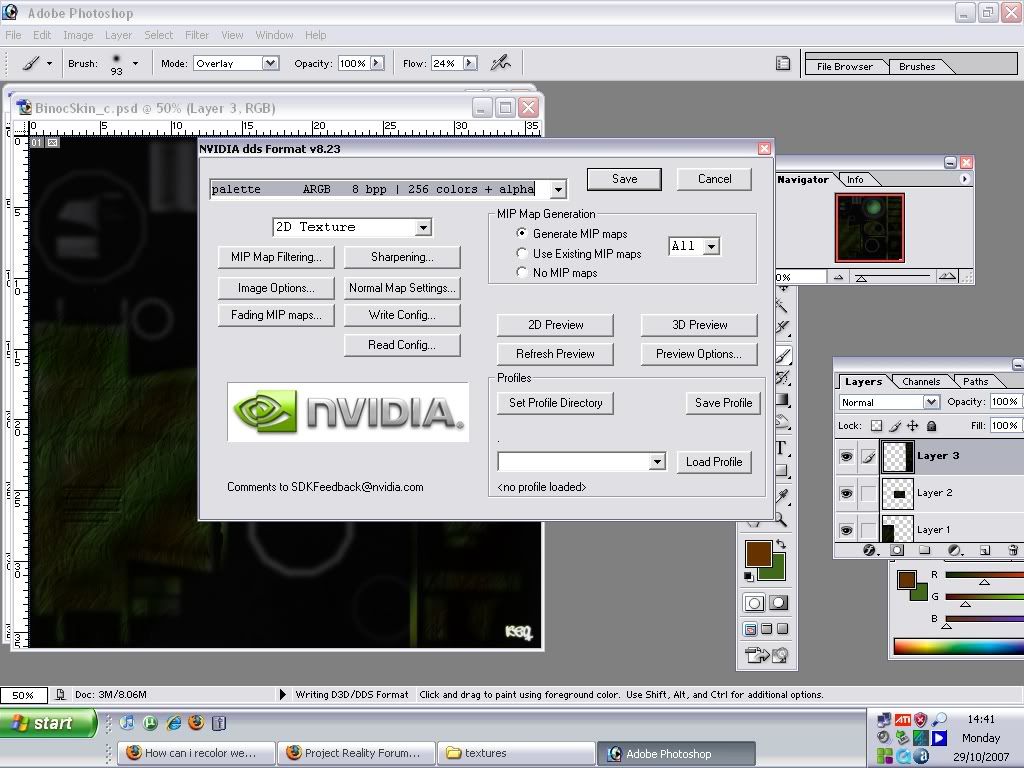
what sould i click in on the save screen :S
Posted: 2007-10-29 14:49
by Z-trooper
I'd probably chose the first one.. something with "DXT-1 no alpha" or something like that..
if you want it to show up in game you need to replace it with the original texture file - inside the zipped folder (which is where the game looks for stuff)...
Posted: 2007-10-29 15:00
by Pride
Use one of the DXT settings, and dont change any of the other settings. I think i normallly go for 'DXT5 interpolated alpha' or something like that.
Also, like Z-trooper said, make sure you replace it back in the same place as the original, with exactly the same name (Something_c).
Posted: 2007-10-29 18:24
by Dan UK
Thanks guys i can sorta recolour weapons now
it makes the game feel abit more personal when youve got your name on your rifle
Posted: 2007-10-29 18:49
by Dan UK
oh dear

ive just recoloured the brit sniper rifle with some ace cammo. but now when i try to load a map on pr it ctd's me when it says loading objects on the load screen

anybody know how i can sort it
Posted: 2007-10-29 19:09
by Pride
run in windowed mode.
Go to start>run and put in:
"C:\Program Files\EA GAMES\Battlefield 2\BF2.exe" +modPath mods/pr +menu 1 +fullscreen
0
except change the mod to the name of the mod that you have your custom skins in
When it crashes it should tell you what the problem is

Posted: 2007-10-29 19:17
by Z-trooper
Pride wrote:run in windowed mode.
Go to start>run and put in:
"C:\Program Files\EA GAMES\Battlefield 2\BF2.exe" +modPath mods/pr +menu 1 +fullscreen
0
except change the mod to the name of the mod that you have your custom skins in
When it crashes it should tell you what the problem is
good tip there mate

Posted: 2007-10-29 19:45
by Dan UK
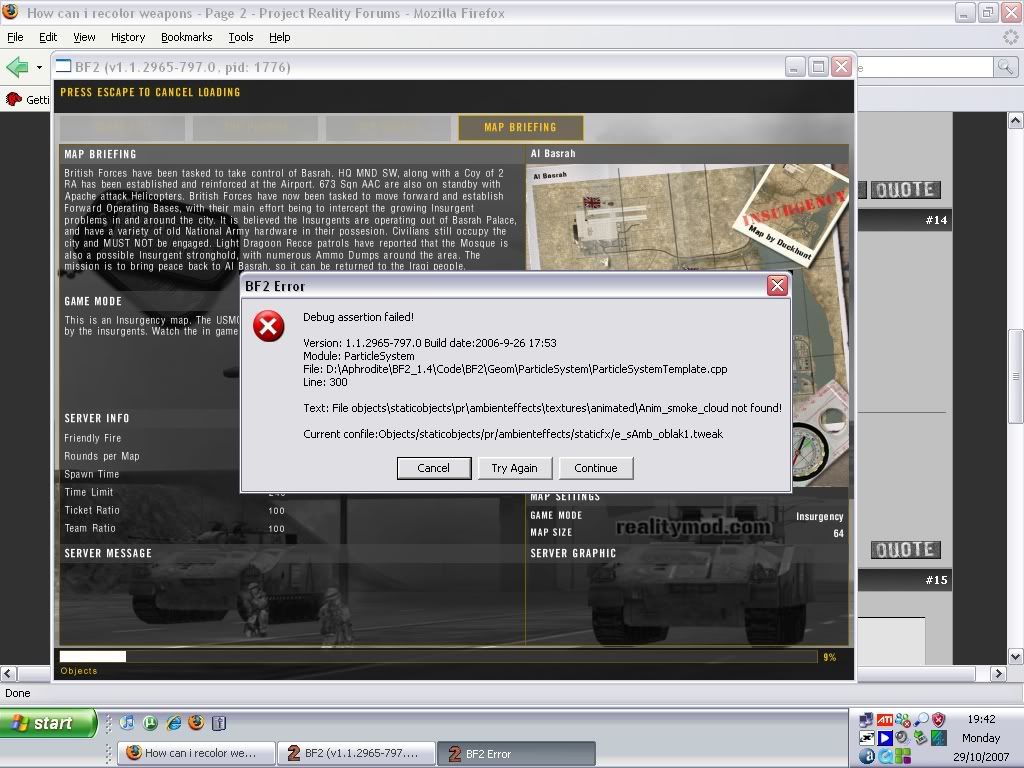
any ideas?
Posted: 2007-10-29 20:02
by Z-trooper
looks like you are missing either some code or a file containing something to do with smoke particles :/ or maybe it just cant find it due to some other changes when you modified the contents of the game. But I'm no expert, those are just some of my guesses
Posted: 2007-10-29 20:20
by Dan UK
there are alot of files missing from my client_objects folder for some reason so ive replaced some with the ones from the PR_SP which has normal pr files in but now ive just tried to put the russia/cars/red4x4 in and its not having it, looks like ill have to re install pr. its saying something about a file called rzi and that it cant be created. this is baffling! woah **** now objects_server.zip has gone missing :S lol
Posted: 2007-10-29 20:39
by Z-trooper
Dan UK wrote: there are alot of files missing from my client_objects folder for some reason so ive replaced some with the ones from the PR_SP which has normal pr files in but now ive just tried to put the russia/cars/red4x4 in and its not having it, looks like ill have to re install pr. its saying something about a file called rzi and that it cant be created. this is baffling! woah **** now objects_server.zip has gone missing :S lol
always take small steps when messing around with game files and test every time you make a change, or else stuff will just build up and you wont know where what went wrong :/ trust me, I know...
Posted: 2007-10-29 21:01
by Dan UK
advice taken