Page 1 of 4

[Request] Help PR making some icons (photoshop skills necessary)

Posted: 2007-11-01 07:51
by dbzao
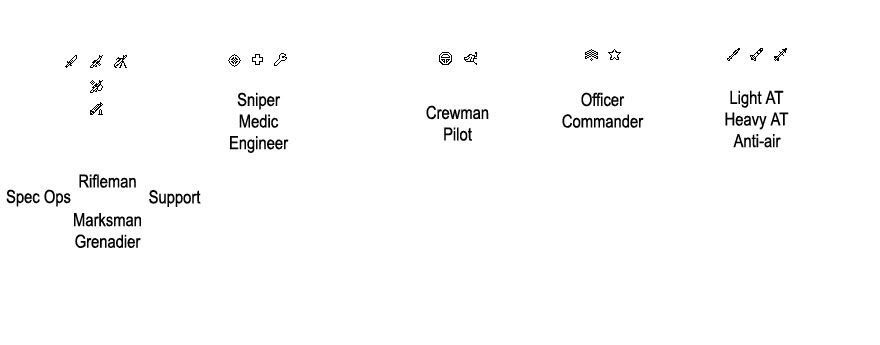
We want to make new icons for our specialized kits. These icons appear in the squad list and scoreboard and would be very useful to show them differently.

Here are the ones from vBF2 located in menu_client.zip/HUD/Texture/Ingame/Kits/Icons:

Image

We want to use the original ones like this:

- kit_Commander = commander
- kit_ATAA = heavy AT
- kit_Engineer = engineer
- kit_Heavy_Assault = support gunner
- kit_Light_Assault = rifleman
- kit_Medic = medic
- kit_Sniper = sniper
- kit_SpecOps = specops

And then we would need a few more:

- kit_Officer: maybe a rank icon, like stripes or something.
- kit_AA: rotate the AT one 45 degrees so it's pointing up.
- kit_Crewman: a steering wheel.
- kit_Pilot: pilot wings or something pilot-like.
- kit_Light_AT: could be an AT4 shape thing so it's different than the HAT.
- kit_Grenadier: paint a grenade launcher bellow the light_assault rifle.
- kit_Marksman: don't know, but would be nice if it was different than the sniper.

Anyone wanting to help or having better suggestions for a kit icon, post bellow.

Also notice that you need to make each one with and without the outline. Check the folder I posted above to know what I mean.

Posted: 2007-11-01 07:55
by Rhino
good idea db :D

hope some of you can help here ;)

Posted: 2007-11-01 08:01
by MAINERROR
I'll try to design them today. ;-)

Posted: 2007-11-01 08:04
by Desertfox
What do the other ones look like? I don't currently have photoshop installed ;o

Posted: 2007-11-01 08:14
by MAINERROR
[R-CON]Desertfox wrote:What do the other ones look like?
What do you mean?

Posted: 2007-11-01 08:17
by dbzao
Thanks MAINERROR, check the folder I linked to see how exactly they did it. It requires an alpha channel and a version without the black outline.

Posted: 2007-11-01 08:25
by MAINERROR
In the middle of this icons ... is there a white color or is it transparent?

Posted: 2007-11-01 08:27
by dbzao
That's why I said to check the icons already in vBF2... :p

It's white in the middle and transparent around. The one without outlines has the same white shape but without the black lines.

They don't use any gray pixels. It looks like they do in the picture above, but it's just how the thumbs are done. They just use black pixels to make the outline, white for the body inside and transparent around it.

Posted: 2007-11-01 08:39
by MAINERROR
Roger that i'll try my best

Posted: 2007-11-01 08:44
by Z-trooper
Oh MARINE already took the job. Maybe thats good, since my desk is full :|

Posted: 2007-11-01 08:50
by Maxfragg
ive done a marksman icon and I'm working on the others, will upload them with in the next 12h, cya guys

Posted: 2007-11-01 10:16
by Maxfragg
here we go, the marksman without outline looks awefull, i know, will fix that later

edit: all issues fixed, i hope you can use some of my icons

Posted: 2007-11-01 10:29
by dbzao
Nice Maxfragg... thanks, will test them out.

Some changes needed:

- I think the AA would look better if it was in a 45 degree angle, like the rifles. Right now it looks like a ICBM or a hairy penis :p

- The crewman needs to be more general, not a little tank, specially because the vehicle icon shows up right beside that one in the list. I think the steering wheel is still the best option.

- I will test the Light AT one in-game but I'm not sure about the little missile. I think just the tube should be ok. You should check the non-outlined one and make the tube a little thicker for that one.

- Maybe the officer stripes could be 1 pixel closer together, and not that wide. It looks a little weird in-game. Check the medic margins to have an idea.

- The pilot one I would remove the little feets at the bottom. Would be something more like this: http://www.cookieman.org/WING%20SR%20PILOT%209M.jpg

- Marksman without outline needs work as you said.

- I need one more icon: it's the light assault rifle with some ammo on the side. Vertical or horizontal bullets, something like that.

And that's it ;) Thanks for your help. :)

Posted: 2007-11-01 12:01
by dbzao
@Chuc: If you want to do it, go ahead, but I don't see why it's needed.

@Maxfragg: there's a problem with the TGA type you used. BF2 only works with a certain type of TGA. Use 32-bit without any compression. I think that works fine.

Posted: 2007-11-01 12:10
by Chuc
Here's my attempt.

Image

Concerning the grenadier icon, its meant to resemble a M203, or just a generic UGL
If you guys wanna go commonwealth, flip the officer chevrons =D

(edit: I also threw in that rifleman ammo one you wanted)

Posted: 2007-11-01 13:00
by =HR=Drayu
Except for the first set and the pilot, I think they look good Chuc, good job man!

Posted: 2007-11-01 14:53
by tupla_s
Some of them didn't turn out that good, hard to work with that small pics
Image
bigger -> http://i89.photobucket.com/albums/k207/tupla_s/All.jpg

The red bit is just the alpha channel overlay, it's white really.
the pilot was supposed to be wings but it looks more like a butterfly =)

Posted: 2007-11-01 16:28
by MAINERROR
Chuc's icons are very nice. I had made it the same way i think.

Posted: 2007-11-01 17:04
by Maxfragg
Chuc: i think yours look sic without the outline that might be the problem, apart from this, most of them look nice.
Tupla s: i like your AT icon, and well, with the GL icon, we had the same idea :-P
as long as my Marksman is used, i'll be glad, good work all together, will be a great help, when you see what classes your squadmen use and whar kind of kit is lying on the ground

Posted: 2007-11-01 18:54
by Mongolian_dude
Grenadier would simply be a pineapple/Stielhandgrenate?

Its not very noticeable, adding a UGL.

...mongol...