Page 1 of 2
[Question] BF2 Object Editor Question
Posted: 2008-04-11 23:13
by llPANCHOll
I hope this is the right place for this thread..
Using the BF2 Object Editor, how do I render this
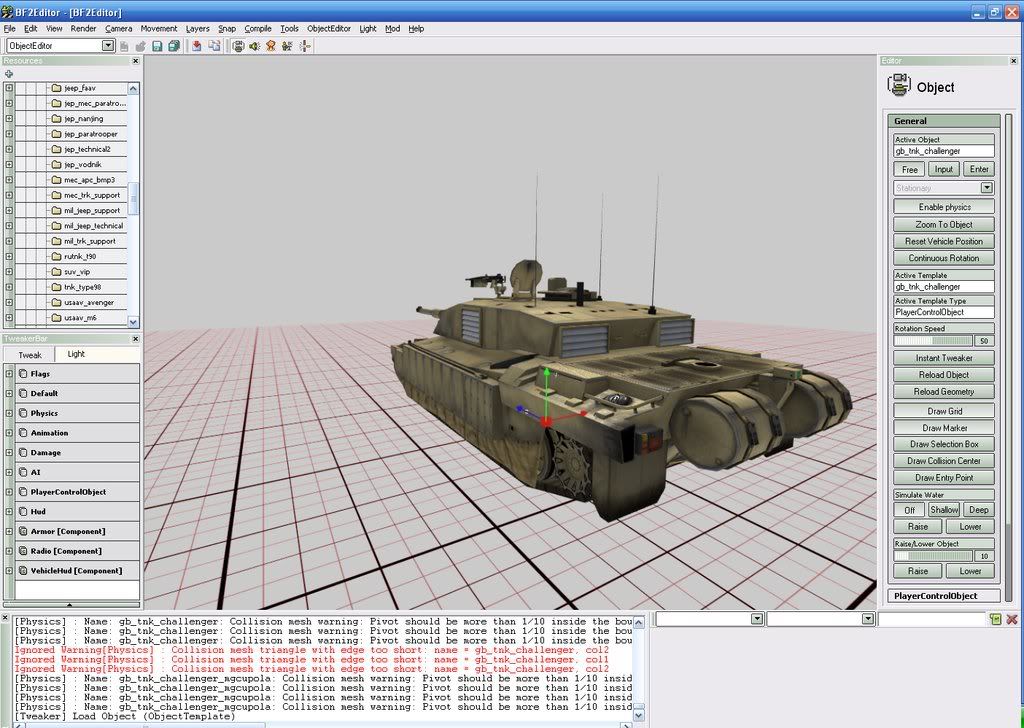
So that it looks like this...
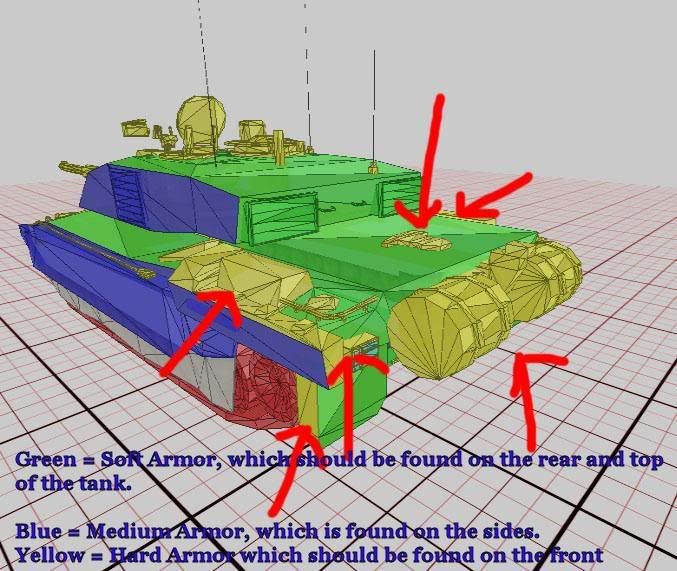
I saw the above image in a thread on another forum, I contacted the person that posted the thread, and they said they got the image from a thread, I assume in this forum.. I play around on the Editor quite a bit never with the object part..
any help is appreciated..
Could someone move this thread to the Community Modding Section
Posted: 2008-04-11 23:57
by foxxravin
umm... i think its in the wrong section of the forums...

Posted: 2008-04-12 00:39
by Mora
Posted: 2008-04-12 02:06
by nedlands1
Render -> Toggle Draw Collision Meshes -> Decal Mesh
Posted: 2008-04-12 03:27
by llPANCHOll
[R-CON]nedlands1 wrote:Render -> Toggle Draw Collision Meshes -> Decal Mesh
Thank you so much...
Posted: 2008-04-12 03:42
by nedlands1
No problem. Happy modding!
Posted: 2008-04-12 07:06
by Rhino
[R-CON]nedlands1 wrote:No problem. Happy modding!
he dont want to mod, all he wants to do is see where the weak points are on each tank

moved to community modding anyhow cos its about the editor.
Posted: 2008-04-12 15:47
by llPANCHOll
[R-DEV]Rhino wrote:he dont want to mod, all he wants to do is see where the weak points are on each tank
moved to community modding anyhow cos its about the editor.

Well maybee.. I have been trying to learn about Modding a little bit at a time, Ive done some of the Tutorial's, and now I must tell you I have a lot of respect for the guys that do the work..
After reading a post about Tank Tactics and seeing the image above I went to look at the other armor. I know its best to hit the back of the tanks and APC's firstly because they cant see where its coming from, secondly the armor should be weaker there.
So I looked at the M1A2
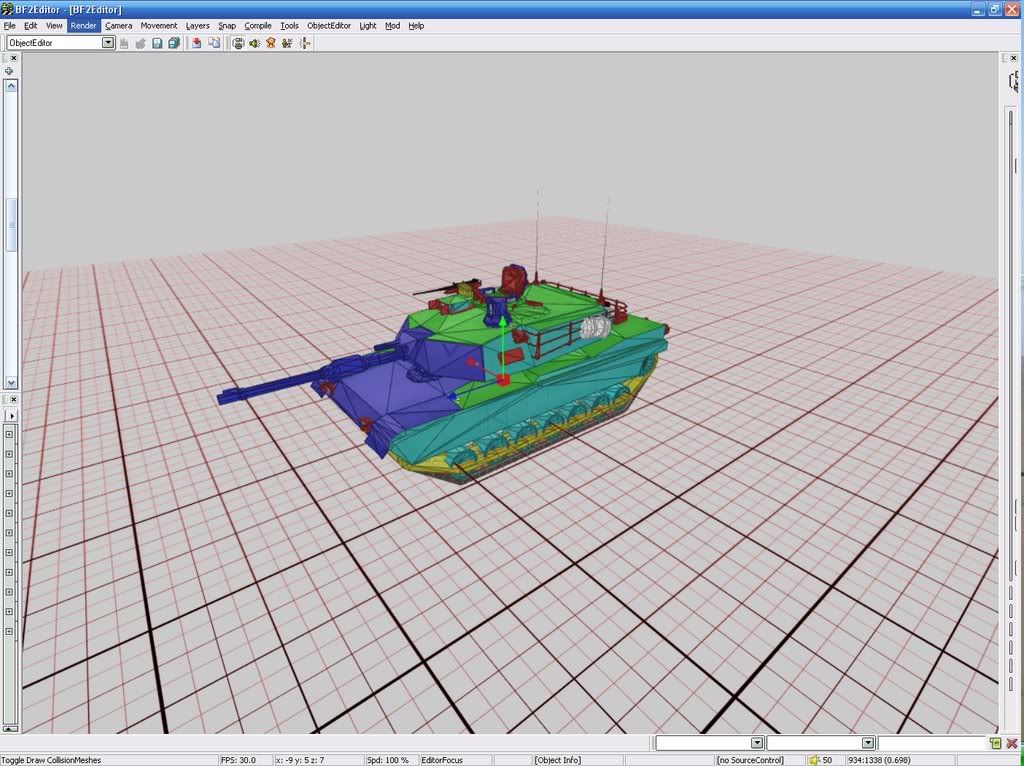
and the LAV25
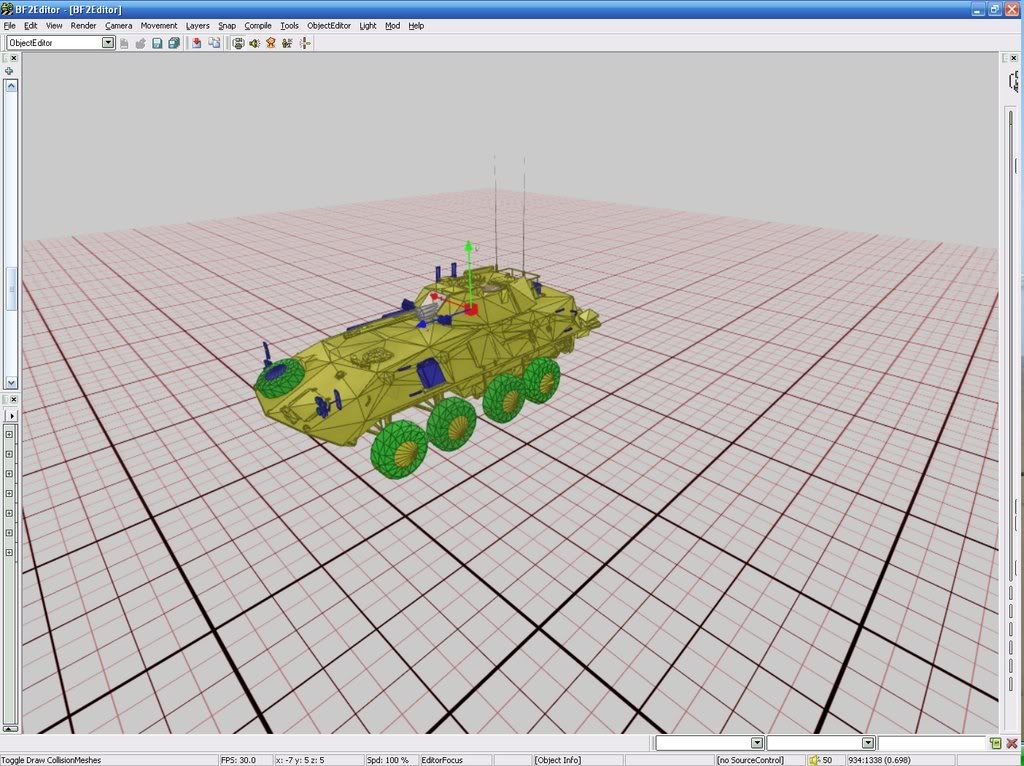
and it occured to me that the Decal Mesh could very well be just that, DECAL.. where you skin the vehicle, and not actually have anything to do with armor at all..
I looked for any posts regarding vehicles in this thread but saw none, could someone give me a breif explaination of how this works..
The Physics Mesh I assume is the one that the engine uses to move the vehicle over terrain and how the soldiers interact with it, ie standing on the vehicle and the like, is the Physics Mesh what takes the hit?
PLEASE EXCUSES MY OBVIOUS LACK OF MODDIFICATION
Posted: 2008-04-12 16:02
by e-Gor
In general an object will have 4 different meshes:
1) Visual mesh - this is what you see, it's what the texture gets applied to.
2) Projectile collision (or decal) mesh (invisible). This is for collisions with projectiles - bullets, missiles etc. The 'decal' name is because the bullet hole decals are applied according to where the bullet hits - i.e. according to this mesh, not the visual one.
3) Vehicle collision (or physics) mesh (invisible). This is for collisions with vehicles, statics, terrain.
4) Soldier collision mesh (invisible). This is for collisions with players.
Some staticobjects may have a 5th - the AI mesh. Afaik, this is for AI pathmapping for enterable buildings. Don't quote me on that though...
Posted: 2008-04-12 16:05
by Rhino
e-Gor wrote:In general an object will have 4 different meshes:
1) Visual mesh - this is what you see, it's what the texture gets applied to.
2) Projectile collision (or decal) mesh (invisible). This is for collisions with projectiles - bullets, missiles etc. The 'decal' name is because the bullet hole decals are applied according to where the bullet hits - i.e. according to this mesh, not the visual one.
3) Vehicle collision (or physics) mesh (invisible). This is for collisions with vehicles, statics, terrain.
4) Soldier collision mesh (invisible). This is for collisions with players.
Some staticobjects may have a 5th - the AI mesh. Afaik, this is for AI pathmapping for enterable buildings. Don't quote me on that though...
yep, AI mesh is to help with pathfinding afaik so AI players dont keep on walking into buildings etc.
I suggest you look though my dev joneral post I made on my static crane I was making (now finished
)
https://www.realitymod.com/forum/f204-f ... post630046
has lots of info that may help you

Posted: 2008-04-12 16:45
by Deadfast
Let me recycle this thread.
How comes that I'm only able to load BF2 vehicles?
The resources windows only loads common on startup and I have to load vehicles manually.
That wouldn't be too big problem if I could load PR vehicles this way, but I can't.
I dunno what happened because it was working just fine on the 1st startup, but now it's not.
Reinstalling doesn't help.
Posted: 2008-04-12 16:54
by Rhino
Posted: 2008-04-12 17:36
by Deadfast
Thanks for the reply but that doesn't work.
It was the 1st thing I've tried.
When I check the things in the Mod Manager and click OK it gives me a heckloads of errors like
Ignored Warning[Base] : Template with name: S_GroundContact_Grass already exists. Setting existing one as active.
and the resources list stays the same (only common)
Posted: 2008-04-12 17:38
by Rhino
Deadfast wrote:Thanks for the reply but that doesn't work.
then to put it simply you have done something wrong. go back and start the tut over again from scratch.
Posted: 2008-04-12 17:51
by Deadfast
OK, I dunno what I did but it works now

Thanks Rhino

Posted: 2008-04-12 17:52
by Rhino
Deadfast wrote:OK, I dunno what I did but it works now
Thanks Rhino
told you
glad you got it sorted
Posted: 2008-04-12 17:58
by Mosquill
Did you make pr_edit mod and unpacked pr and bf2 to it? If so then it looks like bf2editor was loading content from parent bf2 mod. I had the same problem, looks like you have an old version of editor. Make sure it's v.0.1.237.0 2006/5/15.
Posted: 2008-04-12 20:47
by llPANCHOll
Thanks Guys, now am I to understand that the APC's have only one Armor Value? ie it dosent matter where you hit it, (it all appears the same, with the exeption of the 2 rear doors).
I should hold my posts till I finish reading all of Rhinos Crane Thread...
Posted: 2008-04-12 21:31
by Rhino
llPANCHOll wrote:Thanks Guys, now am I to understand that the APC's have only one Armor Value? ie it dosent matter where you hit it, (it all appears the same, with the exeption of the 2 rear doors).
I should hold my posts till I finish reading all of Rhinos Crane Thread...
yep, thats how it works in vBF2.
DICE decide to only give there tanks a veritable damage system, APCs etc do not even thou they should.
Posted: 2008-04-12 22:04
by llPANCHOll
And I suppose they didnt stick with a consistant value for each color they chose, i.e. some vehicles have the front, hard armour rendered in yellow, some have them in blue, they seem to mix it up alot.. we are just to assume that the hard stuff is in the front, the weakest is on the back.. I have been looking for a way to look at the individual values (I accidentally got one tank to render in pieces.. just the skirt rendered, but have had no luck duplicating this) but had no luck, I can see the vehicle HP in the tweaker bar, but have not happened upon the value given to each diffrent section of armour.