I found a fix for the "memory .dll error" for vista 32 & 64 bit user's.
Posted: 2008-05-20 03:14
*** This solution is deprecated with the new BF2 v1.5 patch. It is not needed as the patch already contains this fix.
I found this fix.
I tested it and it work's! PB dose not kick you or anything I have not had 1 crash since I
tested on my 4 computers with 32 bit & 64 bit.
Thank you for making this a Sticky.
I found a fix for the "memory .dll error" that kicks some of us out to desktop every 2 or 3
map loads on certain servers, some more than others but from what I have been reading
this is a problem for a lot of people running Vista, myself included.
The problem is that the BF2.exe is trying to use more memory than it is allowed to, this
fix enables the BF2.exe to use more than it's current limit of 2gb (physical and PF
together) for the second or two it needs it during certain map loads.
Here you go
(You'll need to be an Administrator)
First, you'll need to grab and install Visual Studio C++ Express
from Microsoft.
It's free so don't worry.
Once installed, you'll need to update it, also make sure u have latest game
patch installed.
Backup the bf2.exe file, just in case.
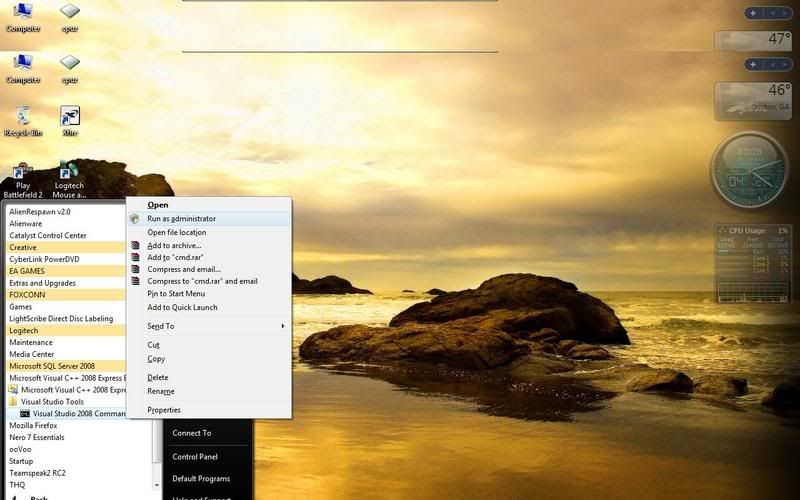
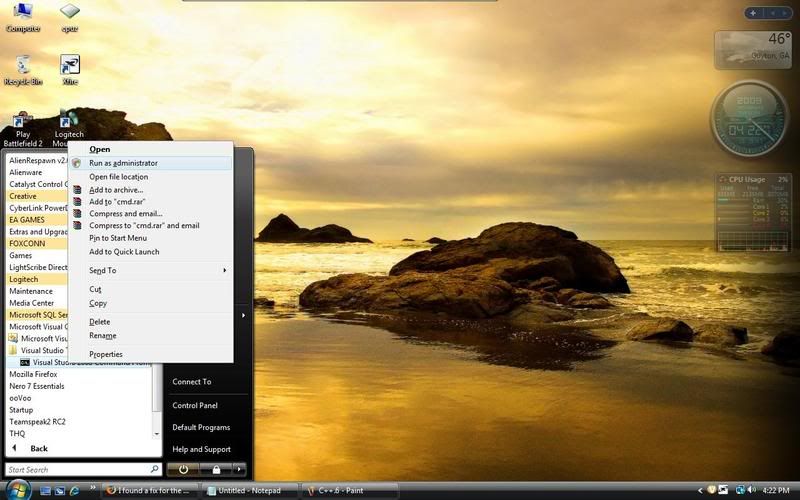
Now, click
Start ->Visual C++ 2005 Express Edition ->Visual Studio Tools ->Visual Studio 2005
Command Prompt
http://img.photobucket.com/albums/v448/sopdelta/C1.jpg
(Don't left click on VS 2005 command prompt though, right click on it and then click "Run as Administrator"
**If you don't run it as Administrator the fix will not work**
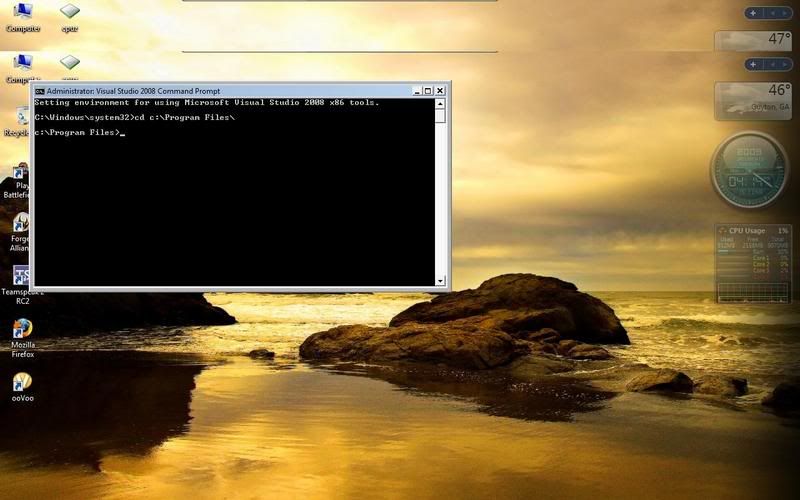
Then, once the black Command Prompt box is open, navigate to your battlefield 2
directory.
If you don't know how to navigate in DOS, follow this:
http://img.photobucket.com/albums/v448/sopdelta/C2.jpg
In Vista 32: cd c:\Program Files\ (Hit ENTER) **or** In Vista 64: cd c:\Program Files (x86)\ (Hit ENTER)
http://img.photobucket.com/albums/v448/sopdelta/C3.jpg
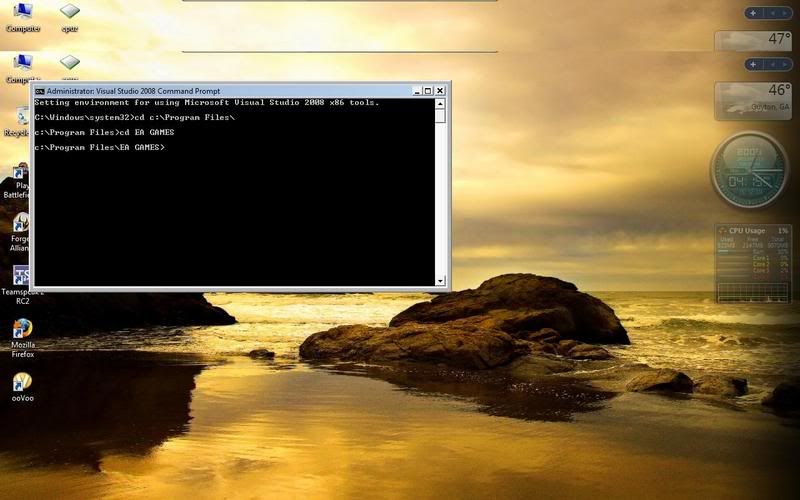
then usually it's "cd EA GAMES" (Hit ENTER)
http://img.photobucket.com/albums/v448/sopdelta/C3.jpg
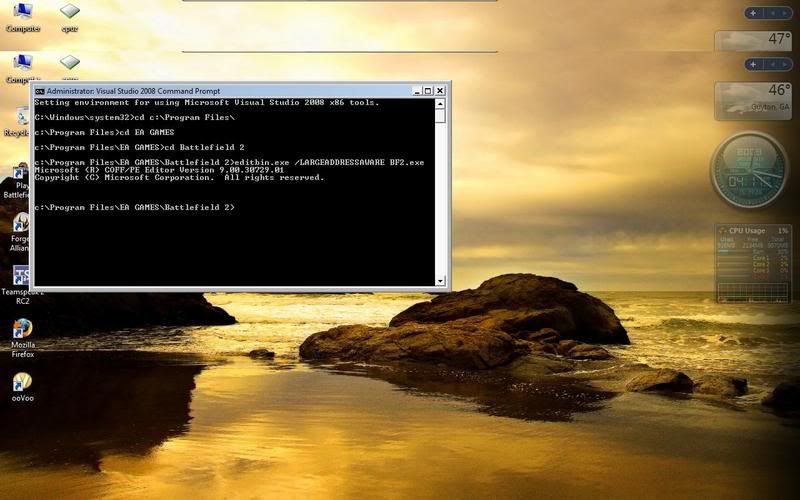
then "cd Battlefield 2" (Hit ENTER)
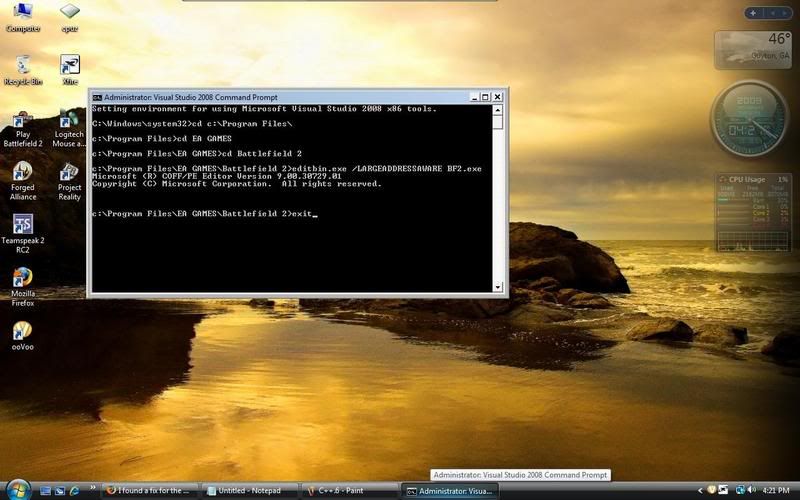
NOW WRITE THIS
http://img.photobucket.com/albums/v448/sopdelta/C5.jpg
editbin.exe /LARGEADDRESSAWARE BF2.exe (Hit ENTER)
It should then come up with a "Microsoft copyright or trademark" type thingy, this means
it was successful.
Type "exit" and (Hit ENTER), and it's fixed for 64-bit users.
http://img.photobucket.com/albums/v448/sopdelta/C6.jpg
64 bit Vista users can now restart and play, but 32 bit Vista users follow the next step...
In a command prompt and once again **Run your command prompt "As Administrator"**
http://img.photobucket.com/albums/v448/sopdelta/C7.jpg
Type this command:
BCDEDIT /set increaseuserva 2900 ENTER
Now exit out of that box, restart and you're done!
http://img.photobucket.com/albums/v448/sopdelta/C9.jpg
Edited ATI card users will want to uninstall Visual Studio C++ Express from Microsoft after they complete this fix.
ATI Drivers will not update with Visual Studio C++ Express from Microsoft you can still do the fix just uninstall the program after words.
I found this fix.
I tested it and it work's! PB dose not kick you or anything I have not had 1 crash since I
tested on my 4 computers with 32 bit & 64 bit.
Thank you for making this a Sticky.
I found a fix for the "memory .dll error" that kicks some of us out to desktop every 2 or 3
map loads on certain servers, some more than others but from what I have been reading
this is a problem for a lot of people running Vista, myself included.
The problem is that the BF2.exe is trying to use more memory than it is allowed to, this
fix enables the BF2.exe to use more than it's current limit of 2gb (physical and PF
together) for the second or two it needs it during certain map loads.
Here you go
(You'll need to be an Administrator)
First, you'll need to grab and install Visual Studio C++ Express
from Microsoft.
It's free so don't worry.
Once installed, you'll need to update it, also make sure u have latest game
patch installed.
Backup the bf2.exe file, just in case.
Now, click
Start ->Visual C++ 2005 Express Edition ->Visual Studio Tools ->Visual Studio 2005
Command Prompt
http://img.photobucket.com/albums/v448/sopdelta/C1.jpg
(Don't left click on VS 2005 command prompt though, right click on it and then click "Run as Administrator"
**If you don't run it as Administrator the fix will not work**
Then, once the black Command Prompt box is open, navigate to your battlefield 2
directory.
If you don't know how to navigate in DOS, follow this:
http://img.photobucket.com/albums/v448/sopdelta/C2.jpg
In Vista 32: cd c:\Program Files\ (Hit ENTER) **or** In Vista 64: cd c:\Program Files (x86)\ (Hit ENTER)
http://img.photobucket.com/albums/v448/sopdelta/C3.jpg
then usually it's "cd EA GAMES" (Hit ENTER)
http://img.photobucket.com/albums/v448/sopdelta/C3.jpg
then "cd Battlefield 2" (Hit ENTER)
NOW WRITE THIS
http://img.photobucket.com/albums/v448/sopdelta/C5.jpg
editbin.exe /LARGEADDRESSAWARE BF2.exe (Hit ENTER)
It should then come up with a "Microsoft copyright or trademark" type thingy, this means
it was successful.
Type "exit" and (Hit ENTER), and it's fixed for 64-bit users.
http://img.photobucket.com/albums/v448/sopdelta/C6.jpg
64 bit Vista users can now restart and play, but 32 bit Vista users follow the next step...
In a command prompt and once again **Run your command prompt "As Administrator"**
http://img.photobucket.com/albums/v448/sopdelta/C7.jpg
Type this command:
BCDEDIT /set increaseuserva 2900 ENTER
Now exit out of that box, restart and you're done!
http://img.photobucket.com/albums/v448/sopdelta/C9.jpg
Edited ATI card users will want to uninstall Visual Studio C++ Express from Microsoft after they complete this fix.
ATI Drivers will not update with Visual Studio C++ Express from Microsoft you can still do the fix just uninstall the program after words.
 .
.