Page 1 of 2
[Model] Mac 10
Posted: 2008-07-20 09:41
by Trigz07
I would like to present you with the Mac 10 wip I need some critiscim so any areas please tell me if anything isn't right.


Re: [Model] Mac 10
Posted: 2008-07-20 10:51
by arjan
Nice model.

didnt the israeli forces uses this one?
Re: [Model] Mac 10
Posted: 2008-07-20 12:17
by Madhouse
FAKE!

Lets see a wireframe
Re: [Model] Mac 10
Posted: 2008-07-20 14:02
by ice_killer
Madhouse wrote:FAKE!
Lets see a wireframe
for allah (read god) sake i hope it not j/k
no offeence intended guys if you thing i offend you pm me and ill edit it

any way tris count etc ?
Re: [Model] Mac 10
Posted: 2008-07-20 21:42
by Trigz07
Tri count is 2,558 I'm going to need to redo some of those little spheres.
Also can you please tell me how to make the back of the grip look smoother? It looks like utter **** and when I use auto smooth it still looks bad


Re: [Model] Mac 10
Posted: 2008-07-20 22:01
by Drav
Re: the handle, look in the 3dsm help for 'smoothing groups'. That should help you out. The front curve on the handle has been assigned a smoothing group, the back curve hasn't and it needs one if you want it to look, er, smooth
Re: [Model] Mac 10
Posted: 2008-07-20 22:31
by Trigz07
I don't know what you mean by the smoothing group thing? When I put smoothing groups it turns out bad.
Re: [Model] Mac 10
Posted: 2008-07-21 08:58
by markonymous
im gonna try some modeling but i think im gonna fail
anyways nice model so far.
Re: [Model] Mac 10
Posted: 2008-07-21 10:06
by Tonnie
Ok a quick runthro ...
Click the handle object
Select Poly
Highlight the polys you want smoothed together
Scroll down on the selection panel till you see a sub area called Smoothing Groups (Or something similar)
Click on say group 4 that should do a quick smooth on the polys you have selected...
I know its not the greatest explanation but if it does not help then try googling it

Re: [Model] Mac 10
Posted: 2008-07-21 10:13
by Drav
Tesher, this is not a learn to model forum dude. I'll gladly point you in the right direction, but you need to do some homework yourself too...
Get this video and watch it. It goes through the basics of everything...
Model a 3D glock weapon download - Mod DB
Re: [Model] Mac 10
Posted: 2008-07-21 13:15
by Madhouse
Mescaldrav wrote:Tesher, this is not a learn to model forum dude. I'll gladly point you in the right direction, but you need to do some homework yourself too...
Get this video and watch it. It goes through the basics of everything...
Model a 3D glock weapon download - Mod DB
Don't be rude, the PR Community modding forum is meant for this kinda stuff, everyone has to learn from somewhere, ask questions, show to see what everyone thinks, learn tips from other modders, etc.
If we have negative people like you bashing everyone who posts up a WIP, they won't feel like helping PR or other people trying to learn or are stuck.
Encourage learners, don't bash them.
Re: [Model] Mac 10
Posted: 2008-07-21 20:27
by Trigz07
Umm I already used that tutorial but I'm not done with it... Also about the smoothing group thing, the handle is part of the gun... It's not a seperate object. I could detach it thought and cap the edges.
Re: [Model] Mac 10
Posted: 2008-07-21 21:06
by Drav
Madhouse wrote:Don't be rude, the PR Community modding forum is meant for this kinda stuff, everyone has to learn from somewhere, ask questions, show to see what everyone thinks, learn tips from other modders, etc.
If we have negative people like you bashing everyone who posts up a WIP, they won't feel like helping PR or other people trying to learn or are stuck.
Encourage learners, don't bash them.
Er, Madhouse, if you look through Teshers posts you will see I have posted in nearly all of them offering advice. In fact have a look through my posts and you'll see I often given advice to people getting started in this forum. Oh and look, if you read past the first line of my post, there is some more advice about a video that will help him more than I possibly can. Specific instructions are very time consuming to type out, and often hard to follow anyway. Much easier is to see it done in a video tutorial, and that is what I recommend rather than trying to decipher instructions written on a forum.
Please do a little research before slating people in the future, then you won't look like an idiot when it turns out you're wrong....
Tesher, I'd recommend watching all of that video before you do any more to your model, as it explains sooo many things that are important, one of those being smoothing groups.
Re: [Model] Mac 10
Posted: 2008-07-21 21:13
by Trigz07
ya... well um none of you were able to answer my question but I thank you all for you'r efforts. Thanks. Time to pack up and leave =(.
Re: [Model] Mac 10
Posted: 2008-07-21 21:29
by Katarn
With that attitude, I sure hope you do.
Re: [Model] Mac 10
Posted: 2008-07-22 00:50
by Trigz07
Wow what a slug fest this is turning into it's like me(Rambo) against all of you....
Pretty weird how all of you assume you know me in reallife enough to bash me and talk **** like you known me. No ones the same and no ones thinks alike so think before you say.
Re: [Model] Mac 10
Posted: 2008-07-24 09:07
by Trigz07
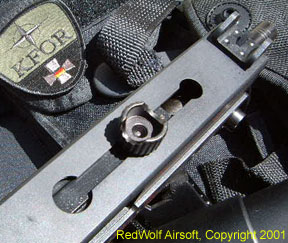
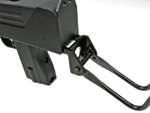
Do any of you know where I can get some good refrence pictures of the stock and the top of the gun because google has only side images.
Re: [Model] Mac 10
Posted: 2008-07-24 09:24
by Cheeseman
Re: [Model] Mac 10
Posted: 2008-07-24 09:54
by ali-tom
tesher07 wrote:Do any of you know where I can get some good refrence pictures of the stock and the top of the gun because google has only side images.
... here we go:
Modern Firearms - Ingram MAC Model 10 / M10 and Model 11 / M11 submachine gun
Re: [Model] Mac 10
Posted: 2008-07-24 10:27
by Trigz07
Thanks but if you can, can you please find a top view?