Project Reality Background Menu Videos
Posted: 2008-12-15 05:15
Have you ever simply just disliked the movies in the background. Not that the Project Reality movies are bad, but after awhile I'm sure you have just seen them enough.
Heres alittle fix that'll reduce some computer lag, improve performance slightly, and even help you load up your maplists faster. --- While still keeping Project Reality in good taste.
Make sure that Project Reality is not running while you perform this.
________________________________________
1. First, go to your BF2 directory. (Default is the following)
If you have done this correctly, you will have the standard login screen of the British Soldier with the Chinook in the background remain as it is, and also become the new "video background" that you would usually see while you are logging in.
Basically if you did it right... This is what you will see.
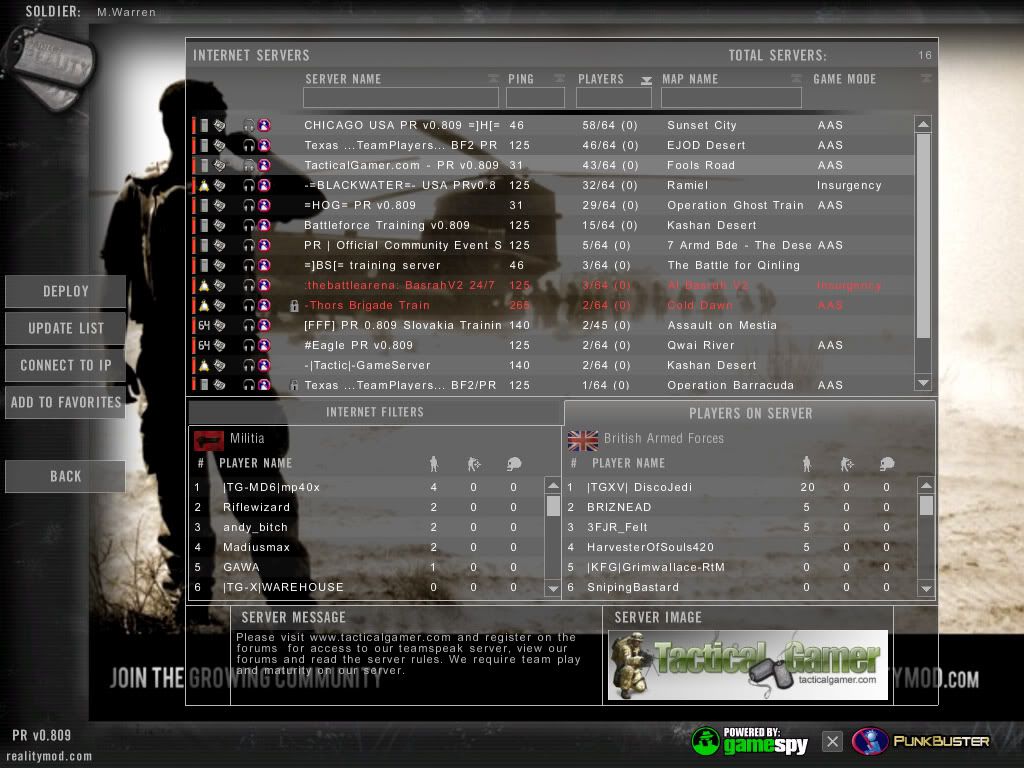
Still works out well doesn't it? A simple and completely harmless change in the PR human interface.
As you can see, it doesn't damage the essence of Project Reality and it helps improve performance slightly. Most likely reduces the amount of time it takes to enter the options mode after pressin the escape button aswell.
________________________________________
Uninstallation:
1. To undo this action, simply go to the "Movie Removal Folder"
This folder already contains a file named 'menu_loggedin.bik'
Would you like to replace the existing file
243KB
with this one?
140MB
5. Click "Yes", this will replace the altered file you created with the original one.
6. You're done!
________________________________________
What happens when you perform this action, is that you remove the .bik movie files from the directory in which they are played from when the game is running. Creating an additional folder in that directory basically "hides" it from the program so that they are not used.
When you drag the copy of the menu.bik file, it is the picture of the British Soldier with the Chinook in the background. Now you rename this file to the menu_loggedin.bik so that you trick the game into thinking that it's the animated background video.
If you simply just remove the original menu_loggedin.bik without replacing it, it will then default to the standard BF2 background video of a panoramic view of "Strike at Karkand" from a satellite. A video that we've all seen in our lifetime.
Heres alittle fix that'll reduce some computer lag, improve performance slightly, and even help you load up your maplists faster. --- While still keeping Project Reality in good taste.
Make sure that Project Reality is not running while you perform this.
________________________________________
1. First, go to your BF2 directory. (Default is the following)
- C:\Program Files\EA GAMES\Battlefield 2\mods\pr\movies
- bss_intro.bik
- menu.bik
- menu_loggedin.bik
- pr_intro.bik
- warning.bik
- C:\Program Files\EA GAMES\Battlefield 2\mods\pr\movies\Movie Removal Folder
- menu_loggedin.bik
- C:\Program Files\EA GAMES\Battlefield 2\mods\pr\movies\
- menu.bik
- Copy of menu.bik -----> menu_loggedin.bik
If you have done this correctly, you will have the standard login screen of the British Soldier with the Chinook in the background remain as it is, and also become the new "video background" that you would usually see while you are logging in.
Basically if you did it right... This is what you will see.
Still works out well doesn't it? A simple and completely harmless change in the PR human interface.
As you can see, it doesn't damage the essence of Project Reality and it helps improve performance slightly. Most likely reduces the amount of time it takes to enter the options mode after pressin the escape button aswell.
________________________________________
Uninstallation:
1. To undo this action, simply go to the "Movie Removal Folder"
- C:\Program Files\EA GAMES\Battlefield 2\mods\pr\movies\Movie Removal Folder
- menu_loggedin.bik
- C:\Program Files\EA GAMES\Battlefield 2\mods\pr\movies
This folder already contains a file named 'menu_loggedin.bik'
Would you like to replace the existing file
243KB
with this one?
140MB
5. Click "Yes", this will replace the altered file you created with the original one.
6. You're done!
________________________________________
What happens when you perform this action, is that you remove the .bik movie files from the directory in which they are played from when the game is running. Creating an additional folder in that directory basically "hides" it from the program so that they are not used.
When you drag the copy of the menu.bik file, it is the picture of the British Soldier with the Chinook in the background. Now you rename this file to the menu_loggedin.bik so that you trick the game into thinking that it's the animated background video.
If you simply just remove the original menu_loggedin.bik without replacing it, it will then default to the standard BF2 background video of a panoramic view of "Strike at Karkand" from a satellite. A video that we've all seen in our lifetime.
 .
.