Page 1 of 1
Mumble - Distorted sound/Fixed
Posted: 2010-02-07 00:57
by Dr Rank
64x edition of WIN 7
S/C - PCIe SB X-Fi Titanium Fatality Pro Series, Driver version 2.17.7 (latest)
Mumble v 0.5(beta) (lastest PR mumble)
For some reason all of the sound outputed from mumble (
i.e. everyone speaking) is badly distorted. Here's an example:
4shared.com - online file sharing and storage - download mumble fail v2.zip
Tried:
reinstalling mumble
reinstalling s/c drivers
installing latest normal mumble too to see if it would update codecs or w/e
changing around various sound set up option in the mumble program
Teamspeak/ingame voip work perfectly, only mumble has an issue.
re: Mumble - Distorted sound/Fixed
Posted: 2010-02-07 02:29
by Epim3theus
Not much help but i've got the exact same thing with the normal titanium, same latest drivers and Win7-64.
Did a fresh win7 instalement and fresh driver instalement couple of days ago.
re: Mumble - Distorted sound/Fixed
Posted: 2010-02-07 03:49
by Mr.Hyde
Win 7 has an Exclusive Mode that might be messing up Mumble while you have other voice programs running. Go To: Control panel > open Sound > Double Tap Recording device > Select Advanced......
Unckeck the box that says, "Allow applications to take exclusive control of this device".
Let me know if that works, or take screen shots of your mumble settings.
re: Mumble - Distorted sound/Fixed
Posted: 2010-02-07 08:46
by Snares
What is the sampling rate on the output? Does this same problem occur with Mumble 1.2.1? You can connect to some public server and do a loopback. Actually, you might want to try the loopback with PR Mumble as well, since that will isolate some other possible factors.
re: Mumble - Distorted sound/Fixed
Posted: 2010-02-08 15:32
by Dr Rank
Thankyou for the advise so far. Unfortunately this didn't make any difference:
Mr.Hyde wrote:Win 7 has an Exclusive Mode that might be messing up Mumble while you have other voice programs running. Go To: Control panel > open Sound > Double Tap Recording device > Select Advanced......
Unckeck the box that says, "Allow applications to take exclusive control of this device".
Let me know if that works, or take screen shots of your mumble settings.
Here are my mumble settings, I tried playing around with them a bit but they should be on default now:
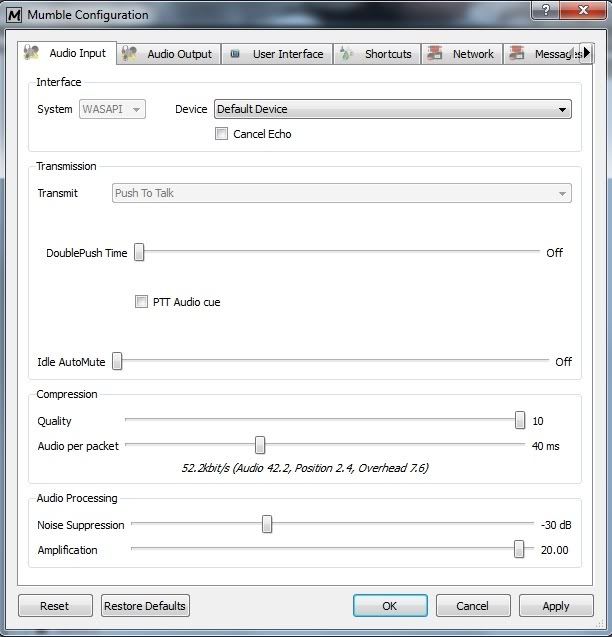
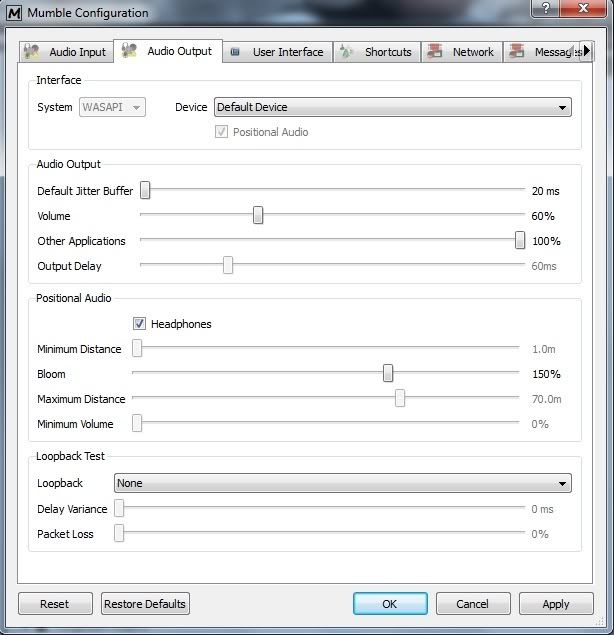
Snares wrote:What is the sampling rate on the output? Does this same problem occur with Mumble 1.2.1? You can connect to some public server and do a loopback. Actually, you might want to try the loopback with PR Mumble as well, since that will isolate some other possible factors.
Ok, tried Mumble 1.2.1 and no, it doesn't have the same problem. Went a bit mad when I tried to set up the audio during the initial tutorial (edhoing sounds, mic reverbing etc) so I skipped that. But when I connected to a random public mumble servers I could hear everyone speaking clearly. However when I connected back to pr mumble I still had the issue.
EDIT: Tried uninstalling and reinstalling prmumble again with no joy. Even the sound I hear back when talking during the setup wizard is distorted in the same way, as is the guys voices when he says "this is an examples of speaks, an audio compression tool" etc.
re: Mumble - Distorted sound/Fixed
Posted: 2010-02-08 15:55
by Mr.Hyde
Try to set your device to the specific type, not default. Do this for both audio in/out.
Have you tried to download a different PRMumble?
re: Mumble - Distorted sound/Fixed
Posted: 2010-02-08 17:54
by Dr Rank
Mr.Hyde wrote:Try to set your device to the specific type, not default. Do this for both audio in/out.
Have you tried to download a different PRMumble?
Yeah, tried those cheers, still no joy

re: Mumble - Distorted sound/Fixed
Posted: 2010-02-08 18:12
by thepalerider
Have you tried checking the TCP option? Perhaps your router and/or firewall or virus protection is interfering with your UDP packets?
re: Mumble - Distorted sound/Fixed
Posted: 2010-02-08 21:54
by Duckmeister
I'm having this exact same problem, with a Titanium series card. Latest drivers and everything, hugely distorted sound.
I'm even getting the main menu music as distorted, but all other music and sounds are fine.
re: Mumble - Distorted sound/Fixed
Posted: 2010-02-09 01:58
by SnipingCoward
make sure you select headphones/stereo for your speaker type in the sound driver program/windows sound settings - not 7.1 or so
disable all enhancements off the device
check your sound driver program if it tries to filter and or apply effects and disable them
also you can set devices to be used for voip (default communication device) - maybe that has something to do with it (no clue where to go from here though xD)
re: Mumble - Distorted sound/Fixed
Posted: 2010-02-09 02:57
by Duckmeister
Right now, all my sound card drivers are adding is EAX and CMSS 3-D, no crystalizer or EQ or anything like that. Both of those shouldn't/aren't causing the problem, and I really don't want to turn them off.
Speaker type is on stereo.
I haven't tried the "exclusive control" thing yet, though.
I've tried raising the packet size and lowering the quality in mumble, to no avail.
re: Mumble - Distorted sound/Fixed
Posted: 2010-02-09 17:09
by SnipingCoward
it would be helpful for testing purposes to turn them off so we know its not them causing the issue...
you might want to consider contacting the mumble developers in their form - or since they seemed to have fixed the issue in the newer version find the bug-report for it and how it got resolved
re: Mumble - Distorted sound/Fixed
Posted: 2010-02-09 20:22
by Duckmeister
Neither EAX nor CMSS 3-D are causing the problem, I just tested them both.
Mumble has something in their FAQ on "robotic voices", talking about how people with bad connections heard everybody distorted because of the codec they used prior to version 1.2.
However, I don't have a bad connection, as I was able to use mumble just fine on a previous computer using the same connection.
EDIT: This website:
http://mmo-mumble.com/help/AdvancedOptions
says that if people are distorted or breaking up, there are various settings you can try. I've tried all of them, to no avail, except for "output delay". For whatever, the "output delay" slider is grayed out, I have no access to it. This may be the answer to my problem, if only it wasn't blocked.
EDIT 2: I've also done some loopback tests, and I sound just as distorted to myself as others do to me.
re: Mumble - Distorted sound/Fixed
Posted: 2010-02-09 22:41
by SnipingCoward
good thing you tried that
bad thing i would just tend to say its because prmumble is an old mumble
untill there is an update of pr mumble i don't see how your problem could be fixed (maybe by replacing files from the new mumble install hoping that the bugged version gets replaced and doesnt cause new problems)
re: Mumble - Distorted sound/Fixed
Posted: 2010-02-09 23:47
by Napoleon_TR
I got this problem now.
re: Mumble - Distorted sound/Fixed
Posted: 2010-02-10 18:10
by Duckmeister
Bump for great justice, this is an extremely annoying problem.
re: Mumble - Distorted sound/Fixed
Posted: 2010-02-11 00:56
by Dr Rank
FIXED!!!!!

Simple really, I don't know why I didn't think of it before. I just set the PRmumble(0.5beta).exe to run in compatibility mode windows xp service pack 3 (
works with service pack 2 as well). Now seems to be working perfectly, although annoyingly I do seem to have to reapply having my audio output settings every time I reload mumble (
literally just have to click on configure - settings - apply every time you load up mumble and it will start working, don't need to change any settings if its already been set up correctly) otherwise I can't hear anyone speaking.
At least it works now though!
re: Mumble - Distorted sound/Fixed
Posted: 2010-02-11 13:19
by Duckmeister
I can confirm that setting for compatibility mode (xp service pack 3) does fix the distorted sound. Good thinking!
re: Mumble - Distorted sound/Fixed
Posted: 2010-02-12 14:26
by Epim3theus
Yep it works, thanks.
And i don't even have to reapply my audio settings every time.
re: Mumble - Distorted sound/Fixed
Posted: 2010-07-25 00:18
by Silly_Savage
Bump.
I was having issues with static/distorted voices when anyone broadcast over Mumble.
Running Mumble in compatibility mode with Windows Service Pack 2
DID fix my issues.
Thank you, Dr. Rank.
