Page 1 of 1
Bf2/Pr Start crash
Posted: 2010-02-10 06:11
by Bf2sniper
First i know there are ten threads on this but i really cant figure out wats going on
-I installed bf2
-Installed 1.41
-Installed 1.5
-Installed pr
-Changed the running resolution and refresh rate to match my comp
-Im the admin
None of this is working, I start bf2 or Pr and it flashes the Bf2 center logo, Goes black and then right back to the desktop
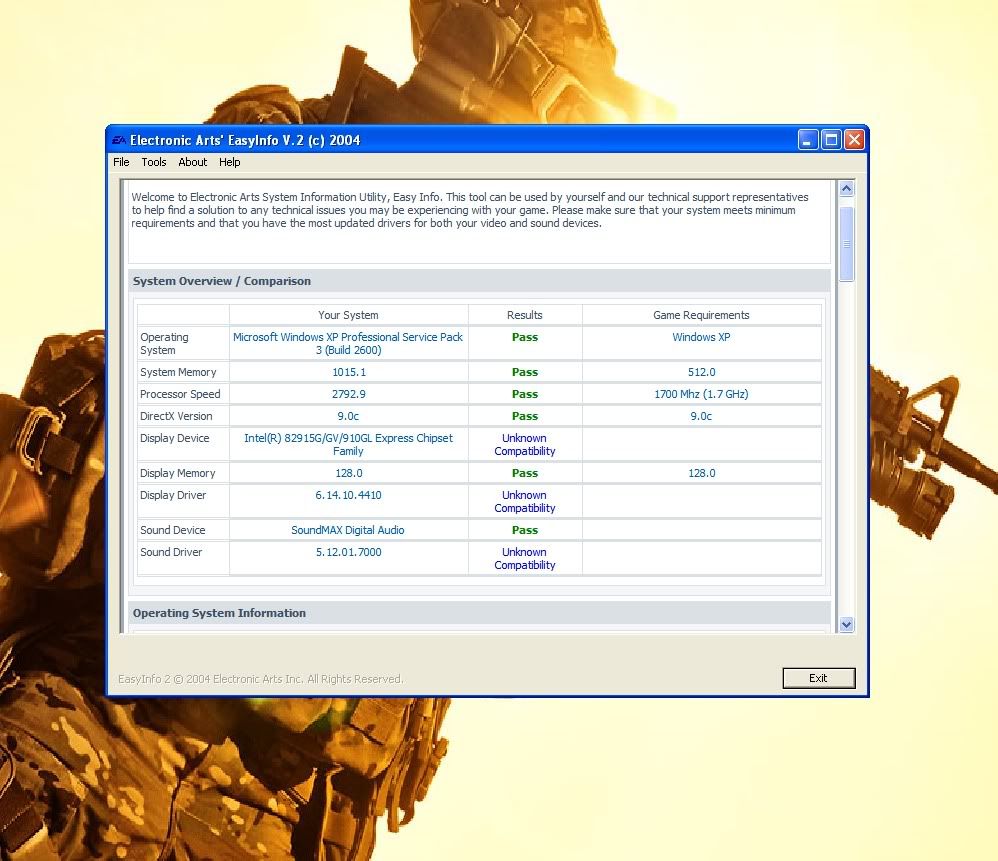
Microsoft Windows XP Professional Service Pack 3 (Build 2600)
System Memory 1015.1
Processor Speed 2792.8
DirectX Version 9.0c
Display Device Intel(R) 82915G/GV/910GL Express Chipset Family
Display Memory 128.0
All of these pass so i know my comp can handle it, And im running an older screen at 60hz
Re: Bf2/Pr Start crash
Posted: 2010-02-10 07:29
by SnipingCoward
Bf2sniper wrote:None of this is working, I start bf2 or Pr and it flashes the Bf2 center logo, Goes black and then right back to the desktop
there is your problem.. you should see the pr logo flashing which means bf2 cannot locate the pr installation
check if you installed pr into the right folder: "Battlefield 2\mods\pr" and not something like "Battlefield 2\mods\pr\mods\pr"
when the installer asks you where to install it wants to know where your bf2 folder is -> "Battlefield 2" is enough
do
not change it to "Battlefield 2\mods\pr"
did u install BOTH part 1 AND part 2 of pr?
did you change the refresh rate in the video.con?
you can get bf2 to give you an error message by running it in windowed mode: append "+fullscreen 0" to your shortcut's target line. then google the error, post here if you cant find anything - GL!
Re: Bf2/Pr Start crash
Posted: 2010-02-10 18:16
by Bf2sniper
I clicked download but all i did was save it to my documents, I tried moving it to the bf2 folder but all it does when i click on it, is start bf2
Re: Bf2/Pr Start crash
Posted: 2010-02-10 18:30
by SnipingCoward
huh?
those 2 files (PR Client installer v0.9 Part 1 of 2 and PR Client installer v0.9 Part 2 of 2 are actual installers that you have to run to install pr on your computer)
please rephrase your last post - i dont understand a thing
Re: Bf2/Pr Start crash
Posted: 2010-02-10 18:39
by Bf2sniper
Sorry about that i just woke up
I go to the downloads feature and download part 1 and then part 2...They become their own files and when i click to start them they run bf2
I get no installation menus or screens
Re: Bf2/Pr Start crash
Posted: 2010-02-10 18:53
by SnipingCoward
Bf2sniper wrote:I go to the downloads feature and download part 1 and then part 2...They become their own files and when i click to start them they run bf2
I get no installation menus or screens
that totally makes no sense to me. why should an installer start bf2 instead of the installation wizard?
only time something similar happend to me was when my hard drive was defective and the links on the desktop would call random applications - but i dont believe that is your problem
i think you are missing a vital step in the installation - when you download the files use "save as" and not "run" then select a destination that you can easily find again - after both files are done downloading double click the part 1.exe file and after that installation has finished double click part 2 - this should install pr
when it asks you to specify the installation folder just leave what is default (should be something with "Battlefield 2" at the end
Re: Bf2/Pr Start crash
Posted: 2010-02-10 19:36
by Bf2sniper
This is exactly what i do,
I download both files to My Documents, but my computer is directly conecting them with bf2 for some reason, I Double click #1 and instead of installation wizard coming up, it starts bf2
Re: Bf2/Pr Start crash
Posted: 2010-02-10 22:00
by Bf2sniper
Ok i deleted everything and reinstalled it all, Now my bf2 wont even start, it crashes as soon as the screen turns black
Also i think i found the pr problem, When i go to properties and look at "open with" it says bf2, what should i change it to, to get the installation wizard instead
Re: Bf2/Pr Start crash
Posted: 2010-02-10 22:30
by SnipingCoward
the file that you downloaded should be an exe - which means it does not get opened by an application but instead is one itself
if you can say "open with" on that file the extension does not seem to be "exe"
did maybe download the .torrent file - that one is a file used by bit torrent clients to tell them where to download the actual file
make sure you download something with ".exe" at the end those files should be around 1.8 GB each and would take like 20 min if you have a fast internet connection (instead of seconds like the .torrent which is only a few kB)
edit: also - some download managers rename those files giving them an extension like .tmp which shall indicate that its not completely downloaded yet - make sure it is actually completely downloaded
Re: Bf2/Pr Start crash
Posted: 2010-02-10 23:17
by Bf2sniper
I did download the torrent, the other link was corrupted and fileplanet said i had to pay
Re: Bf2/Pr Start crash
Posted: 2010-02-11 04:59
by Bf2sniper
K i got pr to work but my bf2 still crashes before once the screen goes black, Any info on how to fix this
I downloaded directx 9.0 and heres what my program tells me so i feel it should work
Re: Bf2/Pr Start crash
Posted: 2010-02-11 06:46
by SnipingCoward
since you already installed 1.41 and 1.5 patches you should be good to go
when exactly does the crash occur? on map load, on game load?
have you tried the fixes proposed in other threads about crashing?
Re: Bf2/Pr Start crash
Posted: 2010-02-11 15:43
by Bf2sniper
Ive tried everything
It crashes when the game loads, Right before the Intro video
Re: Bf2/Pr Start crash
Posted: 2010-02-11 16:57
by thepalerider
OK
Some other things you can try before you uninstall/reinstall.
Run
battlefield cleaner to flush out your video cache files.
Next
Backup your BF2 folder that's inside your documents folder.
Once you have a backup delete the original from your documents folder.
Restart BF2,
a new default folder is created.
link to your online account.
Quit out.
Run 1.41 updater for BF2 again
Start BF2 - quit out.
Run 1.5 updater again.
Start PR from the shortcut
If all goes well (CTD gone) all you have to do to get your custom settings back is
copy your 'control' file from your backup to the new profile folder.
Path:
C:\Users\your user name here\Documents\Battlefield 2\Profiles\0002
note: you may not have a 0002 folder so use 0001
Hope it helps