Page 1 of 1
What's So Hot?
Posted: 2010-04-01 00:15
by boom50cal
I recently built a new computer from parts I mostly ordered from newegg(excluding HDD and disk drive). It's been running REALLY good. But one thing has been bothering me, speedfan is telling me I have something running at 80 degrees celcius!!! I have no idea what it is, but I'm thinking it's the powersupply. My specs are in my profile. Any help is appreciated.
Re: What's So Hot?
Posted: 2010-04-01 02:32
by Feriluce
What GPU do you have? Its probably that.
Re: What's So Hot?
Posted: 2010-04-01 02:48
by FuzzySquirrel
Feriluce wrote:What GPU do you have? Its probably that.
GPU 47C...
If you're really unsure just stick your hand in your case when its that hot. You'll find out what it is fast. (My guess is your n or s bridge)
Re: What's So Hot?
Posted: 2010-04-01 20:55
by boom50cal
Okay guys, I'll try that later today before I get PR up and running. I'm thinking 80 degrees celsius is something to worry about so I'll get an 8cm fan to place above/near it whenever I order two new 12cm fans for replace my cases current ~850rpm intake/exhaust fans. Also, could I have a good sub $40 AM3 compatible HSF suggestion from newegg? I'm really wanting to OC this computer to 3GHz or even 3.3GHz...
Re: What's So Hot?
Posted: 2010-04-24 07:53
by Not A Tumour
I would say its your GPU, you may wish to inculde what cooling you have, and what gpu you have. But 80 degrees isnt all that bad. Computers auto shutdown at 110-120, and they MELTdown at around 150. So theres really no worry.
Re: What's So Hot?
Posted: 2010-04-24 14:38
by Raic
GPU is marked there on its own.
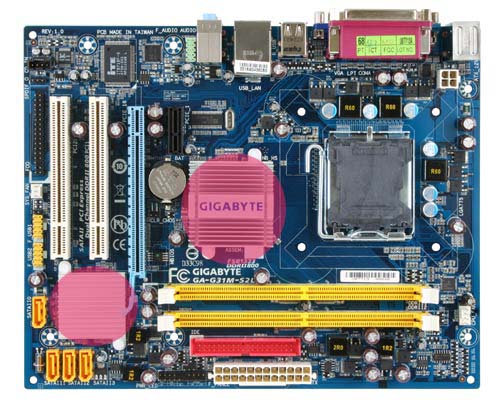
Check South and North-bridges. There should be small cooling block down from the CPU and/or left or left-up. These two are south and north-bridges. They are controller units and can get very hot if the blocks are installed incorrectly. Check if they are hot. Best way to make sure is to actually somehow check it from underneath as if the blocks are indeed incorrectly placed the heat wouldn't be transferring to the blocks properly making them feel cool.
Heres a picture with bridges marked.
http://www.build-your-own-computer.net/ ... bridge.jpg
In newer boards its not uncommon to have a small fan and heatpipes to be used to cool them.
What motherboard you have btw? I remember that there was one board which had problems with cooling of south or northbridge, the fastenings were somehow made very badly so they loosened on their own.
EDIT: Before anything double check that the temperature it shows is actually correct, speedfan is known to shows some weird numbers sometimes. Try some other temperature check programs. Would recommend to check if the mobo manufacturer has somesort of program to check temperatures. Also, bios should give a lot more accurate temperature readings.