Why is my onboard GPU roasting hot!?
Posted: 2010-08-25 22:34
Hi guys, been having some troubles with random shutdowns when pushing everything on high.... thought it was a fault with my GTX 260BA, but its temps never peek 75°C
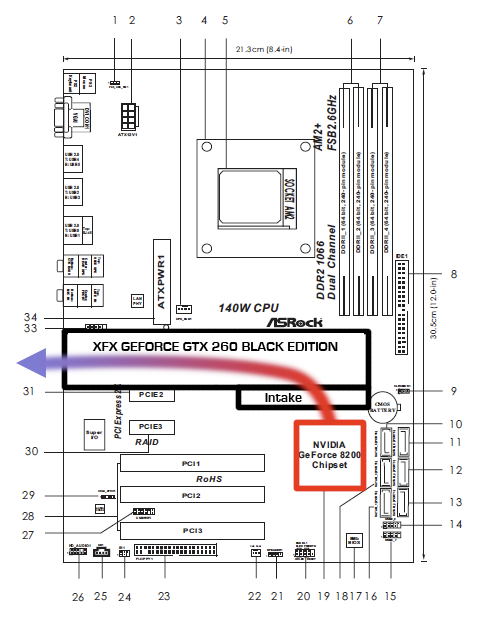
So was feeling around for hotspots after the last crash, and burnt my finger on the heat-sink of the motherboards NVIDIA GeForce 8200 that is right under the intake of my GTX 260BA making the cooling fan less then effecint as the air around the intake is so hot!
SO, here are the questions:
1:Why is the motherboards NVIDIA GeForce 8200 getting so hot when its not the GPU im using?
2: What is MCP, as its the only thing that peeks into the high70°C's?
Here is a bunch of stuff that may help someone help me!
Temperatures
Motherboard 34 °C (93 °F)
CPU 40 °C (104 °F)
CPU #1 / Core #1 33 °C (91 °F)
CPU #1 / Core #2 33 °C (91 °F)
CPU #1 / Core #3 33 °C (91 °F)
CPU #1 / Core #4 33 °C (91 °F)
MCP 78 °C (189 °F)
Aux 40 °C (104 °F)
GPU 61 °C (133 °F)
GPU Memory 48 °C (118 °F)
GPU Ambient 47 °C (117 °F)
WDC WD1600SD-01KCC0 31 °C (88 °F)
Cooling Fans
CPU 3516 RPM
GPU 1492 RPM (40%)
Computer:
Computer Type ACPI x64-based PC
Operating System Microsoft Windows 7 Ultimate
OS Service Pack -
Internet Explorer 8.0.7600.16385
DirectX DirectX 11.0
Motherboard
CPU Type QuadCore AMD Phenom X4 Black Edition 9950, 2600 MHz (13 x 200)
Motherboard Name ASRock K10N78 (3 PCI, 2 PCI-E x1, 1 PCI-E x16, 4 DDR2 DIMM, Audio, Video, Gigabit LAN)
Motherboard Chipset nVIDIA GeForce 8200, AMD K10
System Memory 4096 MB (DDR2-800 DDR2 SDRAM)
DIMM1: 2 GB DDR2-800 DDR2 SDRAM (6-6-6-18 @ 400 MHz)
DIMM3: 2 GB DDR2-800 DDR2 SDRAM (6-6-6-18 @ 400 MHz)
BIOS Type AMI (02/05/09)
Communication Port Communications Port (COM1)
Display
Video Adapter NVIDIA GeForce GTX 260 (896 MB)
Video Adapter NVIDIA GeForce GTX 260 (896 MB)
3D Accelerator nVIDIA GeForce GTX 260
Monitor Mitsubishi Diamond Plus 92 [19" CRT] (012101735)
Multimedia
Audio Adapter Realtek ALC888/1200 @ nVIDIA MCP78 - High Definition Audio Controller
So was feeling around for hotspots after the last crash, and burnt my finger on the heat-sink of the motherboards NVIDIA GeForce 8200 that is right under the intake of my GTX 260BA making the cooling fan less then effecint as the air around the intake is so hot!
SO, here are the questions:
1:Why is the motherboards NVIDIA GeForce 8200 getting so hot when its not the GPU im using?
2: What is MCP, as its the only thing that peeks into the high70°C's?
Here is a bunch of stuff that may help someone help me!
Temperatures
Motherboard 34 °C (93 °F)
CPU 40 °C (104 °F)
CPU #1 / Core #1 33 °C (91 °F)
CPU #1 / Core #2 33 °C (91 °F)
CPU #1 / Core #3 33 °C (91 °F)
CPU #1 / Core #4 33 °C (91 °F)
MCP 78 °C (189 °F)
Aux 40 °C (104 °F)
GPU 61 °C (133 °F)
GPU Memory 48 °C (118 °F)
GPU Ambient 47 °C (117 °F)
WDC WD1600SD-01KCC0 31 °C (88 °F)
Cooling Fans
CPU 3516 RPM
GPU 1492 RPM (40%)
Computer:
Computer Type ACPI x64-based PC
Operating System Microsoft Windows 7 Ultimate
OS Service Pack -
Internet Explorer 8.0.7600.16385
DirectX DirectX 11.0
Motherboard
CPU Type QuadCore AMD Phenom X4 Black Edition 9950, 2600 MHz (13 x 200)
Motherboard Name ASRock K10N78 (3 PCI, 2 PCI-E x1, 1 PCI-E x16, 4 DDR2 DIMM, Audio, Video, Gigabit LAN)
Motherboard Chipset nVIDIA GeForce 8200, AMD K10
System Memory 4096 MB (DDR2-800 DDR2 SDRAM)
DIMM1: 2 GB DDR2-800 DDR2 SDRAM (6-6-6-18 @ 400 MHz)
DIMM3: 2 GB DDR2-800 DDR2 SDRAM (6-6-6-18 @ 400 MHz)
BIOS Type AMI (02/05/09)
Communication Port Communications Port (COM1)
Display
Video Adapter NVIDIA GeForce GTX 260 (896 MB)
Video Adapter NVIDIA GeForce GTX 260 (896 MB)
3D Accelerator nVIDIA GeForce GTX 260
Monitor Mitsubishi Diamond Plus 92 [19" CRT] (012101735)
Multimedia
Audio Adapter Realtek ALC888/1200 @ nVIDIA MCP78 - High Definition Audio Controller
