Page 1 of 1

[?] Regarding PR Pinetrees and Custom textures

Posted: 2010-12-24 12:32
by Element-X_IV
Hey guys,

I wanted to ask about something regarding the pinetrees in PR, like the ones in Fools Road.
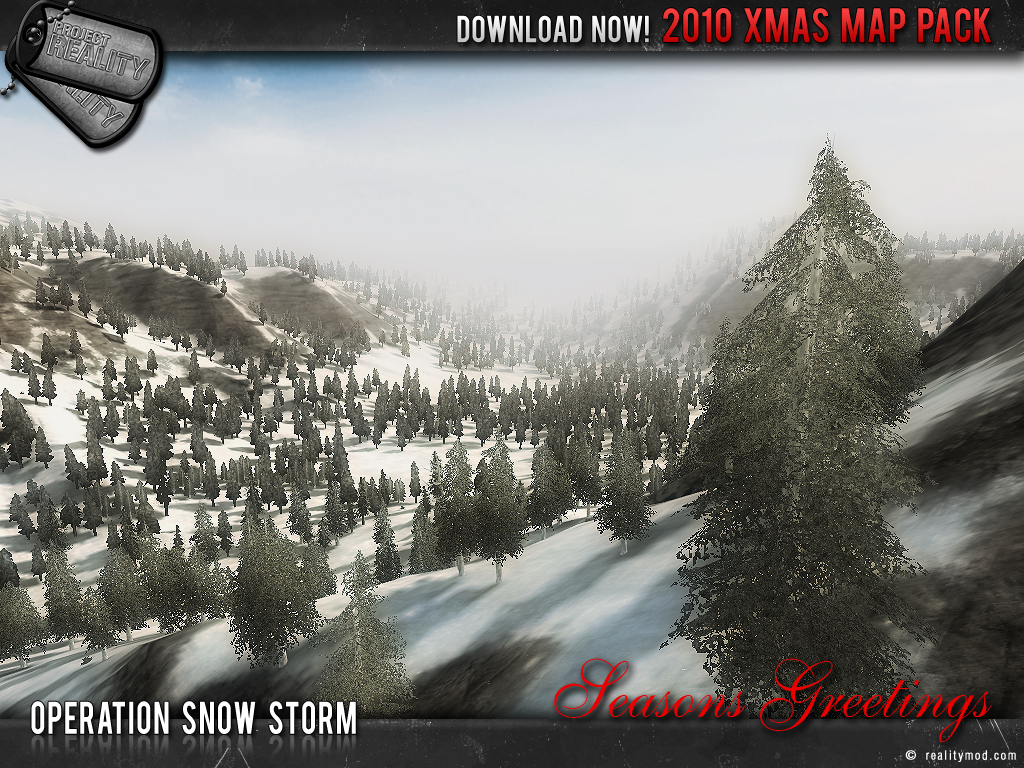
They seem to look ugly from a distance, they look like a green cut out picture on a piece of wood rather than a tree, I want them to look like the ones in the picture of Operation Snowstorm, like this.

So, may I ask how do you make them render differently in a distance instead of looking like ****.

And now, how do I make my map use different static textures, example is Fallujah, the buildings colors are different compared to the normal textures, I tried changing the custom texture suffix in init.con but there doesn't seem to be a change in the editor.

btw, when I added vehicle spawns and stuff like that, but once I reopen the editor, I no longer see the spawnables, just their boxes. Is it supposed to be like that or can I make them still show up after I close the editor?

The help would be much appreciated, thanks.

Happy holidays.

Re: [?] Regarding PR Pinetrees and Custom textures

Posted: 2010-12-24 12:52
by Rhino
All overgrowth lod textures (other than overgrowth fields) are saved into the map's overgrowth atlas, All I did for OSS and NL was to edit there LOD textures to make them more beefy and also to make the snowy too, as well as a few other things.

I should probably release my updated lod textures, was meaning to last year but never quite got round to it :(

Re: [?] Regarding PR Pinetrees and Custom textures

Posted: 2010-12-24 15:31
by VapoMan
The deciduous series of trees and bushes should get an update for their lods. They provide almost 0 cover from choppers due to the distant lod looking paper thin from above.

Re: [?] Regarding PR Pinetrees and Custom textures

Posted: 2010-12-24 16:27
by Element-X_IV
Alright I understand, hope the LODs get updated soon.

Now can anyone help me with my question regarding the custom textures and the other thing? Please? :-)

Re: [?] Regarding PR Pinetrees and Custom textures

Posted: 2010-12-24 16:29
by sylent/shooter
by my understanding you need to create a different texture, using the standard texture for that static. Save it in photoshop as a .dds with the texture suffix you plan to use then put it "somewhere" in your map folder. Then it should read the texture suffix

Re: [?] Regarding PR Pinetrees and Custom textures

Posted: 2010-12-24 17:07
by Rhino
VapoMan wrote:The deciduous series of trees and bushes should get an update for their lods. They provide almost 0 cover from choppers due to the distant lod looking paper thin from above.
can you give me a screen shot? I know what your saying and why it would look like that I just want to see how bad it is.

Re: [?] Regarding PR Pinetrees and Custom textures

Posted: 2010-12-24 17:43
by Element-X_IV
sylent/shooter wrote:by my understanding you need to create a different texture, using the standard texture for that static. Save it in photoshop as a .dds with the texture suffix you plan to use then put it "somewhere" in your map folder. Then it should read the texture suffix
I wish to use the custom textures from Fallujah west as those made the middle eastern buildings less colorful and more grayish. I remembered someone saying on a thread that just adding the texture suffix would work.

Re: [?] Regarding PR Pinetrees and Custom textures

Posted: 2010-12-24 17:51
by Amok@ndy
if you want to use the Falludja textures set your Texture Suffix to ' fw '

Re: [?] Regarding PR Pinetrees and Custom textures

Posted: 2010-12-24 19:26
by Element-X_IV
[R-CON]Amok@ndy wrote:if you want to use the Falludja textures set your Texture Suffix to ' fw '
I did try that, but it doesn't seem to show any changes in the editor, it all looks the same.
or will the changes only show once in-game?

Re: [?] Regarding PR Pinetrees and Custom textures

Posted: 2010-12-24 19:44
by Amok@ndy
only ingame
to change it in the editor you need to add the custom suffix to:

Code: Select all

C:\Program Files\EA GAMES\Battlefield 2\bf2editor\Settings\Init\ResourceInit.con
go to the bottom and you will find this one:

Code: Select all

ResourceHandler.AddCustomTextureSuffix "Woodland"
now you can add:

Code: Select all

ResourceHandler.AddCustomTextureSuffix "fw"
how it shoud look like for example:

Code: Select all

ResourceHandler.AddCustomTextureSuffix "Woodland"
ResourceHandler.AddCustomTextureSuffix "isaf"
ResourceHandler.AddCustomTextureSuffix "fw"
ResourceHandler.AddCustomTextureSuffix "Snow"
and then in the editor go to -> Render -> Custom Texture Suffix

Re: [?] Regarding PR Pinetrees and Custom textures

Posted: 2010-12-25 09:59
by Element-X_IV
Alright, tried it and it works now.

Thanks, Merry Christmas